The fastest way to waste a Higgsfield Unlimited plan is to treat every credit prompt as a billing error. The second-fastest is to assume every credit prompt is correct without checking the model, mode, route, and subscription status. Under Higgsfield’s current rules, a credit charge on an “Unlimited” plan usually has one of six explanations — and the fix is almost never another top-up.
त्वरित जवाब
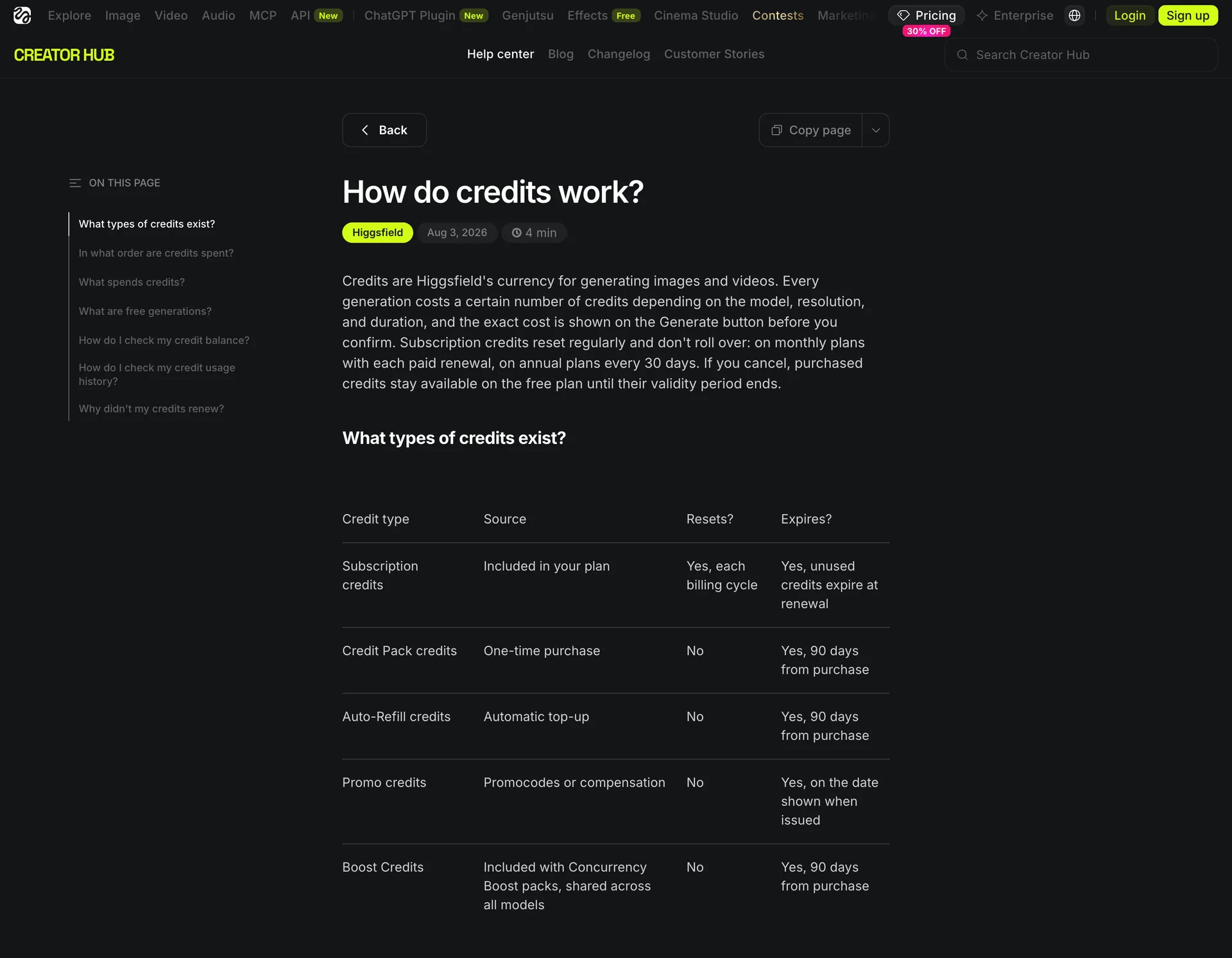
- A credit prompt on an Unlimited plan usually means one of six things — not automatically a bug: the model isn’t included, the toggle is off, you’re on an external route, the plan or Unlimited period lapsed, you chose priority (Credit Mode), or a failed job’s refund hasn’t cleared yet.
- Unlimited is free only for covered models, on higgsfield.ai, while the subscription is active. MCP, CLI, Canvas, and automation always deduct credits.
- Before topping up, read the Generate panel और Usage History — a top-up rarely fixes the real cause.
One-minute self-test
Open the exact model and check for the Unlimited toggle. Run one small job, then open Usage History and see whether it logged as an Unlimited generation or a credit deduction. If the charge still doesn’t match, record the model, route, mode, settings, account state, and Usage History status before you contact support or buy more credits.
Compare Your AI Workflow in Ima Studio
Start here: check the generation mode
If Higgsfield Unlimited is asking for credits, open the exact model and inspect the Generate panel. The official help page says the Unlimited toggle appears only when the selected model is covered. If the toggle is missing, the model is not included. If the toggle is off, the task runs in Credit Mode and deducts credits.
That single panel answers the first question: is this generation actually running under Unlimited Mode? Do not infer the answer from the plan name, a previous generation, or a screenshot of a different model.
The six reasons Unlimited still charges you
Almost every “I bought Unlimited but it wants credits” complaint maps to one of these six rules. Find your case, then run the check in the last column before assuming a billing error.
| The charge you see | The rule behind it | क्या जांचना है |
|---|---|---|
| This model costs credits | Unlimited is model-specific. Mid- and top-tier plans include selected models (listed on the plan card); all other models deduct. | Open the model, confirm the toggle exists, then compare it against the active Unlimited list in Manage Account → Subscription. |
| Unlimited on the site, but my workflow deducted | Free only on higgsfield.ai. MCP, CLI, Canvas, Supercomputer, and automated tools deduct credits. A website test can’t validate an automated route. | Run the same input on the website and on your production route; budget the production route, not the free website test. |
| My 365-day access stopped | The window can expire, and promotional access only lasts while the qualifying subscription stays active. Downgrading or cancelling can stop it early. | Check three dates: subscription end, Unlimited start, and Unlimited expiry for the exact model. |
| Unlimited is too slow, so I used credits | Unlimited runs in the standard queue; Credit Mode gets priority and maximum speed. Standard-queue speed is a trade-off, not a hidden fee. | Decide what’s scarce: exploratory work → Unlimited; a fixed deadline → weigh one priority generation against waiting and rerunning. |
| A failed job still used credits | Failed generations are usually auto-refunded within minutes, but some models may not refund. Usage History records deductions, returns, and status. | Wait the refund window, open Usage History, and check whether the job is failed, refunded, or still processing before contacting support. |
| Promised credits or a trial I never got | There is no traditional free trial; the free tier is limited with no credits, and promotional offers vary by account and model. | Save the offer page and account screen before paying. If the offer isn’t visible in the account that will be charged, treat it as unconfirmed. |
What the complaints look like in reviews
The same six mechanisms show up in public reviews, and they explain why “I was charged” needs a record, not a reflex top-up. One हाल ही में Trustpilot पर दी गई समीक्षा described a cancellation and refund dispute that led to a second charge; Higgsfield’s public reply pointed to the final cancellation step in Manage Account > Subscription > Manage Subscription — a reminder to verify the final status screen rather than assume opening a cancellation flow finished it. A separate review from a user who expected 50 credits drew the reply that offers vary and model-specific free trials may appear — the difference between a general entitlement and a promotion shown to one account.
On failed jobs, a September 21 review described a generation stuck in Processing for days; support cleared it and returned a free generation, showing why “stuck” and “failed” are not the same status. Another September 20 review reported failed API jobs and top-up uncertainty while praising the image quality — a promising output does not remove the need for a clear failure-and-billing trail. None of these prove every account behaves the same way; they show where the product language and the user’s mental model diverge.
How to prove whether the charge is correct
Use this six-line record for every disputed generation. It turns “I was charged” into a checkable question and gives support enough to investigate without guessing from a monthly balance.
| Field | What to record |
|---|---|
| नमूना | exact model name and version if shown |
| मार्ग | Higgsfield website, MCP, CLI, Canvas, or other |
| Mode | Unlimited or Credit Mode |
| सेटिंग्स | resolution, duration, quality, rerolls, upscale |
| Account state | plan, subscription end, Unlimited start/expiry |
| Usage History | deduction, refund, pending, or failure status |
Should you cancel Higgsfield Unlimited?
Cancel only after separating a plan mismatch from a one-off incident.
Keep the plan if:
- the model you need is included, and the website route is acceptable;
- standard queue speed works for your deadlines;
- the fair-use rules match how you work;
- the camera controls or Cinema Studio features save you real production steps.
Test another platform before renewing if:
- your main model is outside the Unlimited list;
- most production work happens through MCP, CLI, or automation;
- you need priority processing for routine jobs;
- the same billing surprise happens even after checking Usage History;
- the plan forces you to buy a second balance for the models you actually use.
जहां इमा स्टूडियो स्थित है
Ima Studio should be evaluated as a task-level alternative, not another vague “unlimited” promise. For the next billing decision, take three representative jobs from Higgsfield — one image generation, one image edit or reference-led task, and one short video or camera-motion task — and run the closest equivalent in Ima Studio. Record the model, output setting, displayed cost, number of attempts, and whether the result is usable without another tool.
| Question | हिग्सफील्ड | Ima Studio test |
|---|---|---|
| Which model did I actually use? | record the exact model | select the exact available model |
| What did one attempt cost? | read the Generate panel | read the task screen |
| How many attempts produced a usable result? | count the full run | count the full run |
| Did I need priority mode? | record standard or Credit Mode | record the actual queue/plan behavior |
| Can I finish the job in the same workflow? | note extra tools | note the image, edit, or video route used |
The existing Higgsfield alternatives research found Ima Studio cheaper on several captured shared-model tasks, but not every model. Those prices came from a September 4–7 snapshot and should be refreshed before they appear in a public comparison. The fair recommendation is conditional: start with Ima Studio when your bill is driven by shared image/video models and task-level cost matters more than Higgsfield’s camera-first interface.
For image work, compare the इमा स्टूडियो इमेज-टू-इमेज वर्कफ़्लो. For motion-led work, compare the इमा स्टूडियो एआई कैमरा मूवमेंट टूल. Pick the route that matches the task instead of paying for a broad plan you only partly use.

Compare AI Camera Movement in Ima Studio
Final answer
Higgsfield Unlimited can still ask for credits without the plan being universally broken. The charge may come from a model outside the included list, Credit Mode, an external route, an expired or cancelled subscription condition, a priority-generation choice, or a failed job whose refund status has not been checked. The fair criticism is narrower and more useful: the word “Unlimited” is easy to read as a suite-wide promise, while the actual benefit is tied to model, route, period, queue, and fair-use rules.
Check those six fields before buying more credits. If the plan still does not match the work you do, run the same three tasks in Ima Studio and compare the cost of usable results — a defensible reason to stay, switch, or use both.
For the broader alternative decision, read Higgsfield alternatives compared by task price और our ChatGPT Images 2.5 editing analysis. For the rules behind the plan, verify the official Higgsfield Unlimited model guide.
लेखक के बारे में