तीन सप्ताह बीत जाने के बाद भी, मैं अपने ओपनक्लॉ एजेंट से एक भी छवि उत्पन्न नहीं करवा सका।.
मैंने होस्टिंग के लिए भुगतान किया था। मैंने चार अलग-अलग ट्यूटोरियल देखे थे। मैंने नोट्स बनाते हुए 1.5 गुना स्पीड पर दो घंटे का सेटअप वीडियो देखा था।.
मेरा एजेंट ठीक से काम कर रहा था - इसने टेलीग्राम में सवालों के जवाब बखूबी दिए।.
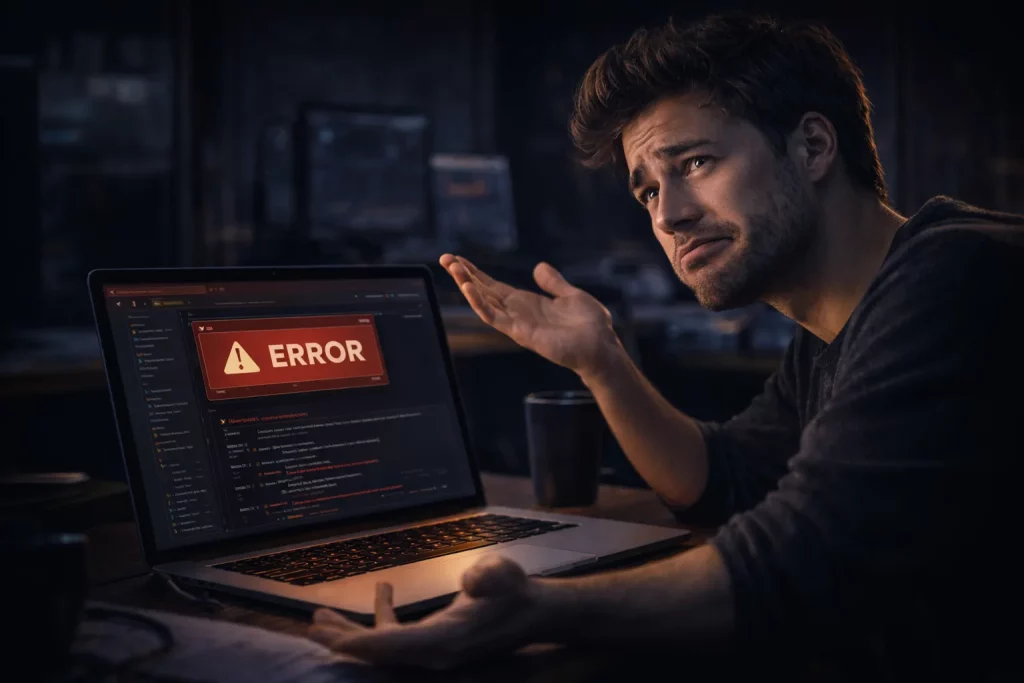
लेकिन जब भी मैंने इससे कुछ दृश्य बनाने की कोशिश की, तो मुझे एक नई बाधा का सामना करना पड़ा: एक प्रतीक्षा सूची में शामिल एपीआई, एक गलत तरीके से कॉन्फ़िगर किया गया टोकन, एक प्रमाणीकरण त्रुटि जिसने मुझे 30 मिनट तक एक ऐसे दुष्चक्र में उलझाए रखा जिससे कुछ भी हल नहीं हुआ।.
आखिरकार मुझे समस्या का पता चल गया। लेकिन इससे पहले कि मैं आपको बताऊं कि समस्या क्या थी, आइए जानते हैं कि यह गाइड वास्तव में क्या करती है — क्योंकि क्रिएटर्स के लिए OpenClaw की अधिकांश गाइड यह नहीं बताती हैं।.
इस लेख के अंत तक, आपको निम्नलिखित बातें पता चल जाएंगी: अधिकांश प्लेटफार्मों पर OpenClaw से इमेज और वीडियो जनरेट करना क्यों मुश्किल है (और इस डिज़ाइन विकल्प से किसे फायदा होता है), एक पूरी तरह से सुसज्जित क्रिएटिव सेटअप वास्तव में कैसा दिखता है, इसकी तुलना में अधिकांश प्रदाता आपको क्या देते हैं, और कई प्लेटफार्मों का परीक्षण करने के बाद मैंने किस प्लेटफॉर्म को चुना - पूरी लागत गणना के साथ, ताकि आप तय कर सकें कि क्या यही तर्क आप पर भी लागू होता है।.
इसे ओपनक्लॉ सेटअप गाइड और ईमानदार समीक्षा समझें, जो मुझे तब चाहिए थी जब मैंने शुरुआत की थी।.
मैं यह इसलिए लिख रहा हूँ क्योंकि मैंने इसे समझने में काफी पैसा और कई सप्ताहांत खर्च किए हैं। मैं चाहता हूँ कि आपको ऐसा न करना पड़े।.
ओपनक्लॉ होस्टिंग के बारे में वो बात जो मुझे किसी ने नहीं बताई
काश किसी ने मुझे ये बात शुरू से ही समझा दी होती:
ओपनक्लॉ की होस्टिंग और ओपनक्लॉ की रचनात्मक क्षमताएं दो बिल्कुल अलग चीजें हैं।.
लगभग हर सेवा प्रदाता आपको पहला विकल्प बेचता है और दूसरे विकल्प का पता लगाने का काम पूरी तरह से आपके ऊपर छोड़ देता है।.
होस्टिंग भाग — वह सर्वर जो आपके एजेंट को 24/7 चालू रखता है — 46 से अधिक प्लेटफॉर्मों द्वारा अच्छी तरह से समर्थित है जो आपकी सदस्यता के लिए प्रतिस्पर्धा कर रहे हैं। MyClaw, xCloud, RunClaw, ClickClaw, ClawTank। किसी भी OpenClaw होस्टिंग तुलना में, वे सभी बुनियादी ढांचे के मामले में काफी अच्छा प्रदर्शन करते हैं: विश्वसनीय अपटाइम, साफ-सुथरे डैशबोर्ड और तेज़ परिनियोजन।.
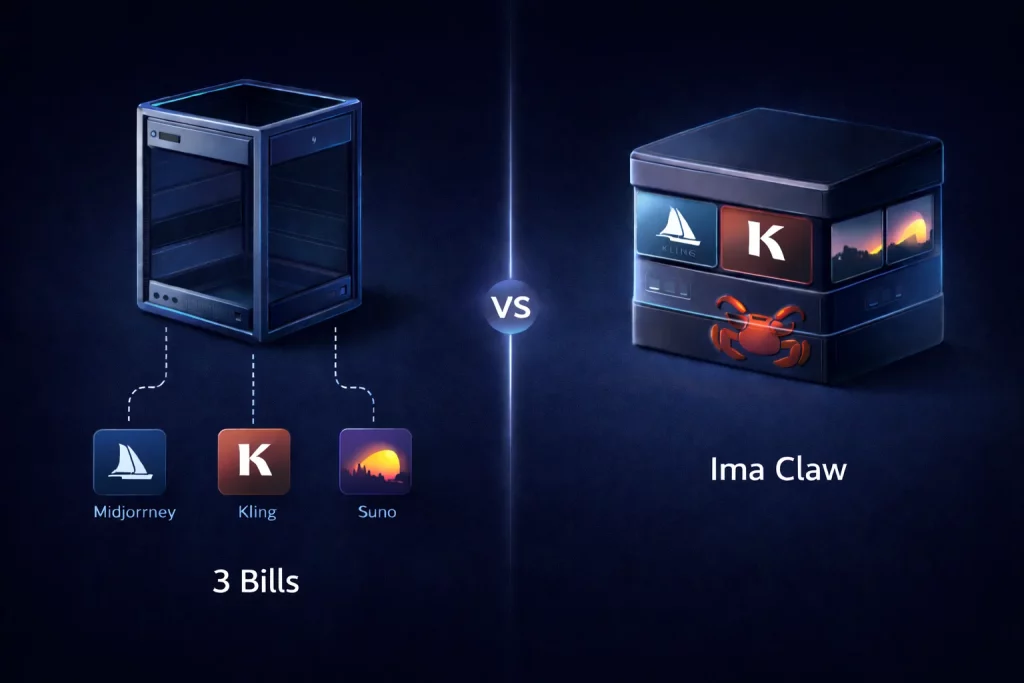
लेकिन जब आप इनमें से किसी के लिए भी भुगतान करते हैं, तो आपको सिर्फ एक खोखला ढांचा मिलता है। एक ऐसा एजेंट जिसके पास कोई उपकरण नहीं होते। एक बेहद सक्षम तर्क शक्ति वाला इंजन जो तब तक एक भी छवि, वीडियो या ऑडियो नहीं बना सकता जब तक आप स्वयं उन सभी क्षमताओं को अलग-अलग प्रदाताओं से प्राप्त नहीं कर लेते - जिनमें से प्रत्येक की अपनी खाता आवश्यकताएं, एपीआई क्रेडेंशियल, बिलिंग सेटअप और विफलता के तरीके होते हैं।.
इमा क्लॉ डिस्कोर्ड के एक क्रिएटर ने इसे अच्छे से समझाया है: “मैंने यह सोचकर MyClaw के लिए साइन अप किया था कि मुझे एक AI क्रिएटिव असिस्टेंट मिल रहा है। मुझे यह समझने में दो हफ्ते लग गए कि मैं सिर्फ एक सर्वर किराए पर ले रहा था। 'क्रिएटिव' वाला हिस्सा तो होमवर्क जैसा था, जिसके लिए मैंने बजट नहीं बनाया था।‘
वह अकेली नहीं है। यहां बताया गया है कि जब आप किसी सामान्य प्लेटफॉर्म पर ओपनक्लॉ एजेंट में इमेज जनरेशन जोड़ने का प्रयास करते हैं तो वास्तव में क्या होता है:
- एक अलग मिडजर्नी खाता बनाएं और एपीआई एक्सेस के लिए आवेदन करें — अक्सर यह प्रतीक्षा सूची में होता है या केवल एंटरप्राइज़ के लिए उपलब्ध होता है।
- OpenClaw के अंदर प्रमाणीकरण को कॉन्फ़िगर करें, इसके लिए दस्तावेज़ों का पालन करें जिनमें डेवलपर की पूर्व-जानकारी अपेक्षित है।
- मिडजर्नी की ओर से होस्टिंग बिल से अलग बिलिंग की व्यवस्था करें।
- अनिवार्य एकीकरण त्रुटियों का परीक्षण करें, उनमें मौजूद खामियों को दूर करें और उनका समाधान करें।
- वीडियो जनरेशन (क्लिंग, वान 2.6) और संगीत (सुनो) के लिए पूरी प्रक्रिया को दोहराएं।
इसका मतलब है कि आपके एजेंट द्वारा सामग्री का पहला भाग तैयार करने से पहले तीन अलग-अलग खाता संबंध, तीन अलग-अलग बिलिंग चक्र और तीन अलग-अलग डिबगिंग सतहें।.
एक डेवलपर के लिए यह एक सामान्य प्रक्रिया है। लेकिन एक ऐसे रचनाकार के लिए जो एआई सहायक चाहता था, यह एक महीने तक चलने वाला प्रोजेक्ट होता है जिसे कई लोग चुपचाप बीच में ही छोड़ देते हैं। मैंने भी लगभग ऐसा ही किया था।.
सही तरीके से सेट अप होने पर ओपनक्लॉ वास्तव में कैसा दिखता है
मैं आपको पहले दूसरा पहलू दिखाना चाहता हूं — कि यह वास्तव में क्या करने में सक्षम है — क्योंकि इसने वास्तव में कंटेंट प्रोडक्शन के बारे में मेरी सोच को बदल दिया है।.
एक बार जब मैंने सही सेटअप तैयार कर लिया, तो मेरी एक सामान्य सुबह कुछ इस तरह की हो गई:
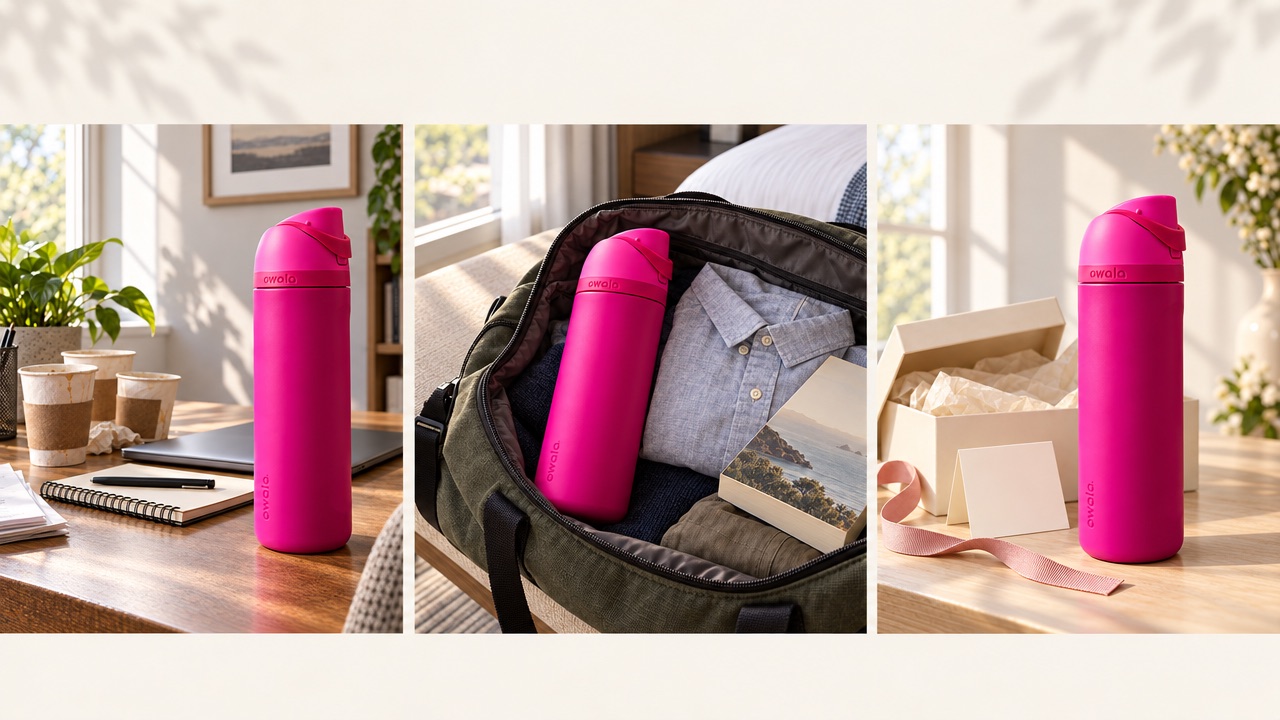
मैंने अपने एजेंट को संदेश भेजा: “"हमारे नए कॉफी मिश्रण के लिए तीन उत्पाद तस्वीरें बनाएं - सुबह की गर्म रोशनी, प्राकृतिक बनावट और जीवनशैली का एहसास।"” लगभग एक मिनट के भीतर, मेरे टेलीग्राम चैट में मिडजर्नी की तीन बेहतरीन तस्वीरें आ गईं। मैंने उनमें से एक को चुना: “इसे आधार मानकर चलें। हमारे ब्रांड की शैली में तीन इंस्टाग्राम कैप्शन लिखें — जो बातचीत के अंदाज़ में हों, आशावादी हों और 150 अक्षरों से कम के हों। प्रासंगिक हैशटैग जोड़ें।” हो गया। फिर: “"इन्हें सोमवार, बुधवार और शुक्रवार को सुबह 8 बजे के लिए निर्धारित करें।"” पूरी बातचीत में शायद बारह मिनट लगते हैं।.
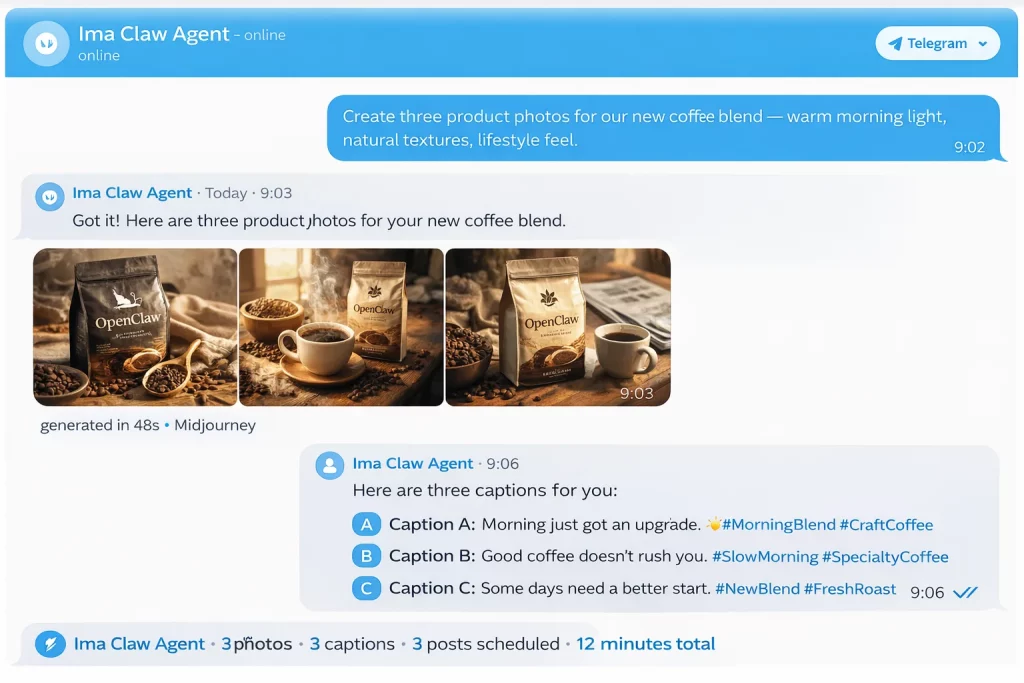
यह एक प्रोडक्ट लाइन के लिए इस सप्ताह का इंस्टाग्राम कंटेंट है। इसे बिना किसी बाहरी टूल का इस्तेमाल किए तैयार, लिखा और शेड्यूल किया गया है। इंस्टाग्राम के लिए OpenClaw का इस्तेमाल करने वाले किसी भी व्यक्ति के लिए, पूरी क्षमता से काम करते समय वर्कफ़्लो बिल्कुल ऐसा ही दिखता है।.
मैं अकेला नहीं हूँ जो इतने कष्टदायक सफर के बाद यहाँ पहुँचा हूँ। समुदाय के माध्यम से जिस यूट्यूबर से मेरा संपर्क हुआ, उसने अपने कार्यप्रवाह का वर्णन किया - यह इस बात का एक अच्छा उदाहरण है कि OpenClaw for YouTube वास्तव में व्यवहार में कैसा दिखता है: “मैं इसका इस्तेमाल मुख्य रूप से थंबनेल और बैकग्राउंड वीडियो के लिए करता हूँ। मैं एक वीडियो के लिए दस अलग-अलग थंबनेल बनाता हूँ, उनमें से तीन का A/B टेस्ट करता हूँ और परफॉर्मेंस डेटा के आधार पर उनमें सुधार करता हूँ। इससे पहले मैं एक थंबनेल डिज़ाइनर को 1040 डॉलर प्रति थंबनेल देता था और दो दिन तक इंतज़ार करता था। अब मुझे कुछ ही मिनटों में चैट में अलग-अलग थंबनेल मिल जाते हैं — और मैं पहले से कहीं ज़्यादा टेस्टिंग कर पाता हूँ।”
मेरी जान-पहचान की एक ई-कॉमर्स विक्रेता के जीवन में भी ऐसा ही एक महत्वपूर्ण मोड़ आया था - और उनका अनुभव इस बात का एक अच्छा उदाहरण है कि ई-कॉमर्स के लिए ओपनक्लॉ वास्तव में कितना पैसा बचा सकता है: “मैंने फरवरी से कोई प्रोडक्ट फोटोग्राफी सेशन बुक नहीं किया है। मैं शॉट के बारे में सब कुछ बता देता हूँ—बैकग्राउंड, माहौल, लाइटिंग—और मुझे उन सेशन से कहीं बेहतर तस्वीर मिलती है जिनकी कीमत $300 रुपये प्रति सेशन होती थी। कमर्शियल लाइसेंस के साथ, Shopify पर इस्तेमाल के लिए तैयार।”
यह रचनाकारों के लिए ओपनक्लॉ है। चुनौती यहाँ तक पहुँचने में है। और यही अंतर— "सक्षम एजेंट" और "रचनात्मक एआई स्टूडियो" के बीच—एक प्लेटफॉर्म को बाकी सभी से अलग करता है।.
साइन अप करने से पहले मुझे जिस चेकलिस्ट की ज़रूरत थी, वो ये है!
सही प्लेटफॉर्म मिलने से पहले, मैंने बड़ी मेहनत से यह सूची बनाई। अगर आप एक क्रिएटर के तौर पर OpenClaw होस्टिंग का मूल्यांकन कर रहे हैं, तो सर्वर स्पेसिफिकेशन या डिप्लॉयमेंट टाइम से ज़्यादा ज़रूरी सवाल ये हैं:
क्या इमेज जनरेशन पहले दिन से ही काम करता है, या मुझे इसे कॉन्फ़िगर करना होगा? यदि उत्तर में एपीआई कुंजी, खाता सेटअप, या "सेटिंग्स में सक्रिय करें" से परे दस्तावेज़ीकरण शामिल है, तो आप अपना सप्ताहांत सामग्री के बजाय बुनियादी ढांचे पर खर्च करने वाले हैं।.
कितने मॉडल हैं — और किस प्रकार के? “हम एक इमेज मॉडल को सपोर्ट करते हैं” और “इमेज, वीडियो और ऑडियो में 50 से अधिक मॉडल” के बीच महत्वपूर्ण अंतर है। थंबनेल और प्रोडक्ट फोटोग्राफी की सौंदर्य संबंधी आवश्यकताएं अलग-अलग होती हैं। सिनेमैटिक बी-रोल और सोशल क्लिप अलग-अलग जनरेटर से अलग-अलग तरह से काम करते हैं।.
मॉडलों में विविधता मायने रखती है।.
क्या इसमें OpenClaw वीडियो जनरेशन वास्तव में शामिल है? रील्स, टिक टॉक, यूट्यूब शॉर्ट्स। आजकल शॉर्ट-फॉर्म वीडियो का बोलबाला है। अगर आपके एजेंट को वीडियो बनाने के लिए अलग से एपीआई इंटीग्रेशन की ज़रूरत है, तो यह ज़्यादातर क्रिएटर्स के लिए एक बड़ी कमी है — और साइन अप करने से पहले इस बारे में सीधे पूछना ज़रूरी है।.
वाणिज्यिक अधिकार क्या हैं? इस बात पर अक्सर ध्यान नहीं दिया जाता। यदि आप किसी ब्रांड, ग्राहक या व्यवसाय के लिए सामग्री तैयार कर रहे हैं, तो आपको प्रमाणित वाणिज्यिक लाइसेंस की आवश्यकता होगी। हर प्लेटफॉर्म में यह सुविधा डिफ़ॉल्ट रूप से उपलब्ध नहीं होती।.
एक बिल या चार? सबसे कम आंका जाने वाला सवाल। तीन अलग-अलग API बिलिंग संबंधों को प्रबंधित करना — होस्टिंग, इमेज जनरेशन, वीडियो जनरेशन — का मतलब है कि तीन चीजें एक्सपायर हो सकती हैं, त्रुटि उत्पन्न कर सकती हैं या अभियान के बीच में अप्रत्याशित शुल्क उत्पन्न कर सकती हैं। मैंने यह व्यक्तिगत अनुभव से सीखा है।.
मैंने इन सवालों को उन सभी प्रमुख प्लेटफॉर्मों पर आजमाया जिन्हें मैं ढूंढ सका। अधिकांश प्लेटफॉर्म दो या तीन शर्तों को पूरा करते हैं। एक प्लेटफॉर्म सभी शर्तों को पूरा करता है।.
मुझे इमा क्लॉ कैसे मिला (और यह अलग क्यों है)
दो अलग-अलग प्लेटफॉर्म पर API कॉन्फ़िगरेशन से जूझते हुए तीन सप्ताह बिताने के बाद, OpenClaw फोरम में किसी ने मुझसे पूछा कि मैं कौन सा सेटअप इस्तेमाल कर रहा हूँ। जब मैंने उसका वर्णन किया, तो उन्होंने चार शब्दों में जवाब दिया: “"तुम्हें इमा क्लॉ चाहिए।"”

इमा क्लॉ के अलग होने का कारण कोई नया फीचर नहीं है। बल्कि यह उत्पाद की मूल प्रकृति ही है।.
अधिकांश प्लेटफॉर्म सर्वर हैं जिन पर OpenClaw स्थापित है। Ima Claw बिल्कुल अलग चीज है — इसमें तीन परतें एक साथ काम करती हैं: ओपनक्लॉ आधार के रूप में, आईएमए स्टूडियो की संपूर्ण रचनात्मक कौशल क्षमता पहले से ही स्थापित है, और क्लाउड होस्टिंग की सुविधा है ताकि यह सब कुछ 24/7 चलता रहे और आपको किसी सर्वर को छूने की आवश्यकता न हो।.
इसे क्लाउड में स्थित एक समर्पित एआई कंप्यूटर की तरह समझें, जो विशेष रूप से आपका है और सदस्यता लेते ही आपके लिए उपलब्ध हो जाता है।.
ब्रांड के अपने शब्दों में कहें तो: Ima Claw क्लाउड में आपका व्यक्तिगत AI क्रिएटिव स्टूडियो है, जो OpenClaw द्वारा संचालित है और IMA Studio के संपूर्ण क्रिएटिव टूलकिट से लैस है।.
आईएमए स्टूडियो ने किसी होस्टिंग उत्पाद में रचनात्मक क्षमताओं को जबरदस्ती नहीं जोड़ा। उन्होंने एक पहले से मौजूद रचनात्मक मंच के आधार पर होस्टिंग का निर्माण किया - एक ऐसा मंच जो होस्टिंग उत्पाद के लॉन्च होने से पहले ही हजारों रचनाकारों को चित्र, वीडियो और संगीत बनाने में मदद कर रहा था।.
उस स्रोत से तुरंत व्यावहारिक फर्क पड़ता है। जब मैंने अपना इमा क्लॉ एजेंट सेट अप किया, तो मैंने एक इमेज मांगने वाला प्रॉम्प्ट टाइप किया। इमेज एक मिनट से भी कम समय में वापस आ गई। कोई एपीआई कॉन्फ़िगरेशन नहीं। कोई प्रतीक्षा सूची नहीं। कोई प्रमाणीकरण त्रुटि नहीं। बस एक प्रॉम्प्ट और एक आउटपुट।.
“"मैंने रविवार दोपहर को इमा क्लॉ की शुरुआत की और रात के खाने से पहले ही कंटेंट तैयार करना शुरू कर दिया था।"” एक समुदाय सदस्य ने लिखा, जिसने दूसरे प्लेटफॉर्म से स्विच किया था।. “"मैंने पिछले सेटअप पर दो सप्ताहांत बिताए थे और फिर भी कुछ भी उत्पन्न नहीं हो रहा था।"”
इमा क्लॉ के हर प्लान में वो सब कुछ शामिल है जो दूसरे प्लेटफॉर्म अलग-अलग बेचते हैं: सर्वर, रीजनिंग के लिए एलएलएम टोकन और इमेज, वीडियो और ऑडियो जनरेशन के लिए क्रेडिट। एक ही सब्सक्रिप्शन। एक ही कीमत। एक ही डैशबोर्ड।.
50+ मॉडल लाइब्रेरी: रचनाकारों के लिए इसका असल मतलब क्या है?
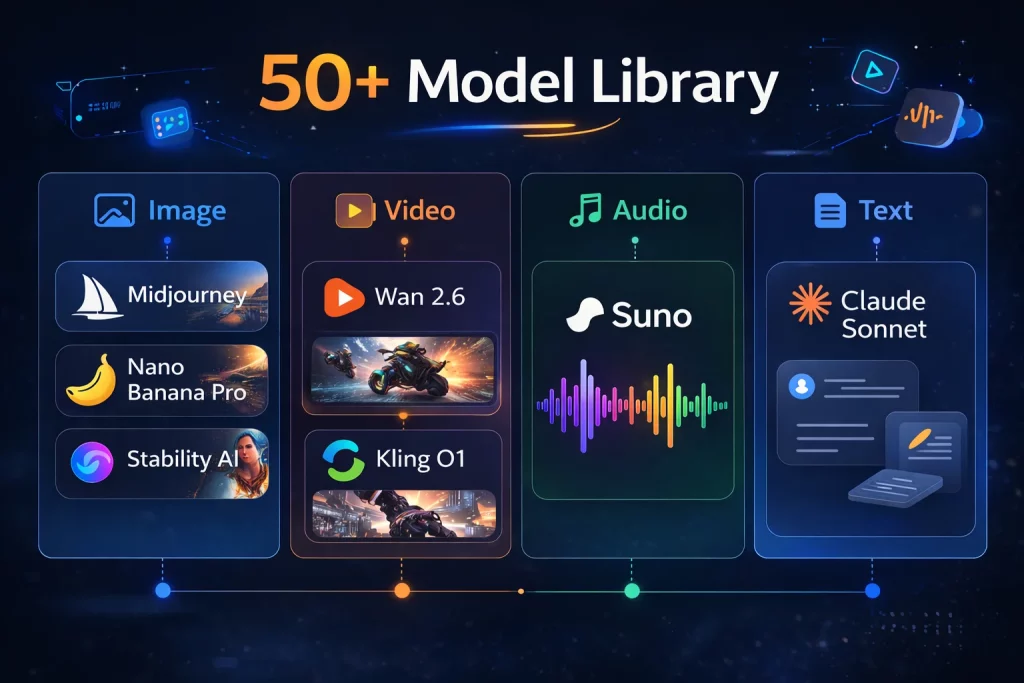
जब सामान्य प्लेटफॉर्म "एआई मॉडल" कहते हैं, तो उनका मतलब आमतौर पर एलएलएम (LLM) होता है - यानी बातचीत को संचालित करने वाला टेक्स्ट मॉडल। इमा क्लॉ के 50 से अधिक मॉडल एक अलग श्रेणी के हैं: हर प्रमुख आउटपुट प्रकार में एक संपूर्ण रचनात्मक स्टैक।.
छवियों के लिए: फोटो रियलिस्टिक और कलात्मक कार्यों के लिए मिडजर्नी, प्रोडक्ट फोटोग्राफी के लिए नैनो बनाना प्रो (गूगल जेमिनी 3 प्रो), और विभिन्न विज़ुअल स्टाइल के लिए स्टेबिलिटी एआई वेरिएंट। चैट के माध्यम से सीधे एक्सेस किए जा सकने वाले एआई इमेज जनरेटर के रूप में, इसकी गुणवत्ता किसी भी विशेष टूल से मिलने वाली गुणवत्ता के बराबर है - और इसके लिए किसी अलग अकाउंट सेटअप की आवश्यकता नहीं है।. “"प्रोडक्ट शॉट्स के लिए मैं नैनो बनाना प्रो का इस्तेमाल करता हूं।"” मैंने जिस ई-कॉमर्स विक्रेता का जिक्र किया था, उसने मुझे यह बताया।. “"यह साफ-सुथरे बैकग्राउंड और व्यावसायिक माहौल वाली रोशनी को उन सभी चीजों से बेहतर तरीके से संभालता है जिन्हें मैंने आजमाया है।"”
वीडियो के लिए: सिनेमैटिक मोशन और बी-रोल के लिए वान 2.6, और तेज़, छोटे-फॉर्म वाले सोशल कंटेंट के लिए क्लिंग O1। जिस यूट्यूबर से मैंने बात की, वह इनका इस्तेमाल सोच-समझकर करता है: “प्रीमियम अनुभव देने वाली किसी भी चीज़ के लिए Wan 2.6 का इस्तेमाल करें। तेज़ गति वाली किसी भी चीज़ के लिए Kling का इस्तेमाल करें। एजेंट खुद ही तय कर लेता है कि कौन सा विकल्प सही रहेगा।”
ऑडियो के लिए: संगीत के पूरे ट्रैक के लिए सुनो (Suno) - शैली, मूड और वाद्य यंत्रों का विवरण सादे टेक्स्ट में दिया गया है। कथन और वॉयसओवर के लिए ध्वनि निर्माण।.
पाठ और तर्क के लिए: लेखन, कैप्शनिंग, रणनीति और अनुसंधान के लिए क्लाउड सॉनेट। अल्ट्रा प्लान पर नवीनतम क्लाउड मॉडल उपलब्ध हैं।.
ओपनक्लॉ टेलीग्राम बॉट और डिस्कॉर्ड बॉट के एकीकरण का मतलब है कि यह सब आपके मौजूदा मैसेजिंग वातावरण में ही आ जाता है - उत्पन्न संपत्तियों को प्राप्त करने के लिए आपको किसी अलग डैशबोर्ड में लॉग इन करने की आवश्यकता नहीं है।.
इसका व्यावहारिक लाभ यह है कि आपके एजेंट की कोई एक शैली या दायरा नहीं होता। एक स्किनकेयर ब्रांड और एक स्ट्रीटवियर ब्रांड को बिल्कुल अलग-अलग विज़ुअल लैंग्वेज की ज़रूरत होती है। पूरी लाइब्रेरी का होना और एजेंट का संदर्भ के आधार पर समझदारी से बदलाव करना ही आउटपुट को विभिन्न ब्रीफ में वास्तव में उपयोगी बनाता है।.
वास्तविक कार्यप्रणालियाँ, वास्तविक लोग
यह समझने का सबसे अच्छा तरीका है कि कौन सी योजना उपयुक्त है, यह देखना कि विभिन्न रचनाकार वास्तव में इसका उपयोग कैसे करते हैं।.
सोशल मीडिया कंटेंट मैनेजर
माया तीन लाइफस्टाइल ब्रांड्स के सोशल मीडिया अकाउंट्स मैनेज करती हैं। उन्होंने 149.99 डॉलर प्रति माह का प्रो प्लान लिया हुआ है — इससे पहले वे Canva Pro, एक अलग AI इमेज सब्सक्रिप्शन और एक आंशिक रूप से काम करने वाले ऑटोमेशन टूल के लिए 180 डॉलर प्रति माह से अधिक का भुगतान करती थीं। उनका सेटअप मूल रूप से एक ही सब्सक्रिप्शन पर चलने वाला AI सोशल मीडिया ऑटोमेशन है: एक ब्रीफ इनपुट, एक सप्ताह का कंटेंट आउटपुट।.
हर सोमवार सुबह, वह प्रत्येक ब्रांड के लिए साप्ताहिक ब्रीफ भेजती है: विज़ुअल दिशा, कंटेंट थीम, पोस्टिंग की आवृत्ति। एजेंट विज़ुअल एसेट्स तैयार करता है, कैप्शन लिखता है, हैशटैग असाइन करता है और समीक्षा के लिए सब कुछ तैयार रखता है। माया लगभग बीस मिनट जाँच और अनुमोदन में बिताती है। बाकी सब कुछ स्वचालित रूप से हो जाता है।.
“"मुझे सबसे ज्यादा आश्चर्य तस्वीरों से नहीं हुआ।"” उसने कहा।. “यह कैप्शन की वजह से हुआ। मैंने एक बार ब्रांड की शैली का वर्णन किया और इसे तुरंत स्वीकार कर लिया गया। मैं अब कैप्शन दोबारा नहीं लिखता। मैं बस उन्हें मंज़ूरी देता हूँ।”
प्रो संस्करण पर, वह तीन क्लाइंट खातों में प्रति माह लगभग 499 छवियां या वीडियो अपलोड करती है। पिछला खर्च: चार अलग-अलग टूल पर $80+/माह। वर्तमान खर्च: $49.99, एक डैशबोर्ड पर।.
ई-कॉमर्स विक्रेता
डेविड Shopify पर आठ सक्रिय उत्पाद श्रेणियों वाला एक स्टोर चलाते हैं। उनका प्लस प्लान $29.99/महीना का है। Ima Claw से पहले, वे प्रत्येक उत्पाद श्रेणी के लिए तिमाही आधार पर $200-300 प्रति सत्र की दर से फोटोग्राफी सेशन बुक करते थे।.
“मैं शॉट का पूरा विवरण देता हूँ—बैकग्राउंड, लाइटिंग, संदर्भ, और मैं किस तरह का माहौल बनाना चाहता हूँ—और मुझे दस अलग-अलग विकल्प मिलते हैं। मैं उनमें से सबसे अच्छे तीन चुनता हूँ। ये व्यावसायिक रूप से लाइसेंस प्राप्त होते हैं और अपलोड करने के लिए तैयार होते हैं। मैं हर बार किसी उत्पाद को अपडेट करते समय नए शॉट लेता हूँ, न कि केवल तभी जब मेरे पास सेशन का खर्च उठाने की क्षमता हो।”
प्लस प्लान से उन्हें प्रति माह लगभग 249 तस्वीरें मिलती हैं। प्लान बदलने के बाद से फोटोग्राफी पर उनका खर्च लगभग शून्य हो गया है।.
यूट्यूबर
जेम्स एक तकनीकी चैनल चलाते हैं जिसके 200k सब्सक्राइबर हैं। वह अल्ट्रा प्लान पर $199.99/महीने के शुल्क पर हैं - जिसे वह एक सामान्य उत्पादन लागत के रूप में मानते हैं: “मैं प्रतिदिन सौ से अधिक एसेट जेनरेट करता हूँ। अगर मैं प्रति एसेट एक डॉलर भी चुकाता, तो यह प्रति माह 1,4000 डॉलर की समस्या होती। मैं अभी 1,400 डॉलर चुका रहा हूँ।”
उनकी विशिष्ट कार्यप्रणाली: प्रति वीडियो दस थंबनेल वेरिएशन, 48 घंटों में ए/बी टेस्टिंग। टॉकिंग-हेड वीडियो में ट्रांज़िशन भरने के लिए Wan 2.6 से बी-रोल क्लिप का उपयोग। एजेंट टिप्पणियों की निगरानी भी करता है और समीक्षा के लिए उत्तरों के बैच तैयार करता है।.
“"जिन कामों में पहले तीन घंटे लगते थे, उन पर मैं अब रोजाना लगभग पंद्रह मिनट खर्च करता हूँ।"” उसने कहा।. “"मेरा बाकी समय वास्तविक उत्पादन में व्यतीत होता है।"”
छोटी एजेंसी
एक तीन सदस्यीय एजेंसी एक ही अल्ट्रा इंस्टेंस पर छह क्लाइंट के सोशल मीडिया अकाउंट्स का प्रबंधन करती है। वे प्रत्येक सप्ताह की शुरुआत में प्रत्येक क्लाइंट के एजेंट को जानकारी देते हैं। एजेंट सभी छह अकाउंट्स के लिए विज़ुअल एसेट्स, कंटेंट और शेड्यूलिंग क्यू तैयार करता है, और टीम एक ही डैशबोर्ड से उनकी समीक्षा करती है।.
अल्ट्रा में प्रति ग्राहक लागत: लगभग $33/माह।. “"हमने पिछले तीन महीनों से सोशल कंटेंट के लिए किसी फ्रीलांसर को काम पर नहीं रखा है।"” संस्थापक ने मुझे बताया।. “एजेंट काम संभालता है। रणनीति हम संभालते हैं।”
ओपनक्लॉ की वास्तविक कीमत: मैं अब वास्तव में कितना भुगतान करता हूँ और पहले कितना भुगतान करता था
चलिए एक ऐसे क्रिएटर के लिए आंकड़े निकालते हैं जो प्रति माह 200 इमेज और 20 शॉर्ट वीडियो बनाता है - यह लगातार सोशल मीडिया पर सक्रिय रहने के लिए एक अच्छी मात्रा है।.
पहले: जेनेरिक होस्टिंग + स्व-कॉन्फ़िगर किए गए एपीआई
| वस्तु | मासिक लागत |
|---|---|
| MyClaw Pro (केवल सर्वर) | $39.00 |
| मिडजर्नी एपीआई (~200 छवियां) | ~$20.00 |
| क्लिंग एपीआई (~20 वीडियो क्लिप) | ~$30.00 |
| क्लॉड सॉनेट (कैप्शन, कॉपी) | ~$20.00 |
| कुल | ~$109/माह |
और यह मानकर चल रहे हैं कि सब कुछ ठीक से काम कर रहा है। मेरे अनुभव में, अक्सर ऐसा नहीं होता। API कुंजी की समय सीमा समाप्त हो जाती है। प्रदाता ऐसे बदलाव जारी कर देते हैं जिनसे समस्याएँ उत्पन्न हो जाती हैं। किसी अभियान के लॉन्च के दिन सुबह एकीकरण की समस्याओं को डीबग करना एक विशेष प्रकार की परेशानी होती है।.
बाद में: इमा क्लॉ प्रो
| वस्तु | मासिक लागत |
|---|---|
| सर्वर + एलएलएम टोकन + रचनात्मक श्रेय + वाणिज्यिक अधिकार | $49.99 |
| अलग-अलग खातों की आवश्यकता है | 0 |
| कॉन्फ़िगरेशन ओवरहेड | 0 |
| कुल | $49.99/माह |
$59/महीना कम। चार के बजाय एक ही बिलिंग संबंध। और सेटअप वाले दिन मेरी पहली कप कॉफी खत्म होने से पहले ही सब कुछ ठीक से काम कर रहा था।.
क्या आप अपने विशिष्ट उत्पादन मात्रा के लिए गणना करना चाहते हैं? imaclaw.ai पर Ima Claw की सभी योजनाएँ देखें →
असल में कैसा महसूस होता है (वह हिस्सा जिसे मापना मुश्किल है)
मैंने फीचर्स और कीमत के बारे में बता दिया है। लेकिन तुलना में सबसे मुश्किल बात यह समझाना है कि शुरुआती रुकावटें दूर होने के बाद अनुभव कितना अलग हो जाता है।.
Ima Claw से पहले मैंने जितने भी प्लेटफॉर्म इस्तेमाल किए, उन सभी पर कंटेंट बनाने का मतलब था अलग-अलग प्लेटफॉर्म पर स्विच करना। नया टैब खोलना, किसी टूल पर जाना, प्रॉम्प्ट लिखना, इंतज़ार करना, डाउनलोड करना, फॉर्मेट बदलना, कहीं और अपलोड करना। हर कदम छोटा होता है। लेकिन पूरे हफ्ते कंटेंट बनाने में लगने वाला यह समय घंटों में बदल जाता है।.
Ima Claw के साथ, OpenClaw का पूरा वर्कफ़्लो उसी मैसेजिंग ऐप में चलता है जिसमें मैं पहले से मौजूद हूँ। मुझे कोई दूसरा कॉन्टेक्स्ट बदलने की ज़रूरत नहीं है। मैं सीधे एक एजेंट से बात कर रहा हूँ जो पेशेवर स्तर का क्रिएटिव आउटपुट देता है। असल में, जब इंफ्रास्ट्रक्चर अदृश्य होता है, तो ऑटोमेटेड कंटेंट क्रिएशन ऐसा ही दिखता है।.
“"पहले हफ्ते तो मैं बस यही इंतजार करता रहा कि कब मुझे काम जैसा महसूस होने लगे।"” इमा क्लॉ समुदाय के एक क्रिएटर ने लिखा।. “ऐसा नहीं हुआ। यह सिर्फ मैसेज भेजने जैसा लगा। फर्क सिर्फ इतना था कि मैसेज के साथ तस्वीरें भी आ रही थीं।”
मुझे जो सबसे सटीक वर्णन मिला है, वह यही है जो वास्तव में उस अनुभव को दर्शाता है।.
इमा क्लॉ ओपनक्लॉ प्लान: कौन सा उपयुक्त है?
बेसिक — $9.99/माह 888 क्रेडिट/महीना (~220 इमेज या छोटे वीडियो)। सभी 40+ मॉडल। व्यावसायिक उपयोग के अधिकार। कोई क्लाउड सर्वर नहीं - केवल स्थानीय उपयोग या प्लेटफ़ॉर्म एक्सप्लोरेशन के लिए। अगर आप सर्वर प्लान लेने से पहले यह देखना चाहते हैं कि एक पूरी तरह से सुसज्जित क्रिएटिव एजेंट कैसा होता है, तो यह एक सही शुरुआत है।.
साथ ही — $29.99/माह 999 क्रेडिट (~249 इमेज/वीडियो)। हमेशा चालू रहने वाला क्लाउड सर्वर (2-कोर 4GB)। टेलीग्राम, व्हाट्सएप, डिस्कॉर्ड और फ़ेशू से कनेक्टेड। स्वचालित वर्कफ़्लो। 30 दिनों तक डेटा सुरक्षित। एक या दो प्लेटफ़ॉर्म पर लगातार कंटेंट पब्लिश करने वाले क्रिएटर्स के लिए, यह बिना डेटा खत्म हुए पूरे कंटेंट कैलेंडर को कवर करता है।.
प्रो — $49.99/माह (व्यक्तिगत रचनाकारों के बीच सबसे लोकप्रिय) 1,999 क्रेडिट (~499 इमेज/वीडियो - लगभग 17 प्रतिदिन)। 4-कोर 8GB सर्वर। प्राथमिकता जनरेशन क्यू। Ima Claw स्वचालित रूप से आपके काम के लिए एक व्यक्तिगत पोर्टफोलियो पेज बनाता और तैनात करता है। प्रो कम्युनिटी। 90 दिनों तक डेटा सुरक्षित। उन रचनाकारों के लिए जो अपनी आउटपुट के एक वास्तविक हिस्से के रूप में AI-जनित सामग्री पर निर्भर हैं, यह योजना दैनिक पेशेवर उपयोग के लिए डिज़ाइन की गई है।.
अल्ट्रा — $199.99/माह 13,999 क्रेडिट (~3,499 इमेज/वीडियो - प्रतिदिन 100 से अधिक)। 8-कोर 16GB सर्वर। नवीनतम क्लाउड मॉडल। सर्वोच्च प्राथमिकता वाली कतार। स्थायी डेटा संग्रहण। कई खातों का प्रबंधन करने वाली एजेंसियों या बड़ी मात्रा में सामग्री बनाने वालों के लिए, इस स्तर पर प्रति-संपत्ति की लागत किसी अन्य कॉन्फ़िगरेशन से मिलना मुश्किल है।.
$9.99 वाला बेसिक प्लान सबसे आसान तरीका है। यहीं से शुरुआत करें, और एक हफ्ते के अंदर आपको पता चल जाएगा कि प्लस या प्रो प्लान आपकी वास्तविक ज़रूरतों के हिसाब से सही है या नहीं।. imaclaw.ai →
व्यापक परिप्रेक्ष्य
2026 में ओपनक्लॉ होस्टिंग बाजार लगभग पूरी तरह से बुनियादी ढांचे (सर्वर स्पेसिफिकेशन, अपटाइम, डिप्लॉयमेंट स्पीड) पर प्रतिस्पर्धा कर रहा है। रचनाकारों के लिए, ये चीजें उतनी ही मायने रखती हैं जितनी किराए पर ली गई कार के इंजन डिस्प्लेसमेंट के बारे में जानना। महत्वपूर्ण यह है कि क्या प्लेटफॉर्म वास्तव में एक एआई कंटेंट क्रिएशन प्लेटफॉर्म के रूप में कार्य करता है - एक ऐसा प्लेटफॉर्म जो केवल प्रोसेसिंग नहीं बल्कि कंटेंट का निर्माण भी करता है।.
छियालीस प्रदाता आपको बुनियादी ढांचा प्रदान करते हैं और आपको करने योग्य कार्यों की एक सूची सौंप देते हैं। इनमें से एक प्रदाता उस कंपनी द्वारा बनाया गया था जो होस्टिंग का निर्माण शुरू करने से पहले ही रचनाकारों की जरूरतों को समझती थी।.
मुझे यह बात समझने में दो हफ्ते बर्बाद हो गए। यह गाइड इसलिए बनाई गई है ताकि आपको ऐसा न करना पड़े।.
सामान्य प्रश्न: कंटेंट क्रिएटर्स के लिए ओपनक्लॉ
प्रश्न: क्या ओपनक्लॉ का कोई निःशुल्क विकल्प उपलब्ध है? ओपनक्लॉ स्वयं ओपन-सोर्स है और इसे आप अपने सर्वर पर निःशुल्क होस्ट कर सकते हैं। हालांकि, व्यवहार में "निःशुल्क" का अर्थ है सर्वर लागत, एपीआई लागत और सेटअप में लगने वाला काफी समय। इमा क्लॉ का बेसिक प्लान 9.99 डॉलर प्रति माह की कीमत पर एक बेहतरीन विकल्प है - इसमें सभी आवश्यक उपकरण शामिल हैं और आपको बिना किसी अतिरिक्त झंझट के एक कार्यशील एजेंट उपलब्ध हो जाता है।.
प्रश्न: क्या गैर-तकनीकी रचनाकारों के लिए ओपनक्लॉ का कोई ट्यूटोरियल उपलब्ध है? OpenClaw के अधिकांश मौजूदा ट्यूटोरियल डेवलपर के पूर्व ज्ञान को मानकर चलते हैं। Ima Claw एक ऐसा विकल्प है जिसमें ट्यूटोरियल की बिल्कुल भी आवश्यकता नहीं है — इसे सेट अप करने में लगभग बीस मिनट लगते हैं और इसके लिए किसी तकनीकी ज्ञान की आवश्यकता नहीं है। यदि आप OpenClaw की व्यापक क्षमताओं को समझना चाहते हैं, तो आधिकारिक दस्तावेज़ में सभी सुविधाओं का विवरण दिया गया है, लेकिन एक क्रिएटर के रूप में शुरुआत करने के लिए, Ima Claw सीखने की प्रक्रिया को लगभग पूरी तरह से सरल बना देता है।.
प्रश्न: क्या मुझे शुरुआत करने के लिए किसी तकनीकी पृष्ठभूमि की आवश्यकता है? नहीं। अपने पिछले अनुभव के आधार पर मैं अधिक कॉन्फ़िगरेशन के लिए तैयार था। Ima Claw को सेटअप करने में मुझे लगभग बीस मिनट लगे - कोई API कुंजी नहीं, कोई Docker नहीं, कोई सर्वर एडमिनिस्ट्रेशन नहीं। सेटअप के तुरंत बाद आपका एजेंट आपके पसंदीदा मैसेजिंग चैनल के माध्यम से उपलब्ध हो जाता है।.
प्रश्न: क्या मैं निर्मित सामग्री का व्यावसायिक रूप से उपयोग कर सकता हूँ? जी हां। व्यावसायिक उपयोग के अधिकार सभी सशुल्क इमा क्लॉ प्लान (बेसिक से अल्ट्रा तक) में शामिल हैं। इसमें ब्रांड एसेट्स, क्लाइंट डिलीवरेबल्स, ई-कॉमर्स लिस्टिंग और सोशल मीडिया शामिल हैं।.
प्रश्न: क्या छवि की गुणवत्ता वास्तव में मिडजर्नी स्तर की है? जी हां — Ima Claw अपने शामिल मॉडलों में से एक के रूप में सीधे Midjourney का उपयोग करता है। इसका आउटपुट Midjourney के मानक इंटरफ़ेस के माध्यम से उपयोग करने के समान है। अंतर केवल इतना है कि यह आपके मैसेजिंग ऐप में आपके एजेंट के माध्यम से आता है, इसके लिए किसी अलग खाते या सदस्यता की आवश्यकता नहीं होती है।.
प्रश्न: प्रो वर्जन पर मैं प्रतिदिन कितनी छवियां बना सकता हूँ? प्रो प्लान में 1,999 क्रेडिट प्रति माह मिलते हैं — लगभग 499 इमेज या वीडियो, यानी प्रतिदिन लगभग 16-17। अधिकांश पेशेवर कंटेंट शेड्यूल के लिए यह पर्याप्त से अधिक है।.
प्रश्न: क्या एजेंट सीधे इंस्टाग्राम या टिकटॉक पर पोस्ट कर सकता है? फिलहाल यह नेटिव इंटीग्रेशन के रूप में उपलब्ध नहीं है। यह एजेंट Telegram, WhatsApp, Discord और Feishu के साथ सबसे भरोसेमंद तरीके से काम करता है। सोशल प्लेटफॉर्म पर पब्लिश करने का सामान्य तरीका यह है: एजेंट कंटेंट तैयार करता है और उसे कतार में लगाता है, आप उसे अप्रूव करते हैं, फिर अपने पसंदीदा टूल के माध्यम से उसे शेड्यूल करते हैं।.
प्रश्न: मुझे किस योजना से शुरुआत करनी चाहिए? एक या दो प्लेटफॉर्म पर नियमित रूप से कंटेंट पब्लिश करने वाले अधिकांश क्रिएटर्स के लिए, $29.99/महीना वाला Plus प्लान एक व्यावहारिक शुरुआती विकल्प है: हमेशा चालू रहने वाला सर्वर, मल्टी-चैनल एक्सेस, और पूरे साप्ताहिक कंटेंट कैलेंडर के लिए पर्याप्त क्रेडिट। सर्वर के लिए कोई प्रतिबद्धता किए बिना पहले परीक्षण करने के लिए, $9.99 वाला Basic प्लान पूर्ण मॉडल एक्सेस प्रदान करता है।. imaclaw.ai पर सभी प्लान देखें →
दो बार प्लेटफॉर्म सेटअप करने में असफल होने, तीन सप्ताह तक एपीआई डीबगिंग करने और डिस्कॉर्ड की एक सिफारिश के बाद - मुझे वह मिल गया जिसकी मुझे इतने समय से तलाश थी।.
यदि आप एक ऐसे क्रिएटर हैं जो OpenClaw से केवल सवालों के जवाब देने के बजाय इमेज, वीडियो और कंटेंट बनाना चाहते हैं, तो आपके द्वारा चुना गया प्लेटफॉर्म लगभग किसी भी अन्य निर्णय से कहीं अधिक महत्वपूर्ण है। इनमें से अधिकांश आपको बुनियादी ढांचा प्रदान करते हैं और आपको शुभकामनाएं देते हैं। Ima Claw आपको एक संपूर्ण क्रिएटिव स्टूडियो प्रदान करता है — OpenClaw इसके मूल में है, IMA की संपूर्ण क्रिएटिव स्किल्स पहले से ही लोड हैं, क्लाउड पर होस्ट की गई हैं और पूरी तरह से आपकी हैं — जो पहले दिन से ही काम करना शुरू कर देता है।.
यह कोई मामूली अंतर नहीं है। अधिकांश रचनाकारों के लिए, यही सब कुछ है।.
क्या आप कुछ नया बनाने के लिए तैयार हैं? अपने इमा क्लॉ को अपनाएं → — ओपनक्लॉ + आईएमए की रचनात्मक क्षमताएं, क्लाउड पर होस्ट की गई और विशेष रूप से आपके लिए।.
लेखक के बारे में