











Ima StudioでSeedream 4.5を無料で使う方法
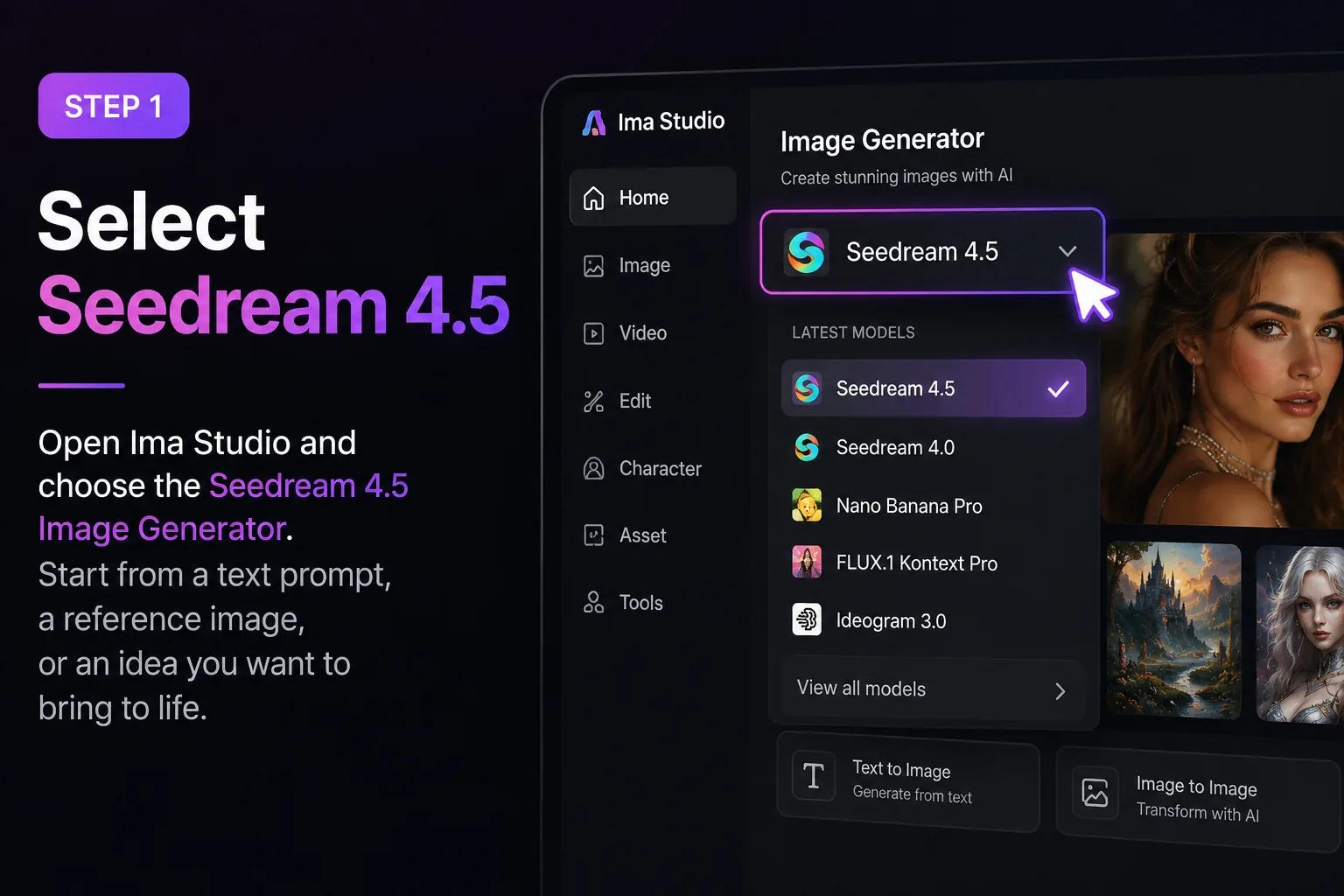
Seedream 4.5を選択してください
Ima Studioを開き、Seedream 4.5イメージジェネレーターを選択します。テキストプロンプト、参考画像、または開発したい既存のクリエイティブなアイデアから始めましょう。.
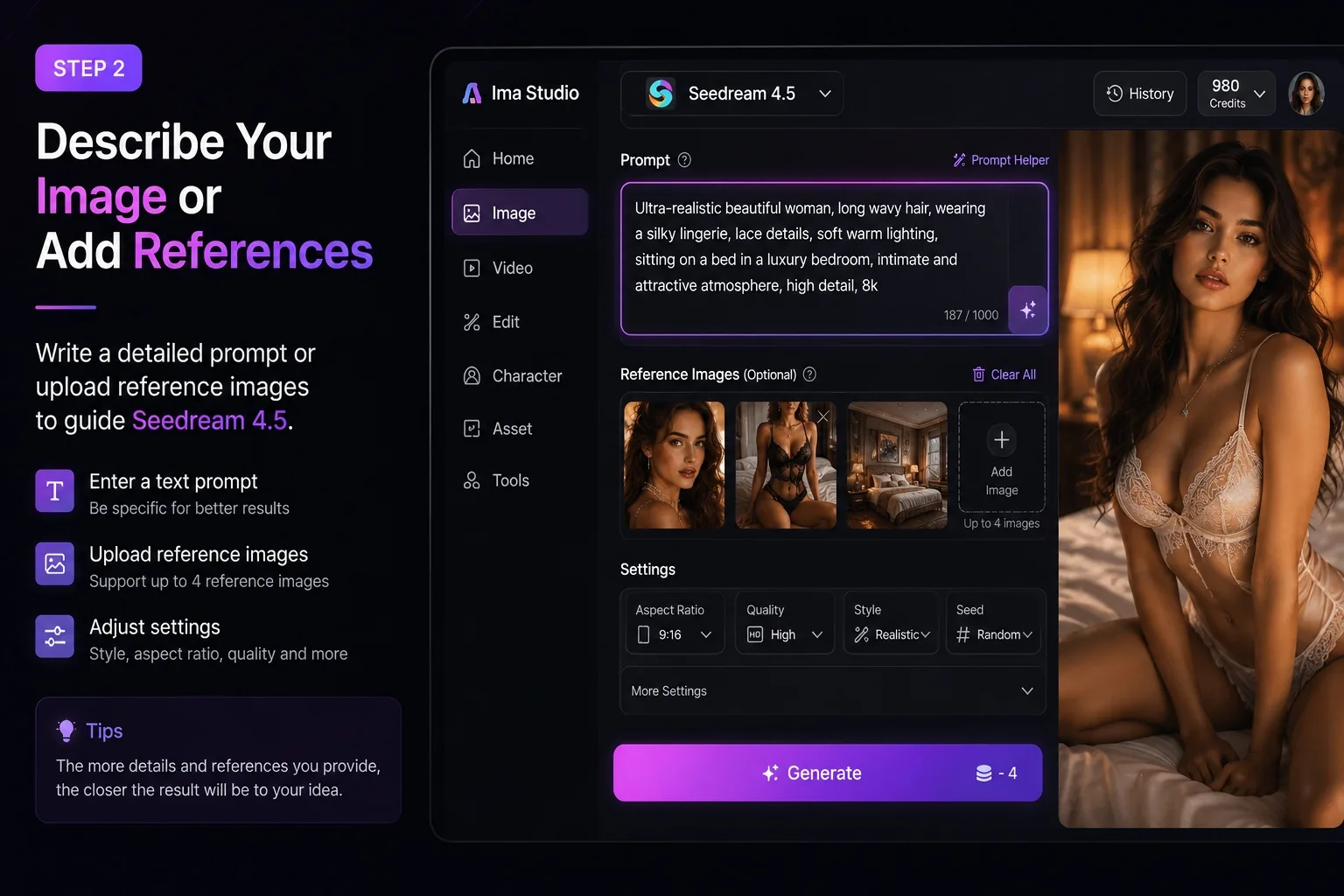
参考文献の説明または追加
詳細な指示を入力するか、モデルをガイドする参考画像をアップロードしてください。Seedream 4.5 では、次のようなものを作成できます。大胆なポートレート画像、ファッションと美容のビジュアル、キャラクターコンセプト、製品キャンペーン画像、映画のようなシーン、ソーシャルメディアのクリエイティブ、一貫性のある画像セット。また、スタイル、照明、素材、カメラアングル、構図、ビジュアルの雰囲気もコントロールできます。.
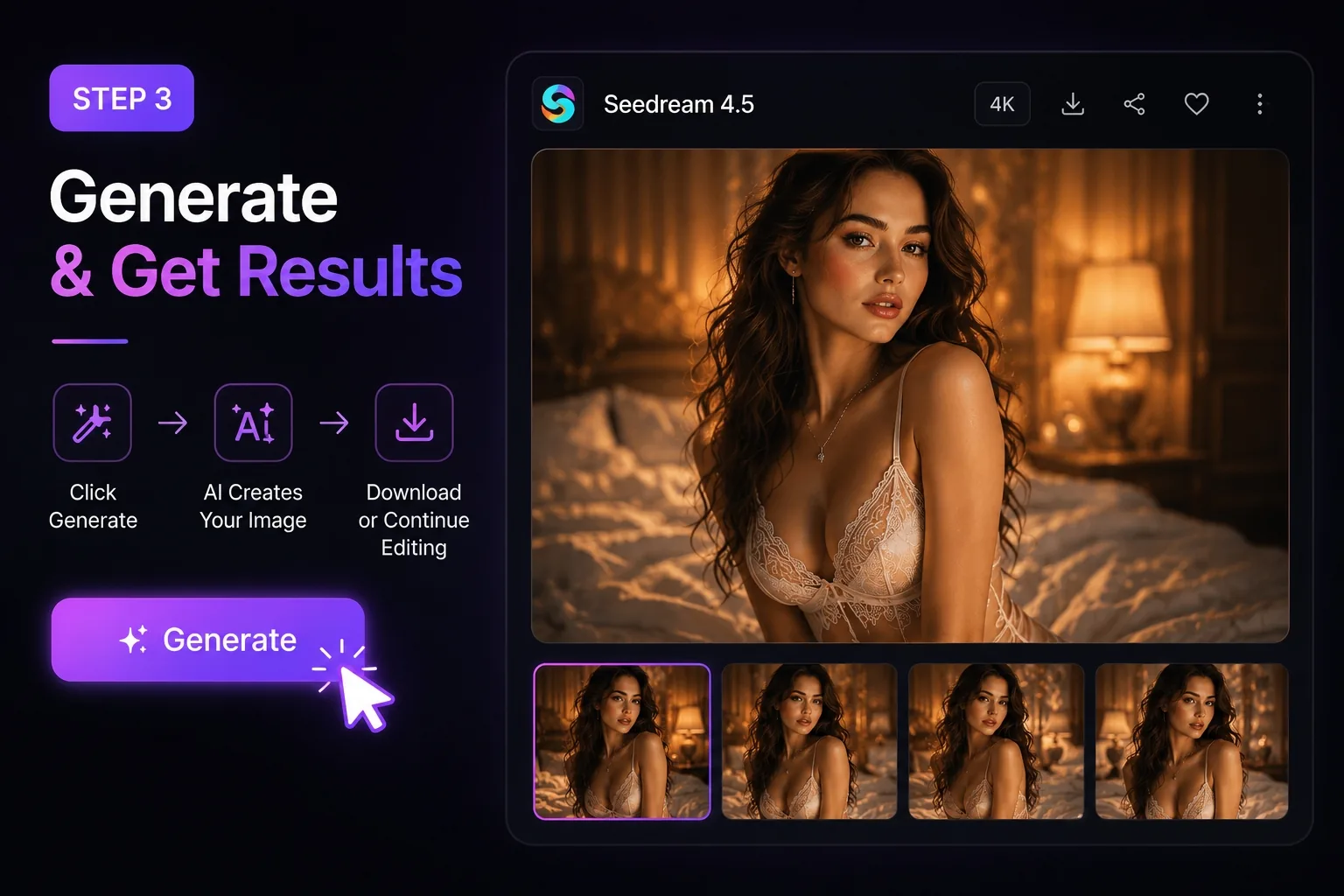
生成と洗練
「生成」をクリックすると、高品質な4K対応画像が生成されます。その後、必要に応じてIma Studio内で編集、アップスケーリング、バリエーション生成、画像から動画への変換などの作業を続けてください。複雑な設定や重いプラグインは不要です。アイデアから最終アセットまで、大胆なAIビジュアルをよりスムーズに作成できます。.
Ima StudioでSeedream 4.5を選ぶ理由
リアリズムと奥行き感を備えた4K対応画像
面倒な設定やプラグインは不要。テキストとリファレンスだけでビジュアルを作成できます。わずか数分で、一貫したライティングとテクスチャ精度を備えたスタジオグレードのレンダリングを生成できます。.
より自由な発想、より少ない制約
多くのAI画像ツールは、プロンプトが少しでも大胆だったり、表現力豊かだったり、視覚的にエッジが効いていたりすると、ワークフローを中断させてしまいます。Ima Studio上のSeedream 4.5は、クリエイターがファッション、ビューティー、ライフスタイル、キャラクター、コマーシャルビジュアルを、創作の流れを途切れさせることなく、より柔軟に探求することを可能にします。.
Nano Banana Proよりもお得
頻繁に作品を制作するクリエイターにとって、コストは重要な要素です。Ima Studio上で動作するSeedream 4.5は、Nano Banana Proよりもクリエイターにとって手頃な価格で、優れた画質とスムーズな画像生成体験を提供します。より多くのアイデアを試したり、より多くのバリエーションを生成したり、より実用的なビジュアルを制作したいユーザーに最適です。.
ダイナミックプリセットとプロンプトコントロール
シネマティック、スタジオ、マクロ、ブランドプリセットから選択、または独自のプリセットを作成できます。Ima Studioを使えば、スタイル、シード、アスペクト比を簡単に微調整できます。.
統合編集とアップスケーリング
Ima Studio内で直接、インペインティング、アウトペインティング、ワンクリック4Kアップスケーリングなどを使って、結果を微調整できます。すべての出力はバージョン管理され、エクスポートにも対応しています。.
オールインワンSeedream 4.5 Creation Suite
Seedream 4.5 によるテキスト画像変換
シンプルなプロンプトから、詳細でリアルな画像を作成できます。Seedream 4.5は、照明、質感、雰囲気、構図を理解し、広告、コンセプトアート、ポートレート、製品画像、映画シーンなどのビジュアル制作をサポートします。.
マルチ参照画像生成
キャラクターの個性、衣装、製品の外観、ポーズ、ビジュアルスタイルなどを決めるための参考資料を複数アップロードしてください。これにより、作品の核となるイメージを損なうことなく、一貫性のある画像セットを作成できます。.
大胆なポートレートとファッションビジュアル
表現力豊かなポートレート、エディトリアルスタイルのファッション画像、ビューティービジュアル、AIインフルエンサー写真、ライフスタイルシーンなどを、より柔軟なクリエイティブ表現で作成できます。視覚的なインパクトを重視し、作業の中断を最小限に抑えたいクリエイターに最適です。.
自動ルーティングと作成エージェント
Ima の Creation Agent がプロンプトを分析し、Seedream 4.5 または他の最適なモデルを自動的に選択します。.
また、画像→ビデオのハンドオフなどのタスクを連結して、シームレスな制作フローを実現することもできます。.
Seedream 4.5 に関するよくある質問
Ima Studioでは、無料トライアルクレジットを使ってSeedream 4.5を使い始めることができます。これは、ワークフローを本格的に展開する前に、モデルをテストし、結果を比較し、さまざまなクリエイティブスタイルを探求するのに最適な方法です。.
つまり、モデルに理解させるためだけにアイデアを単純化する必要はないということです。Ima Studio の Seedream 4.5 は、想像力を制限することなく、詳細なプロンプト、大胆なコンセプト、レイヤー化されたシーン、そしてより表現力豊かなビジュアルディレクションを探求したいクリエイターのために作られています。.
Ima Studio上で動作するSeedream 4.5は、高画質、より柔軟なクリエイティブ表現、そして頻繁な画像生成における優れたコストパフォーマンスを提供します。特に、複雑なプロンプトを探求したり、さまざまなビジュアル表現を試したり、より個性的な作品を生み出したいクリエイターにとって非常に役立ちます。.
はい。キャラクターの個性、製品の外観、スタイル、衣装、ポーズ、照明、構図などを決めるための参考画像をアップロードできます。これは、複数の世代にわたって一貫性のあるビジュアルを作成するのに役立ちます。.
Seedream 4.5は、リアルなポートレート、ファッション画像、ビューティービジュアル、キャラクターコンセプト、商品写真、eコマースのクリエイティブ、映画のようなシーン、ソーシャルメディアコンテンツなどに最適です。.
はい、Ima Studio上のSeedream 4.5は、広告、eコマースのビジュアル、製品キャンペーン、ソーシャルメディアコンテンツ、コンセプトアート、ブランドイメージ制作といった商業的なクリエイティブワークフローに適しています。.
はい。画像生成後も、Ima Studio内で編集、調整、拡大縮小を続けることができます。これにより、ツールを切り替えることなく、最初のドラフトから最終的なビジュアルへとスムーズに移行できます。.
いいえ。Ima Studioは複数のAI画像および動画モデルをサポートしているため、Seedream 4.5で生成した後、必要に応じて他のモデルを使用してワークフローを継続できます。.