Um anúncio em vídeo com a imagem de um produto deve ir além de simplesmente transformar uma foto estática em movimento. O produto precisa de uma entrada visual impactante, um motivo para prender a atenção e uma sequência que transforme detalhes físicos em algo que os espectadores possam entender em segundos. Testamos esse processo com a imagem de um copo térmico. O resultado foi um anúncio minimalista de 15 segundos com movimento do produto, closes em detalhes do material, enquadramentos que destacam os pontos de venda, uma imagem final da marca e áudio original.
Crie um anúncio em vídeo para o seu produto.
Como será o vídeo publicitário final do produto?
O vídeo final começa com um fundo listrado e limpo, e então o copo térmico entra em cena como a primeira revelação. A partir daí, a edição percorre os principais aspectos visuais do produto: o corpo de parede dupla, a alça e a tira de ajuste, a tampa com canudo, a boca larga e a silhueta completa do produto.
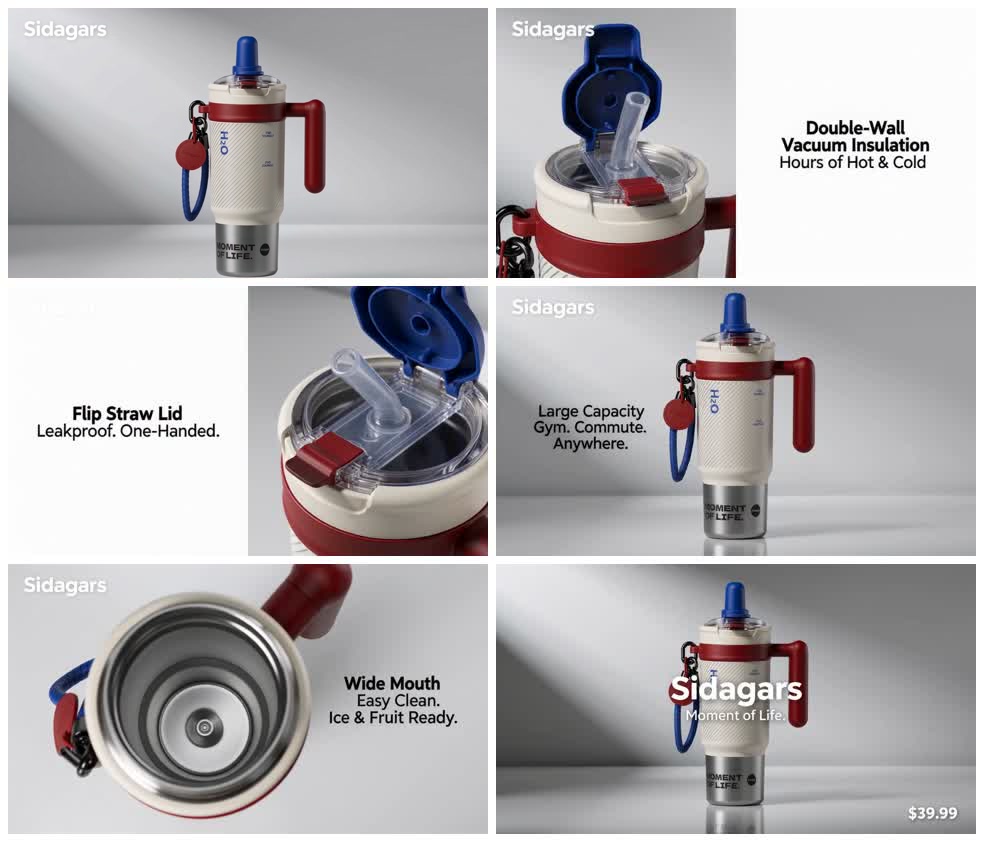
A versão final tem 15 segundos de duração. Ela não se baseia em um zoom contínuo ou em um único movimento em loop; a escala, o ângulo e a função mudam à medida que a história do produto avança.
Uma única imagem serve de base para todo o anúncio.
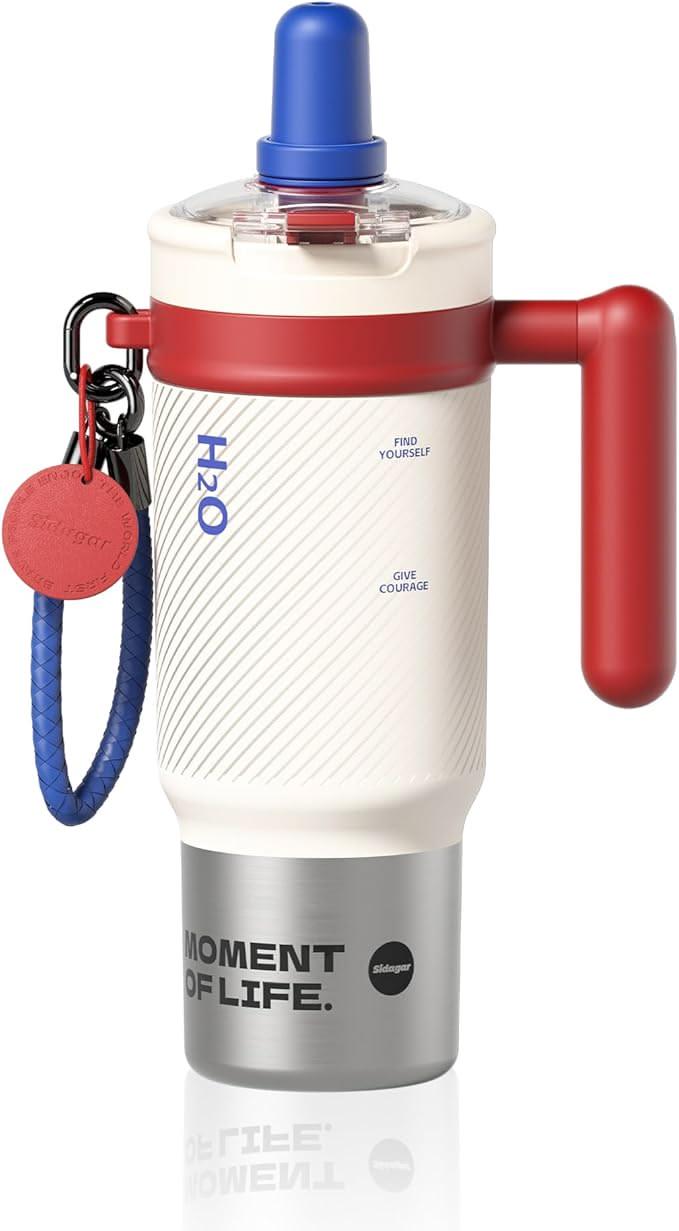
A foto original contém um conjunto de detalhes distintos: um corpo texturizado em tom creme, uma alça e colarinho vermelhos, uma tampa de palha azul, uma alça de transporte trançada, marcações impressas e uma base de aço inoxidável. Esses detalhes conferem identidade ao anúncio.
A silhueta, a paleta de cores creme-vermelho-azul, a alça, a tira, a tampa e a base de aço permanecem reconhecíveis em toda a sequência. Para o texto exato da embalagem, a imagem original — e não a tipografia gerada — continua sendo a referência.
O vídeo utiliza diferentes perspectivas do mesmo desenho:
- Uma foto de corpo inteiro do produto estabelece a silhueta.
- A tampa e o mecanismo de canudo conferem ao objeto um caráter funcional.
- Um close-up do corpo faz com que a mensagem sobre isolamento pareça estar ligada a uma característica física.
- Uma vista de cima para baixo mostra a boca larga e o interior.
- A última imagem mostra o copo inteiro de volta para o recall do produto.
Uma sequência pode conter belos closes e ainda assim não apresentar uma imagem clara do produto. A tomada final, que representa o ponto alto da cena, oferece ao espectador uma imagem estável para recordar.
Por que o resultado parece um anúncio de produto?
O minimalismo nasce da contenção.
O anúncio utiliza um tratamento de estúdio em tons de branco frio, mas o fundo não é o responsável pela criatividade. O produto é.
A maioria dos enquadramentos utiliza um único foco visual. O copo parece grande o suficiente para ser inspecionado. O texto ocupa um espaço vazio em vez de cobrir o produto. As sombras são suaves. O movimento da câmera é controlado. A paleta de cores é composta pelos blocos de cores creme, vermelho e azul do produto, dando a impressão de que o anúncio foi concebido em torno do objeto.
Este é o mesmo princípio por trás de uma boa fotografia de produto: remover tudo o que compete com o item e, em seguida, usar luz, escala, ângulo e tempo para tornar sua forma mais fácil de ser compreendida.
Se você quiser explorar a linguagem da câmera com mais detalhes, consulte nosso guia para Instruções de movimento da câmera por IA Explica como os zooms, os planos macro, os planos orbitais e os movimentos de revelação alteram o que o espectador percebe.
Os pontos fortes da venda tornam-se momentos visíveis
Uma lista de recursos é uma contribuição útil. Não é um plano de filmagem.
Para este copo térmico, o briefing original incluía isolamento térmico, portabilidade, tampa com canudo retrátil, resistência a vazamentos, grande capacidade, design retrô em blocos de cores e boca larga. O anúncio transforma vários desses pontos em elementos visuais distintos.
Isolamento de parede dupla
O produto aparece ao lado de uma breve mensagem sobre isolamento térmico. A imagem mantém a caneca visível enquanto a mensagem é exibida na tela, permitindo que o espectador associe o benefício ao objeto físico.
Transporte e portabilidade
A alça e a tira trançada recebem destaque visual próprio. Isso faz com que o produto pareça pronto para o trajeto diário, a academia ou uma viagem de carro, sem adicionar um toque de estilo de vida que o colocaria em segundo plano.
Acesso de boca larga
Uma tomada de cima para baixo revela a abertura. O ângulo da câmera demonstra a funcionalidade mais rapidamente do que qualquer outra tomada lateral poderia.
É aqui que a transição de uma imagem de produto para um anúncio em vídeo começa a parecer intencional. Cada nova tomada responde a uma pergunta diferente sobre o produto.
Um arco visual claro
- Apresente o produto.
- Aproxime-se de um detalhe funcional.
- Apresente dois ou mais argumentos de venda.
- Retorne a um produto estável e de alta qualidade.
Essa sequência cria um curta-metragem do produto em vez de um loop de câmera contínuo. O espectador vê o objeto inteiro, examina detalhes selecionados e, em seguida, obtém um quadro final que pode conter o nome do produto, o slogan ou o preço.
O melhor gerador de vídeo com IA Não é necessariamente aquele com a lista de recursos mais extensa. Para anúncios de produtos, a questão mais importante é se o fluxo de trabalho consegue manter o produto legível, transformando o briefing em momentos visuais distintos.
O que contribui significativamente para esse estilo?
Você não precisa escrever um texto completo para o vídeo. Comece com os fatos que o anúncio deve preservar:
- Uma imagem nítida do produto
- Nome do produto e principais argumentos de venda
- Preço, se aparecer.
- Proporção de aspecto e duração preferenciais
- Direção de fundo
- Qualquer texto, detalhe do produto ou tratamento visual que deva permanecer inalterado.
O anúncio minimalista de produto utiliza esses elementos para enquadrar o produto, planejar os elementos visuais e preparar a solicitação de produção. A versão atual de produção foi projetada para anúncios curtos, com foco no produto, movimentos de câmera discretos, composição de texto limpa, detalhes materiais e um herói estável no final.
Quais produtos se encaixam nesse estilo visual?
Este tratamento funciona melhor quando o produto tem uma silhueta legível e detalhes que valem a pena serem examinados. Eletrônicos de consumo, utensílios para bebidas, embalagens de produtos para a pele, frascos de perfumes, acessórios e pequenos produtos para casa são aplicações naturais.
Uma imagem de origem nítida ajuda porque fornece ao vídeo uma referência clara de forma, cor, material e detalhes de impressão. Se o produto tiver tampa, dobradiça, botão giratório, textura, porta, alça, superfície reflexiva ou mecanismo de abertura, esse recurso pode se tornar um destaque visual em vez de mais uma linha de texto.
Para equipes que planejam vários anúncios em lojas virtuais, Ideias de anúncios em vídeo para vendedores da Shopify Oferece mais contexto sobre onde anúncios curtos de produtos podem se encaixar em uma campanha.
Crie um anúncio em vídeo para o seu produto.
Perguntas frequentes
Uma única imagem de produto pode se transformar em um anúncio em vídeo completo?
Sim. O caso do copo térmico mencionado neste artigo começou com uma única imagem do produto e resultou em um vídeo de 15 segundos com diversas cenas do produto, destaques, textos e áudio.
O vídeo do produto precisa de uma cena que mostre o dia a dia?
Não. Um anúncio de produto minimalista pode criar variedade através de detalhes macro, vistas de cima para baixo, movimento controlado, iluminação adequada, ações funcionais e fotos de destaque do produto inteiro.
Preciso escrever o roteiro do vídeo eu mesmo?
Não. Forneça a imagem do produto, as informações sobre o produto, a proporção, a duração, a direção do fundo e quaisquer requisitos fixos. A Skill traduz essas informações em uma estrutura de vídeo-produto.
Onde posso experimentar o Minimalist Product Ad?
Abra a Skill na página da comunidade Ima Studio e selecione Anúncio minimalista de produto. Faça o upload de uma imagem do produto para começar.
Sobre o autor