A product image to video ad should do more than make a still photo move. The product needs a visual entrance, a reason to hold attention, and a sequence that turns physical details into something viewers can understand in seconds. We tested that process with one tumbler image. The result was a 15-second minimalist product ad with product motion, material close-ups, selling-point frames, a final brand shot, and native sound.
What the final product video ad looks like
The finished video starts on a clean striped background, then brings the tumbler into frame as the first reveal. From there, the edit moves through the product’s main visual facts: the double-wall body, the handle and strap, the straw lid, the wide mouth, and the full product silhouette.
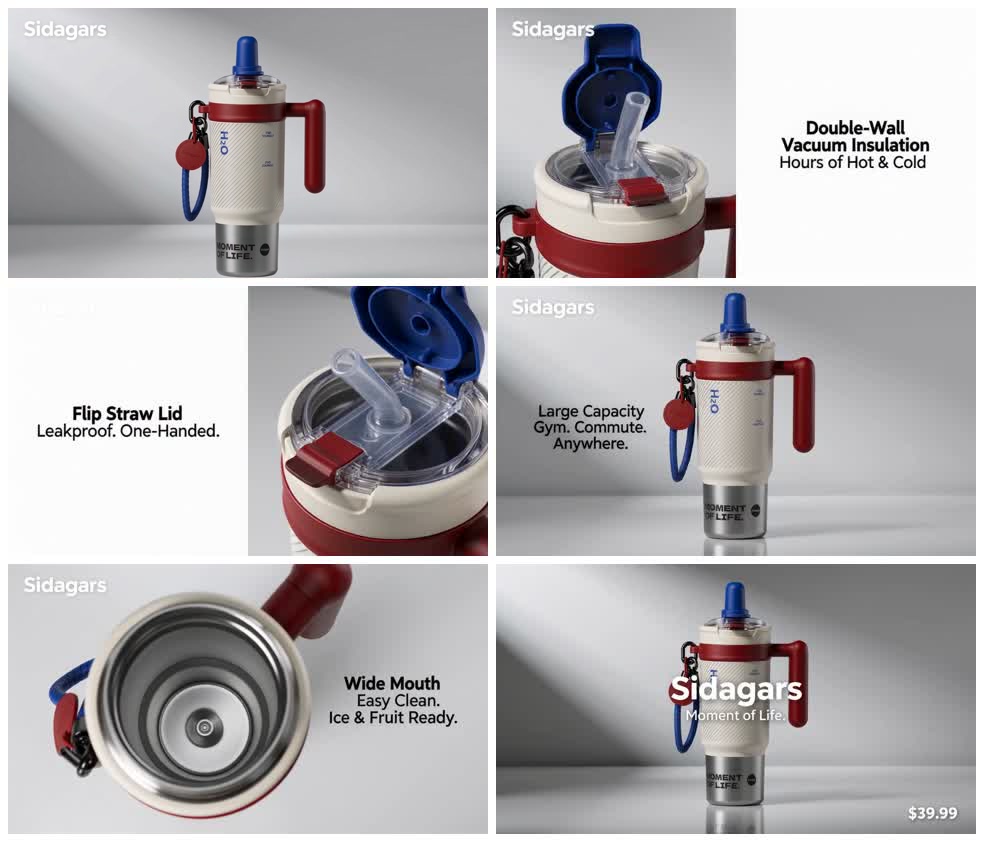
The finished cut is 15 seconds long. It does not rely on one continuous zoom or a single looping move; scale, angle, and function change as the product story advances.
One source image anchors the whole ad
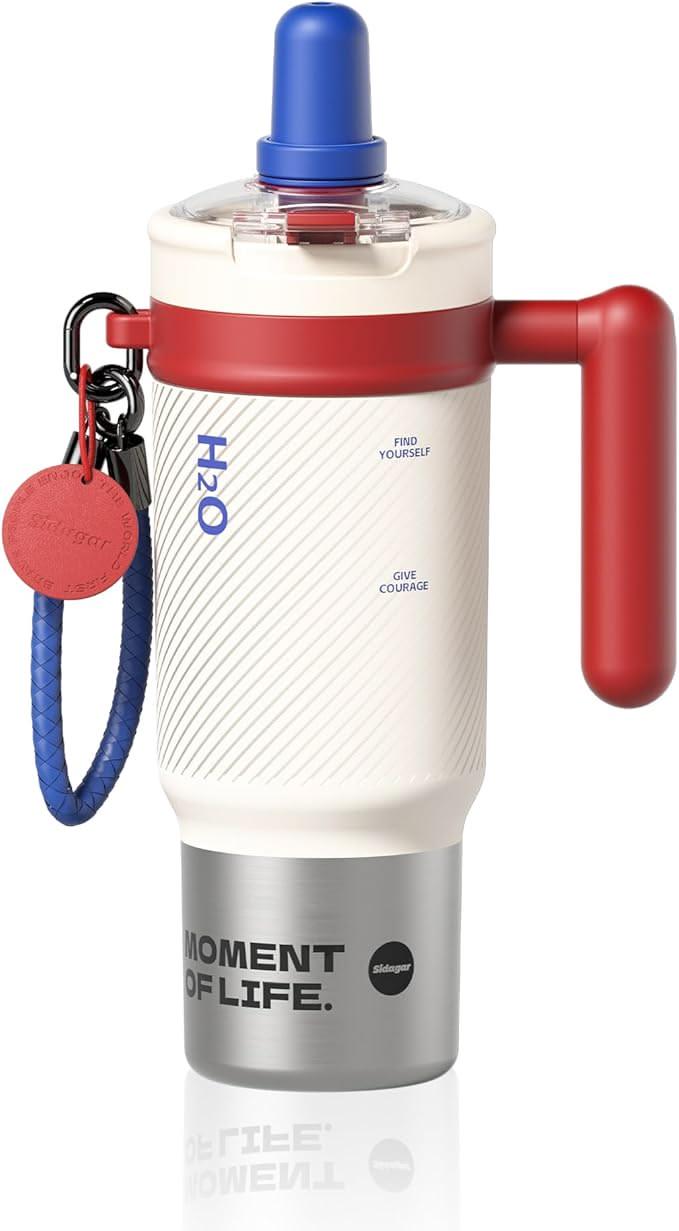
The source photo contains a distinctive set of details: a cream textured body, a red handle and collar, a blue straw lid, a woven carrying strap, printed markings, and a stainless-steel base. Those details give the ad its identity.
The silhouette, cream-red-blue palette, handle, strap, lid, and steel base remain recognizable across the sequence. For exact packaging copy, the source image—not generated lettering—remains the reference.
The video uses different views of the same design:
- A full-body product shot establishes the silhouette.
- A lid and straw action gives the object a functional moment.
- A body close-up makes the insulation message feel attached to a physical feature.
- A top-down view shows the wide mouth and interior.
- The final frame brings the whole tumbler back for product recall.
A sequence can contain beautiful close-ups and still leave no clear picture of the product. The ending hero shot gives the viewer one stable image to remember.
Why the result reads like a product ad
Minimalism comes from restraint
The ad uses a cool-white studio treatment, but the background isn’t doing the creative work. The product is.
Most frames use one visual focus. The tumbler appears large enough to inspect. Text sits in open space rather than covering the product. Shadows stay soft. Camera movement is controlled. The palette comes from the product’s cream, red, and blue color blocks, so the ad feels designed around the object.
This is the same principle behind a strong product photograph: remove anything that competes with the item, then use light, scale, angle, and timing to make its form easier to read.
If you want to explore camera language in more detail, our guide to AI camera movement prompts explains how push-ins, macro slides, orbit shots, and reveal moves change what a viewer notices.
Selling points become visible moments
A feature list is useful input. It isn’t a shot plan.
For this tumbler, the source brief included insulation, portability, a flip straw lid, leak-resistant carrying, large capacity, a retro color-block design, and a wide mouth. The ad turns several of those points into separate visual beats.
Double-wall insulation
The product body appears beside a short insulation message. The shot keeps the cup visible while the claim is on screen, so the viewer can connect the benefit to the physical object.
Carrying and portability
The handle and braided strap receive their own visual attention. That makes the product feel ready for commuting, the gym, or a road trip without adding a lifestyle scene that would push the product into the background.
Wide-mouth access
A top-down shot reveals the opening. The camera angle proves the feature faster than another side view could.
This is where a product image to video ad starts feeling intentional. Each new shot answers a different product question.
A clear visual arc
- Introduce the product.
- Move closer to a functional detail.
- Show two or more selling-point beats.
- Return to a stable product hero.
That sequence creates a short product film rather than a continuous camera loop. The viewer sees the whole object, inspects selected details, then gets a final frame that can carry the product name, tagline, or price.
The best AI video generator isn’t automatically the one with the longest feature list. For product ads, the better question is whether the workflow can keep the product legible while turning the brief into distinct visual moments.
What makes a strong input for this style
You don’t need to write a finished video prompt. Start with the facts the ad must preserve:
- A clear product image
- Product name and selling points
- Price, if it should appear
- Preferred aspect ratio and duration
- Background direction
- Any wording, product detail, or visual treatment that must stay unchanged
Minimalist Product Ad uses those inputs to frame the product, plan the visual beats, and prepare the generation request. The current production version is designed for short, product-first ads with restrained camera movement, clean text composition, material detail, and a stable ending hero.
Which products fit this visual style?
This treatment works best when the product has a readable silhouette and details worth inspecting. Consumer electronics, drinkware, skincare packaging, fragrance bottles, accessories, and small home products are natural fits.
A clean source image helps because it gives the video a clear reference for shape, color, material, and printed details. If the product has a lid, hinge, dial, texture, port, strap, reflective surface, or opening mechanism, that feature can become a visual beat instead of another line of copy.
For teams planning several ecommerce placements, video ad ideas for Shopify sellers offers more context on where short product ads can fit across a campaign.
FAQ
Can one product image become a full video ad?
Yes. The tumbler case in this article began with one product image and produced one 15-second video with several product views, feature moments, text frames, and sound.
Does the product video need a lifestyle scene?
No. A minimalist product ad can create variety through macro detail, top-down views, controlled movement, material lighting, functional actions, and full-product hero shots.
Do I need to write the video prompt myself?
No. Provide the product image, product facts, ratio, duration, background direction, and any fixed requirements. The Skill translates those inputs into a product-film structure.
Where can I try Minimalist Product Ad?
Open the Skill from the Ima Studio community page and select Minimalist Product Ad. Upload a product image to begin.
About The Author