Create a Video with Seedance 2.5
This AI bullet time product video starts with a bag opening: everything inside explodes into the air, hangs there for a moment, then drops onto the table as a perfect still life. Below is the full prompt behind the 12-second video, made with 种子舞 2.5 and two reference images.
Below you will find the full prompt, a line-by-line look at what each part does, and a second version for different products in a different setting.
What the bullet time effect means for a product ad
The bullet time effect makes action look frozen or extremely slow while the camera keeps moving around it. In AI video, you create it with words: tell the model to slow time, hold every object in place, and keep the camera moving.
Classic bullet time freezes a moment while the camera moves around it. In a product ad, that effect turns an ordinary reveal into a spectacle: products burst out, hang in the air, and the camera glides among them before everything lands.
This prompt breaks the idea into five beats across 12 seconds: the trigger, the explosion, a moment of zero gravity, gravity returning, and a final still-life landing. Each beat gets its own block of instructions, which is why the prompt is long and why it works as a template.
The full prompt
Use it with Seedance 2.5 in image-to-video mode. Upload two reference images: a photo of your model and a flat-lay of your products. It is a timestamp prompt: each block starts with a time range, so the model knows what should happen at each moment of the 12 seconds. We set the video to 12 seconds, 720p, with audio on, and ran the prompt exactly as written below.
The Makeup Explosion|Beauty in Zero Gravity

Visual Style

ARRI Alexa 35 cinematic realism, 35mm subtle film grain, premium European and American luxury beauty campaign, physically accurate lighting, realistic skin texture, glass reflections, metallic surfaces, and high-speed photography. Sophisticated editorial color grading, tactile material details, natural motion blur. Absolutely no CGI animation aesthetics.

Reference & Continuity Rules

Use the uploaded reference images strictly. Preserve the same female model, facial identity, hairstyle, makeup, outfit, makeup bag, and every cosmetic product throughout the entire video. All product packaging, colors, logos, proportions, and textures must remain identical to the references.

Use only the exact products shown in the uploaded images. Do not add, invent, substitute, or duplicate any products. The original product inventory must remain consistent throughout the video. Do not generate additional cosmetics or accessories, even if they would normally belong in a makeup collection.

One continuous shot from beginning to end. Zero cuts, zero jump cuts, zero hidden transitions, zero teleportation. A single physical camera moves continuously through one coherent three-dimensional environment.

Scene

A stylish young Western woman sits at a beautifully styled vanity in a naturally lit bedroom. She casually opens a makeup bag placed on the vanity. Inside are only the cosmetic products visible in the uploaded reference images.

The environment feels like a real luxury beauty editorial shot on location, not a computer-generated showroom. Soft morning sunlight streams through a nearby window, creating delicate highlights on the products and surrounding surfaces.

0–2.0s — The Trigger

The camera begins in a close medium shot, slightly above the vanity, slowly pushing toward the woman's hands.

She unzips the makeup bag and opens it naturally.

The instant the bag opens fully, a sudden burst of physical momentum sends the referenced products upward and outward, as if the compressed contents have been released under an unexpected force.

The woman instinctively leans back in surprise, her hair moving slightly with the motion.

All products must emerge from the actual opening of the bag and must match the uploaded references exactly. Nothing appears from nowhere. The bag remains on the vanity.

2.0–4.0s — The Explosion

The referenced products burst into the air in different directions, tumbling and rotating according to their individual shapes, masses, and momentum.

Each product retains its original appearance, packaging, color, and logo. A few tiny particles may drift naturally through the sunlight.

The camera accelerates forward and rises between the floating products, passing close to individual items and weaving through the arrangement.

The camera must physically navigate the scene. Objects never move toward the camera simply to create a close-up. No additional products appear.

4.0–7.5s — Beauty in Zero Gravity

At the peak of the explosion, time dramatically slows to approximately 2–3% of normal speed.

Every product freezes at its exact three-dimensional position, preserving its orientation, distance, and trajectory at the moment of deceleration.

Only the camera continues moving.

The camera performs a continuous, elegant orbit through the frozen arrangement, passing within inches of individual products. Focus shifts naturally between their original packaging, surface textures, and reflective details.

The movement feels like an expensive high-speed beauty commercial, with precise spatial depth, realistic optical perspective, and controlled shallow depth of field.

No object changes position during this sequence. No product rotates independently. No object is duplicated, deformed, or attracted toward the camera.

7.5–10.0s — Gravity Returns

Time gradually returns to normal.

Every object resumes its original motion from the exact position and orientation where it was frozen. Gravity takes effect naturally.

The products descend toward the vanity, colliding gently with the tabletop and one another. They bounce, roll, or slide according to their physical properties.

Every movement must be driven by gravity, inertia, friction, and realistic collisions.

As the products descend, the camera smoothly lowers with them, following the action in one uninterrupted movement.

Only the original referenced products may appear throughout the sequence. No new objects or duplicates may emerge during collisions.

10.0–12.0s — The Perfect Landing

The last products settle onto the vanity.

Through their natural trajectories, rolling motion, collisions, and friction, the referenced products end up in an unexpectedly beautiful composition around the open makeup bag.

The final arrangement resembles a premium beauty campaign still life. The products are naturally distributed across the tabletop, with a visually balanced composition that remains physically believable.

The products do not fly into formation, snap into place, or arrange themselves through invisible forces.

The woman looks down at the vanity, pleasantly surprised.

The camera completes its continuous movement and settles into a refined low-angle product composition. Soft sunlight illuminates the products, revealing their original materials, textures, and packaging.

End on a visually striking luxury beauty tableau.

Final Frame: The woman, open makeup bag, and only the original products from the uploaded reference images are visible in one cohesive composition. Every product remains recognizable and identical to its reference image.

Absolute Restrictions

No additional products, no invented cosmetics, no product duplication, no product morphing, no changing packaging, no changing logos, no missing or substituted products, no cuts, no jump cuts, no hidden transitions, no camera teleportation, no impossible camera movement, no floating without physical cause, no automatic product alignment, no magnetic attraction, no distorted hands, no face changes, no outfit changes, no excessive particles, no magical sparkles, no neon effects, no artificial CGI sheen, no cartoon physics, no text overlays, no subtitles, no watermarks, no background music, no dialogue, no voice-over.

Natural environmental and object sound effects are permitted: zipper opening, cosmetic packaging clicks, subtle air movement, light tabletop impacts, and products rolling to a stop.
Tip: for any person in your prompt, say “adult” explicitly, for example “young adult woman.”
What each part of the prompt does
The rules at the top
Before any action, the prompt sets three things: a visual style (a cinema-camera look, film grain, no CGI feel), continuity rules (keep the same model, outfit and products, with packaging and colors identical to the references), and one instruction that this is a single continuous shot with no cuts. These lines keep the result looking like one real take instead of a collage.
The most useful paragraph is this one: “Use only the exact products shown in the uploaded images. Do not add, invent, substitute, or duplicate any products.” More on why below.
0–2 seconds: The trigger
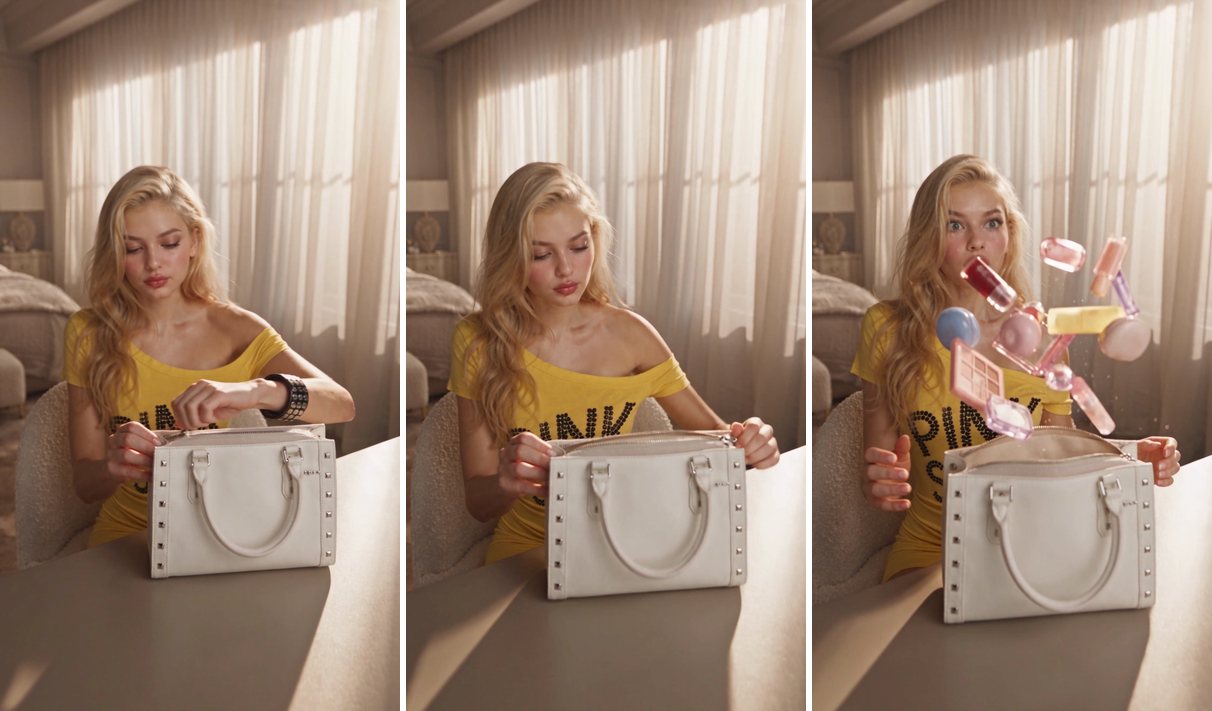
The woman opens the bag and the contents burst out. The key line is “The products must emerge from the actual opening of the bag. Nothing appears from nowhere.” In our video the products leave the bag at about the 1.8-second mark, so the explosion has a visible cause instead of items popping into frame.
2–4 seconds: The explosion
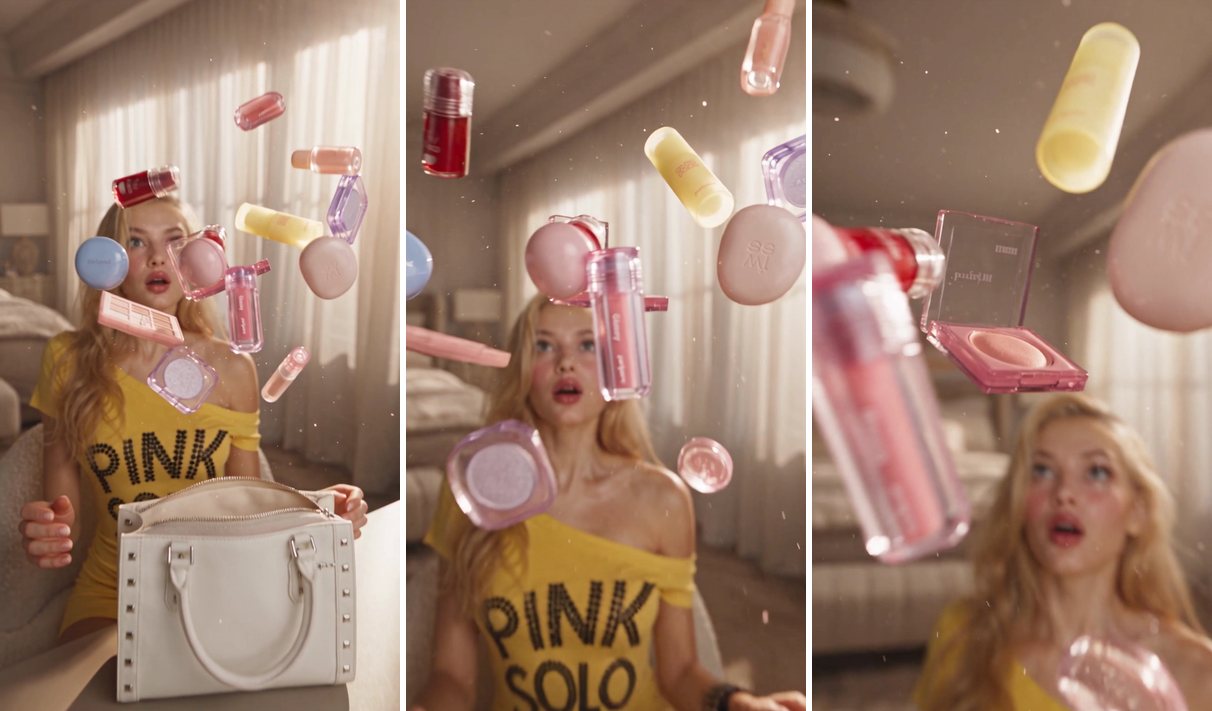
Here the prompt gives each product its own motion: tumbling and rotating “according to their individual shapes, masses, and momentum.” It also gives the camera a job: “The camera must physically navigate the scene. Objects never move toward the camera simply to create a close-up.” The result is a camera that rises between the flying products, not products that fly at the lens.
4–7.5 seconds: Zero gravity
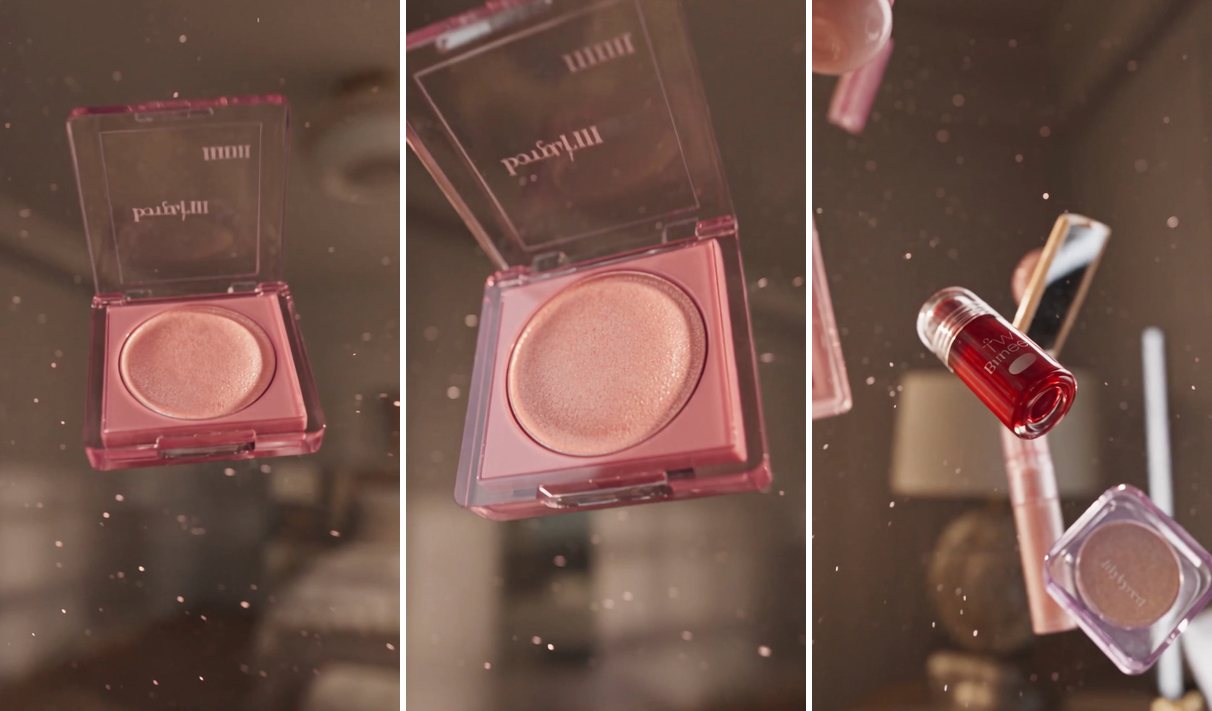
This is the bullet time beat. The prompt asks time to slow to “approximately 2–3% of normal speed,” every product to freeze in place, and only the camera to keep moving. In our video the products hang in the air in soft light while the camera moves in close to individual items, such as a blush compact.
Treat the slow-down as a request, not a guarantee. In our two runs, the camera moved in close to individual products in one and held a low angle in the other, and in the outdoor run the products clearly drifted more slowly than during the explosion. Generate a few takes and keep the one that matches your idea.
7.5–10 seconds: Gravity returns
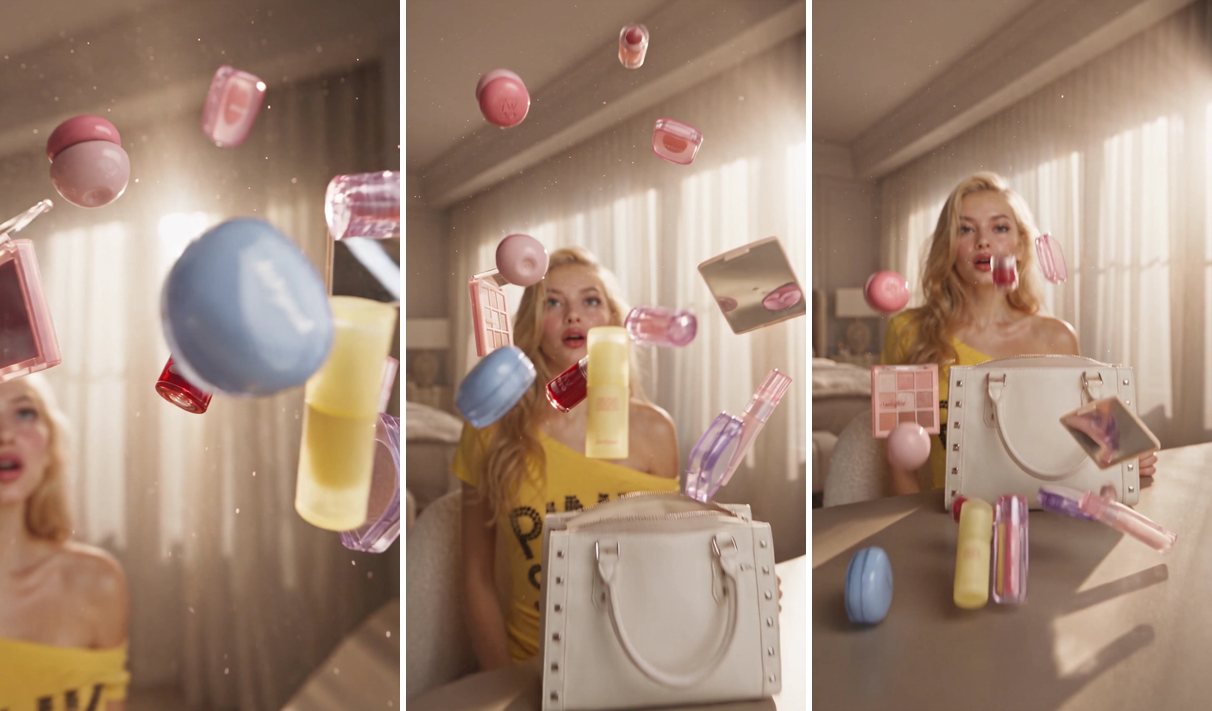
“Every object resumes its original motion from the exact position and orientation where it was frozen” keeps the fall continuous with the freeze. Products drop toward the table and collide, driven by gravity and friction instead of anything that looks animated. In our video most items have landed by about 9 seconds.
10–12 seconds: The perfect landing
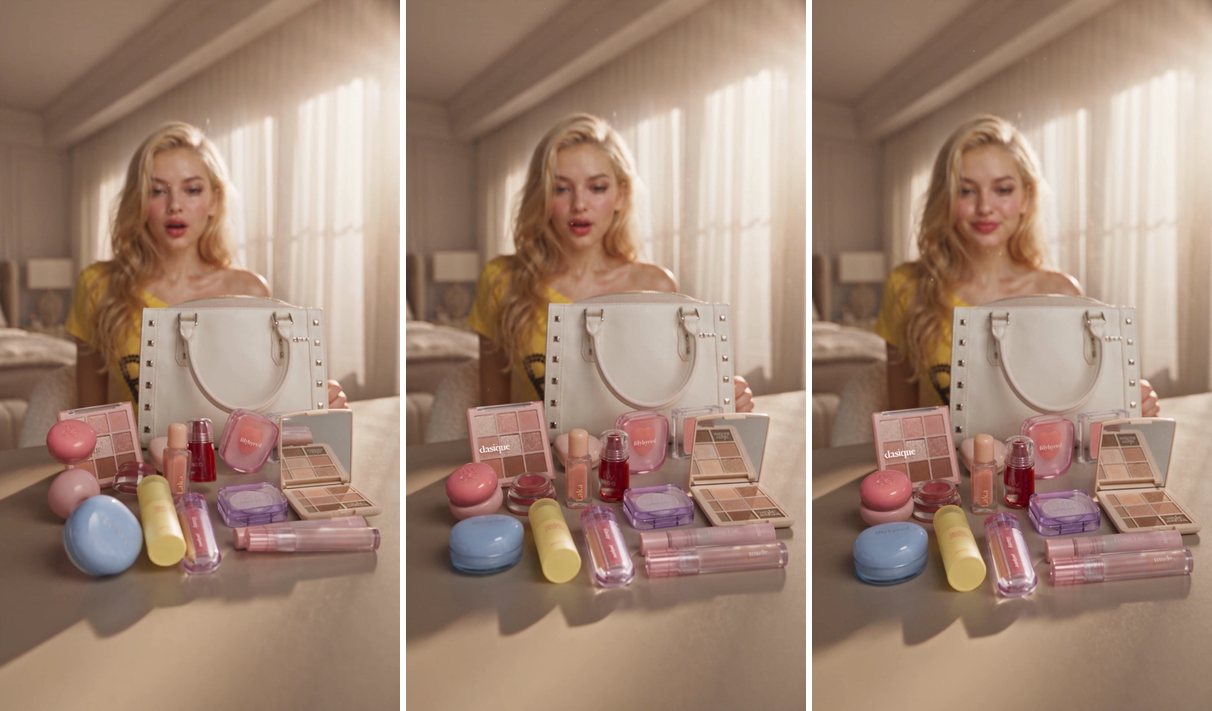
The last beat asks for a composition that looks designed but stays “physically believable,” and adds that products must not “fly into formation, snap into place, or arrange themselves.” The video ends with the products spread across the table, the bag behind them, and the woman smiling over the result.
The restrictions at the bottom
The closing list repeats the biggest risks as hard rules: no cuts, no invented or duplicated products, no changed packaging, no text overlays, no music. It also allows natural sounds such as a zipper and light impacts, so the video still gets realistic audio without a soundtrack.
What the reference images do
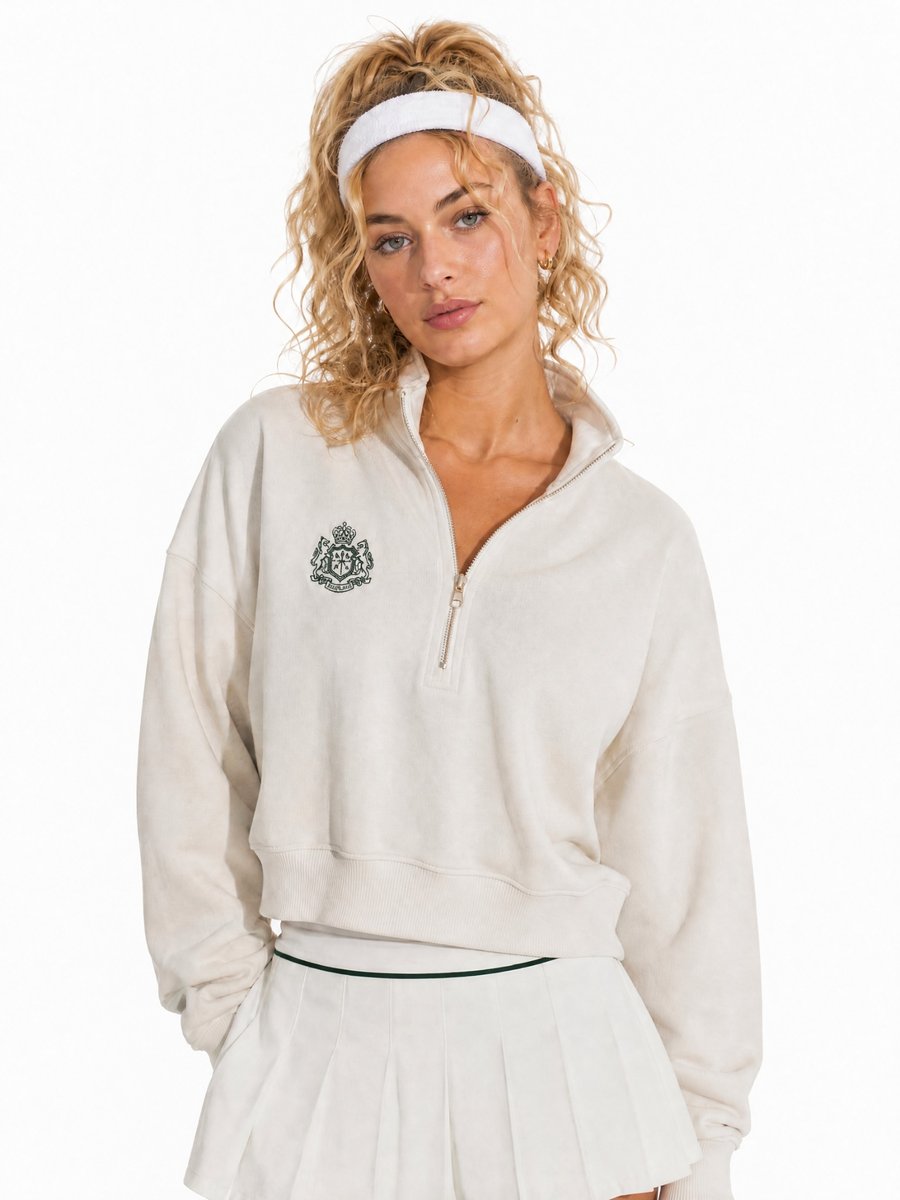
The two reference images shaped the result as much as any line of text.
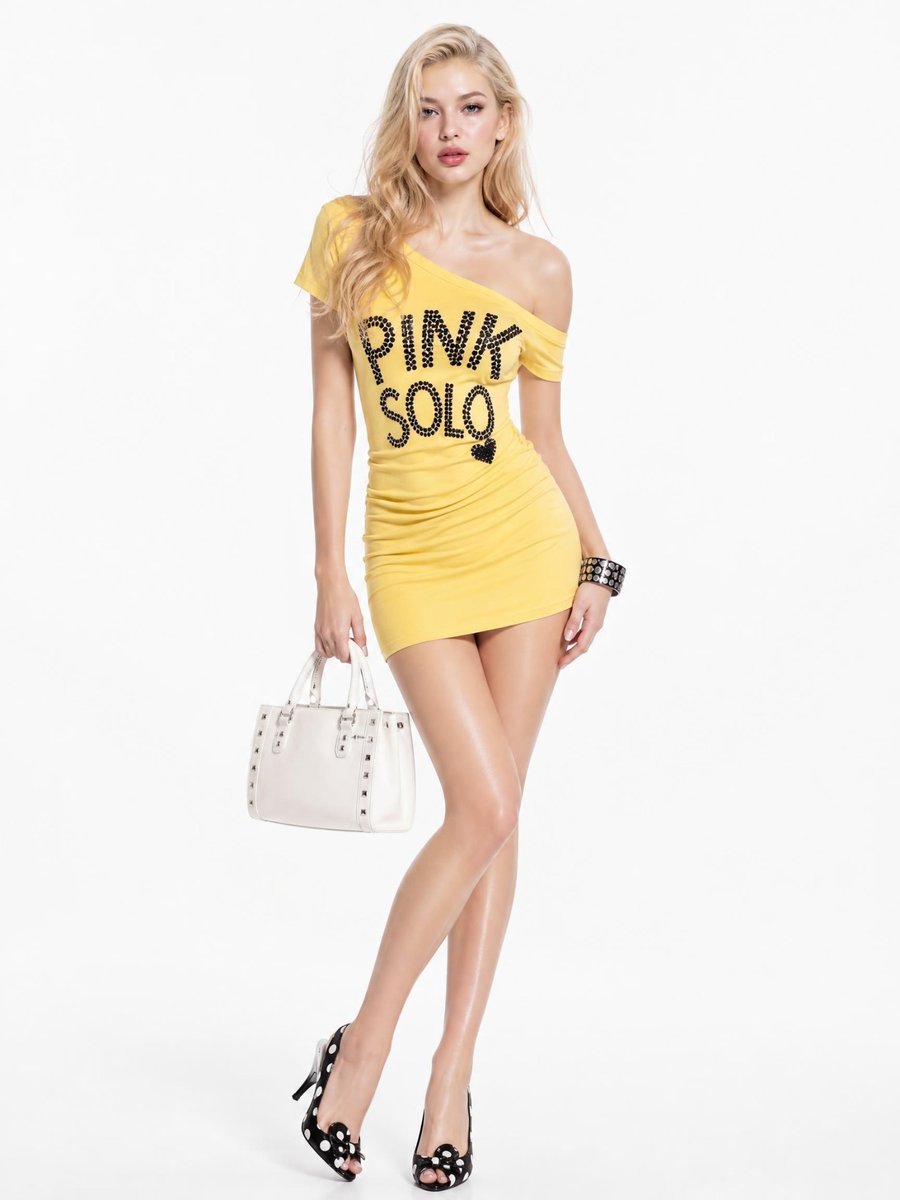
Whatever the model holds becomes the bag
We wrote “makeup bag,” but the model reference shows her holding a white studded handbag, and that handbag is the bag that appears in the video. If you want a different bag, use a model photo where she is not holding one, or give the bag its own reference image.
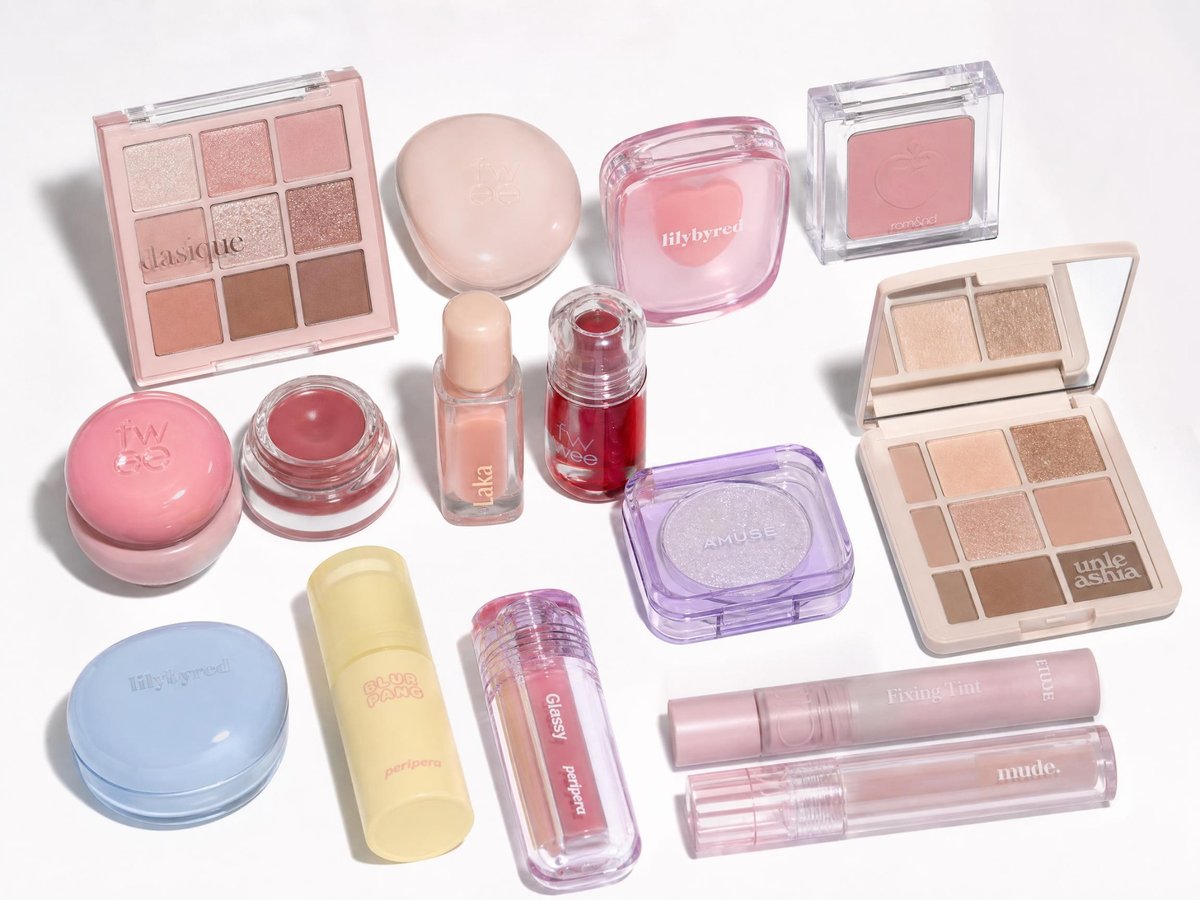
“Use only the products shown” keeps the inventory honest
In our first run, the prompt listed lipstick, mascara and brushes by name, but none of them were in the product image. The video included them anyway. When we replaced that list with “use only the exact products shown in the uploaded images,” the extra items stopped appearing in our second run. If you name products in your prompt, name only what your reference image actually contains.
Swap the products and the setting
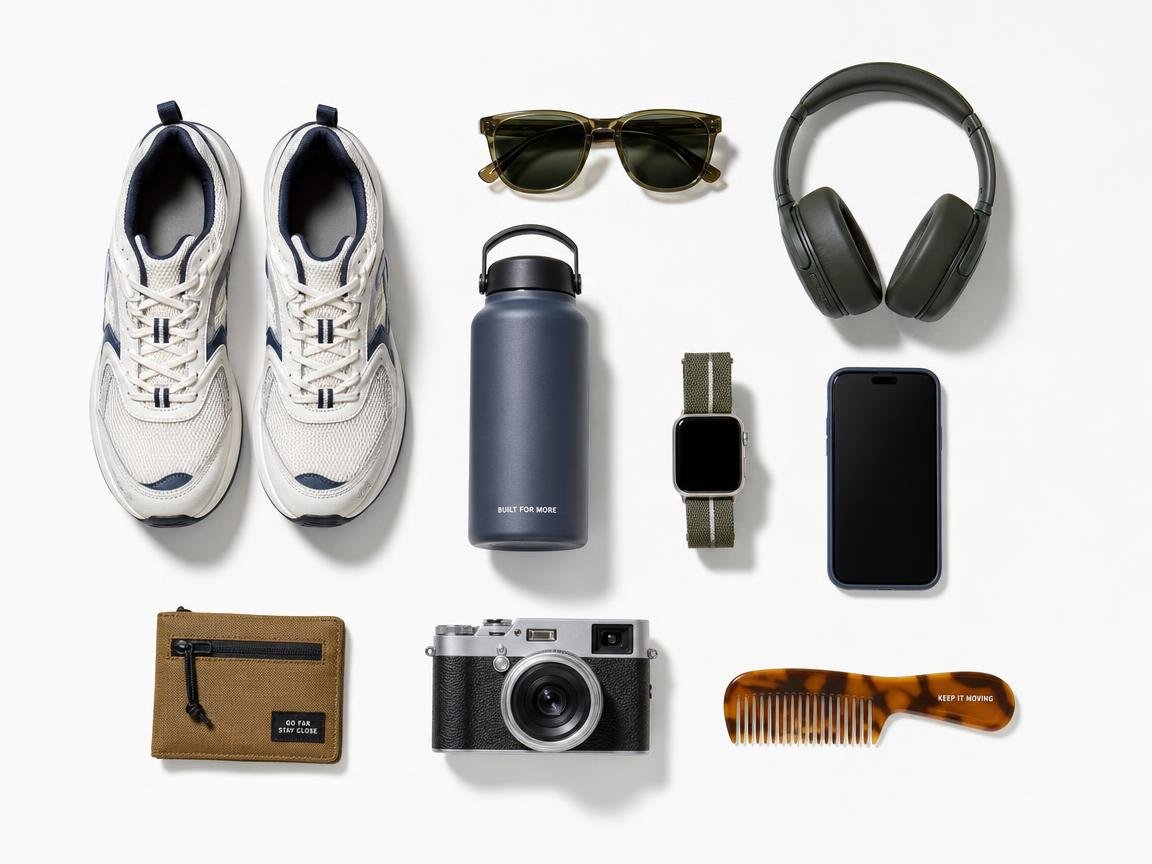
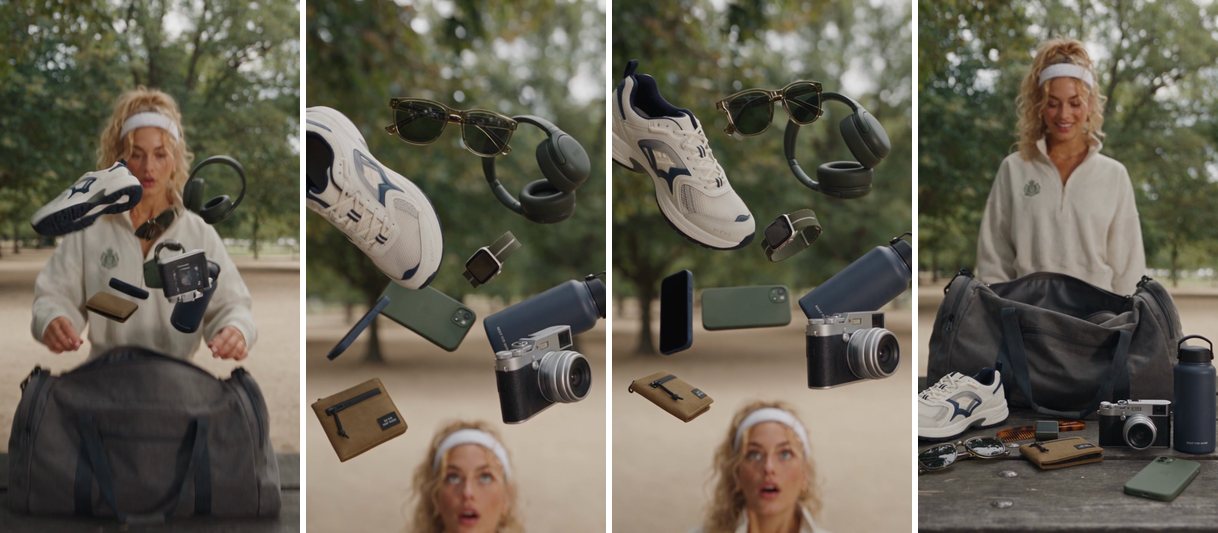
To test whether the structure is reusable, we kept the five beats and changed the products, the bag, the setting and the light. This version uses nine outdoor gear items in a sports bag on a park picnic bench, in soft daylight.
What we changed from the first prompt:
- Products: an explicit list of nine items taken from the product reference.
- Bag: a large sports duffel instead of a handbag.
- Setting: a park trailhead and picnic bench instead of a bedroom vanity.
- Light: soft, diffused daylight, with “no dramatic sunbeams” so the scene does not look staged.
- A closing priority line: product accuracy and realistic light come before visual flourish.
In this version the products clearly slow down and hang in the air while the woman looks up at them, then fall back and settle around the bag.
One lesson from this run: color words in the prompt should match your reference image. Our prompt said “green smartphone,” but the reference phone was black, and the video showed both a black phone and a green one. Describe each item with the colors your reference really shows.
Show the outdoor gear prompt we used
The Ultimate Gear Explosion | Everything in Motion

Visual Style

ARRI Alexa 35 cinematic realism, subtle 35mm film grain, premium outdoor lifestyle campaign, realistic skin and material textures, natural motion blur, physically accurate movement, sophisticated editorial color grading. Authentic outdoor footage with realistic ambient light. No artificial CGI aesthetics.

Reference & Continuity Rules

Use the uploaded product reference image as the exclusive source for all products. Include only these exact items: the pair of sneakers, sunglasses, over-ear headphones, blue water bottle, black smartwatch, green smartphone, dark wallet, black camera, and beige comb.

Preserve each item's original design, color, shape, logo, proportions, and texture. No additional products, accessories, duplicates, substitutions, or invented objects. Every item must remain recognizable and consistent throughout the video.

One continuous shot from beginning to end. No cuts, jump cuts, hidden transitions, or teleportation.

Scene

A stylish young adult woman is outdoors at a spacious park-side trailhead, beside a large, open sports duffel bag placed on a wooden picnic bench. The bag is roomy and practical, with a wide opening and enough space to hold all the referenced products.

The setting feels like a real outdoor lifestyle shoot, with trees, a trail, and softly blurred natural surroundings. Use soft, diffused daylight under light cloud cover or open shade. Natural shadows, restrained highlights, and realistic exposure. No dramatic sunbeams, fake golden-hour glow, lens flares, or exaggerated sunlight.

0–2.0s — The Trigger

The camera begins in a close medium shot, slightly above the bench, slowly pushing toward the woman's hands.

She unzips the large sports bag and opens it naturally. The instant the bag opens fully, the referenced products burst upward and outward from inside, as if released by a sudden physical force. She instinctively leans back in surprise.

All products must emerge from the actual opening of the bag. Nothing appears from nowhere. The bag remains on the bench.

2.0–4.0s — The Explosion

The nine referenced product items fly into the air in different directions, each tumbling and rotating according to its shape, weight, and momentum.

The sneakers rotate as a pair, the sunglasses spin naturally, the headphones turn through the air, and the remaining items follow distinct, physically plausible trajectories. Preserve every product's exact appearance and branding.

The camera accelerates forward and moves between the floating products, passing close to individual items with dynamic perspective. Objects must not move unnaturally toward the lens.

4.0–7.5s — Zero Gravity

At the peak of the explosion, time slows dramatically to approximately 2–3% of normal speed.

All referenced products freeze in their exact three-dimensional positions and orientations. Only the camera continues moving, performing a smooth, continuous orbit through the suspended arrangement.

Use realistic depth of field and natural reflections to reveal the original materials and details. Keep the outdoor background softly blurred but recognizable. No product changes position, duplicates itself, or deforms during this sequence.

7.5–10.0s — Gravity Returns

Time gradually returns to normal. Every product resumes its original motion and falls naturally toward the bench and the open sports bag.

Products interact through realistic gravity, inertia, friction, and collisions. Some land inside the open bag while others settle on the bench around it. The camera lowers smoothly to follow the action in one uninterrupted movement.

No products disappear, merge, multiply, or transform.

10.0–12.0s — The Perfect Landing

The final items settle into a clean, visually balanced outdoor gear arrangement around the large open sports bag.

All nine referenced product items remain visible and recognizable. Their placement should feel naturally caused by their trajectories and collisions, not by automatic alignment or invisible forces.

The woman looks down at the gear with a pleasantly surprised expression. The camera settles into a refined low-angle composition featuring the open bag and the products against the softly blurred outdoor setting.

End on a premium outdoor lifestyle campaign image with realistic daylight, natural shadows, and believable materials.

Absolute Restrictions

No products beyond the uploaded references. No duplication, substitution, morphing, packaging changes, logo changes, or altered colors. No impossible physics, automatic product alignment, magnetic attraction, or objects appearing from nowhere.

No artificial sunlight, exaggerated sunbeams, fake golden-hour glow, lens flares, magical sparkles, neon effects, excessive particles, artificial CGI sheen, or cartoon physics.

No cuts, transitions, camera teleportation, distorted hands, face changes, text overlays, subtitles, or watermarks. No background music, dialogue, or voice-over.

Natural environmental and object sounds only: zipper opening, fabric movement, light product impacts, footsteps, and subtle outdoor ambience.

Final Priority: Product reference accuracy and realistic outdoor lighting take priority over visual embellishment. Use only the uploaded products and create impact through camera movement, timing, and physically believable motion.
How to make an AI bullet time video in Ima Studio
- Choose Seedance 2.5 and image-to-video.
- Upload your model photo and your product flat-lay. Use clear images with a clean background, and include only the products you want in the video.
- Paste the prompt, then change the product, bag and setting lines to match your references.
- Set the length to 12 seconds, the resolution to 720p (480p and 1080p are also available), and audio on.
- Generate a few takes and keep the best one.
Seedance 2.5 can generate videos from 4 to 30 seconds. If you change the length, rescale the timestamps in the prompt to match. For a different style of ad, see our Seedance 2.5 prompt tutorial for a 30-second UGC ad.
For a 15-second skincare UGC case with a product-reference lock, see the Seedance 2.5 skincare UGC prompt.
常见问题解答
How do I write a bullet time prompt?
Name what should freeze, ask time to slow, say that only the camera keeps moving, and describe how the camera should travel. In our prompt, the zero-gravity beat does this with four sentences: time slows, every product holds its position, only the camera keeps moving, and the camera passes close to individual products. Then a separate beat tells everything to resume falling from where it froze.
What is the bullet time effect?
It is a shot where the action looks frozen or extremely slow while the camera keeps moving. Our prompt asks for it in the zero-gravity beat, between the explosion and the fall.
Do I need reference images?
This prompt is written for them. We used two: a model photo and a flat-lay of products. The prompt tells the model to use only what appears in those images.
Will the video have sound?
With audio on, the video includes a generated audio track. The prompt asks for natural sounds only, such as a zipper and light impacts, and no music or dialogue.
Why did my video come out vertical or horizontal?
In image-to-video mode, the aspect ratio setting is “adaptive,” so the output follows your reference images. Both of our videos came out vertical, at 720×1280.
Which model version should I choose?
请参阅我们的 Seedance 2.5 vs 2.0 vs 2.0 Mini 30-second commercial test for a side-by-side comparison.
Make your own bullet time product video
Swap in your products, keep the five beats, and generate a few takes.
Create a Video with Seedance 2.5
关于作者