Gemini Omni AI Video Generator on ImaStudio

Create and edit AI videos from text, images, and video references with Gemini Omni-style multimodal generation. Build short social clips, product videos, avatar concepts, and campaign-ready videos in one creative workspace.

圖片轉視頻 🔇
Fashion Clip 🔇
產品展示 🔇
Social Ad 🔇
Creator Clip 🔇
AI Campaign 🔇
圖片轉視頻 🔇
Fashion Clip 🔇
產品展示 🔇
Social Ad 🔇
Creator Clip 🔇
AI Campaign 🔇

How to Use Gemini Omni AI Video Generator on ImaStudio

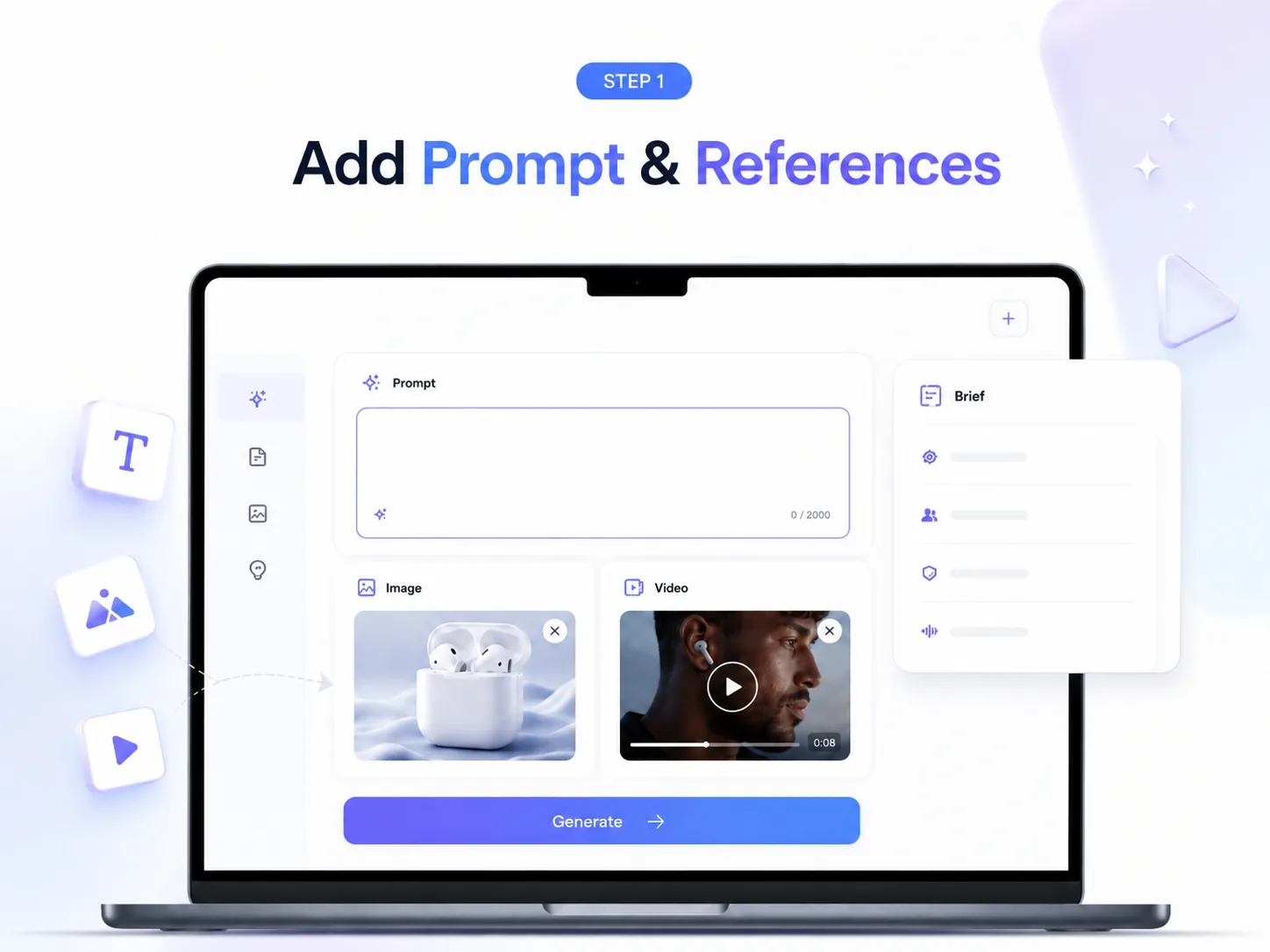
Start with Text, Images, or Video References

Open ImaStudio, choose a Gemini Omni video workflow, and start with a prompt, product image, reference video, or creative brief. Use it for text-to-video, image-to-video, and video-to-video concepts.

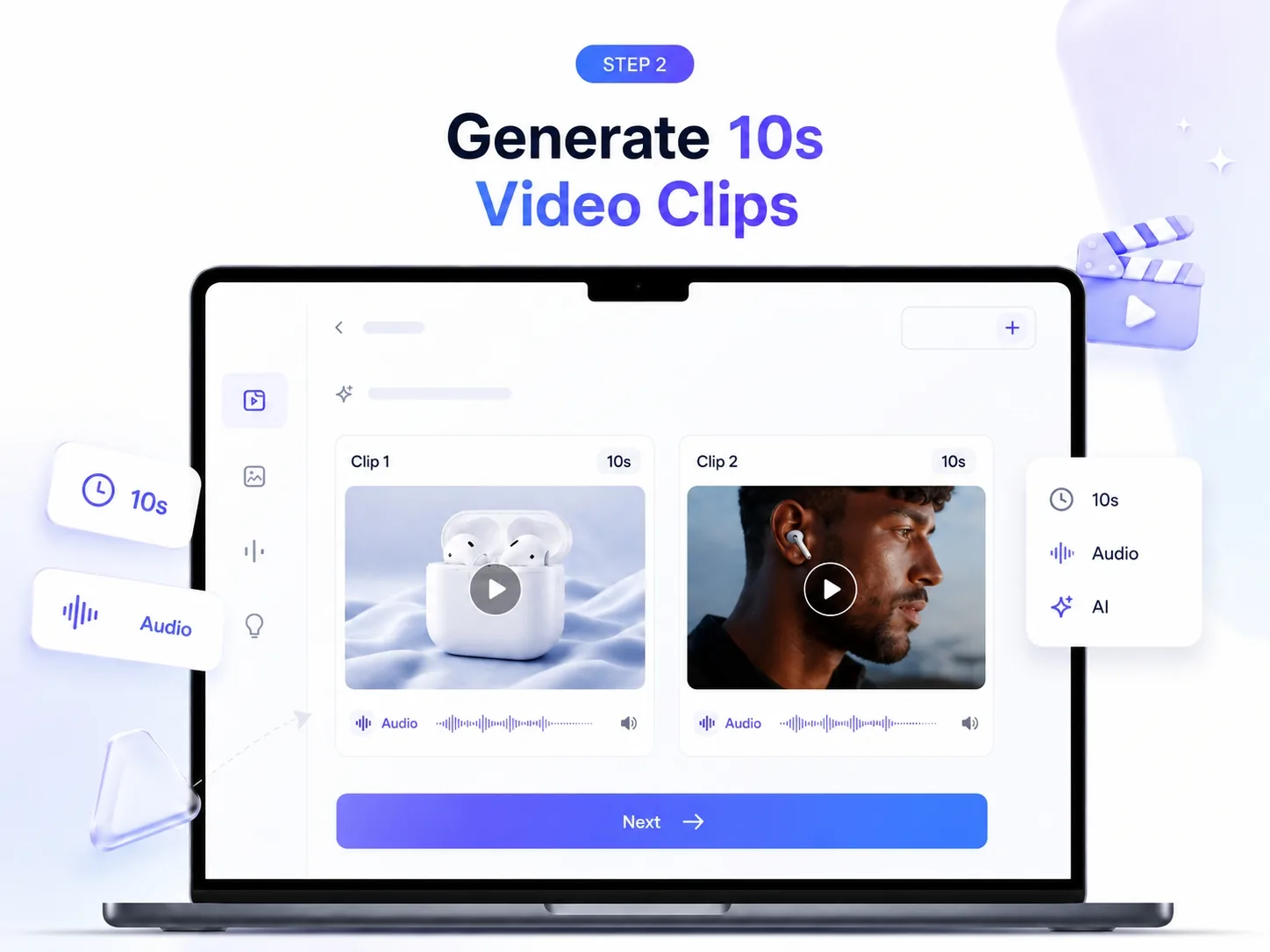
Generate 10-Second Video Clips with Native Audio

Generate short AI video clips from multimodal inputs. Create product demos, social clips, creator videos, and campaign concepts with native audio-ready video direction.

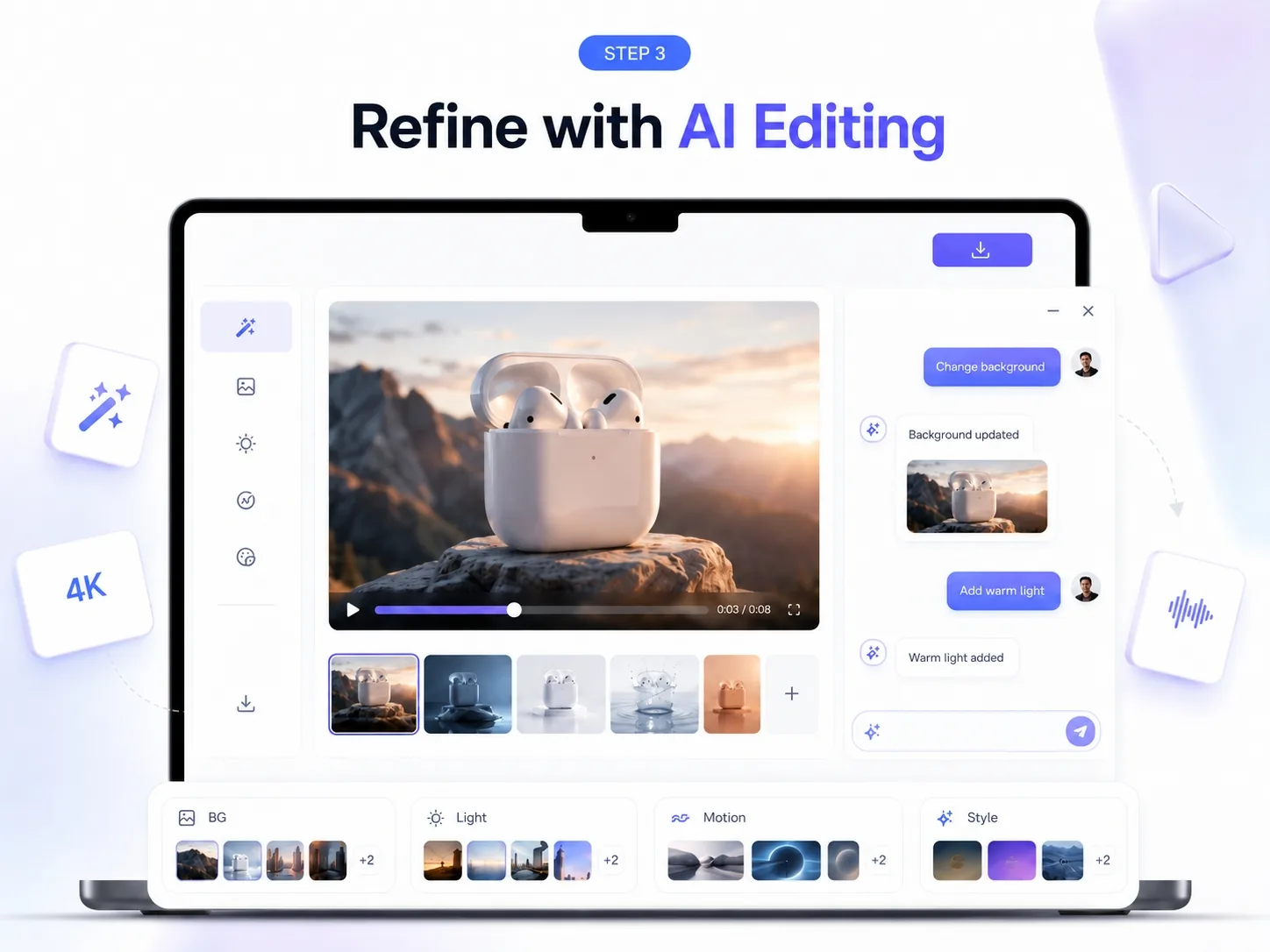
Refine with Multi-Turn Video Editing

Refine outputs with natural-language instructions. Adjust lighting, background, motion, style, characters, or scene details, then export for social, ads, product pages, or creator content.

Why Choose Gemini Omni Video Generation on ImaStudio

Multimodal Video Creation

Start from text, images, or video references. Turn different creative inputs into editable AI video concepts without rebuilding the workflow from scratch.

Image-to-Video and Video-to-Video

Animate product images, remix existing clips, and explore video-to-video editing for product demos, creator content, and short-form campaign assets.

Conversational Editing Control

Shape videos step by step through natural language: change backgrounds, refine motion, adjust lighting, swap visual details, or iterate on style.

Social and Campaign-Ready Outputs

Create clips for TikTok, Reels, Shorts, product pages, ecommerce ads, and creator campaigns, then continue polishing inside ImaStudio.

Gemini Omni AI Video Creation Suite

Text-to-Video Generation

Type a scene, product idea, or campaign brief and turn it into a short AI video concept. Use text-to-video for social posts, explainer clips, product scenes, and creative experiments.

Image-to-Video Generation

Animate product photos, portraits, lifestyle images, or reference visuals. Turn static assets into moving clips while preserving the core subject and visual direction.

Video-to-Video Editing

Use an existing clip as the starting point. Remix the style, adjust the scene, change the background, or refine motion without starting from a blank prompt.

Native Audio, Avatars, and Enhancements

Explore native audio-ready generation, AI avatar video concepts, style transfer, background edits, and multi-turn improvements for more complete video production.

Gemini Omni AI Video Generator FAQs

是的。新用戶可以在升級前探索 Ima Studio 並測試 AI 廣告生成功能。免費試用讓您可以更輕鬆地了解工作流程、嘗試模板,並查看輸出結果是否符合您的廣告活動需求。.

是的。 Ima Studio 可以協助您為包括 TikTok、Instagram、Meta、YouTube、Google、X 等在內的主流社群平台建立廣告素材。您可以產生平台通用的輸出格式,這些格式也是付費社群廣告活動中最常用的格式。.

是的。您可以使用 Ima Studio 為產品、促銷、新品發布和季節性活動建立電商廣告。它尤其擅長將產品圖片和活動創意轉化為可直接用於廣告的素材,速度遠超傳統製作流程。.

是的。 Ima Studio 可以協助您建立更貼近短影片平台原生風格的使用者生成內容 (UGC) 廣告素材。這對於希望打造效果導向廣告內容,同時又希望廣告內容更具真實創作者風格和質感的品牌來說非常有用。.

是的。您可以上傳產品照片、品牌素材和其他視覺參考資料來產生廣告影片。這樣可以更輕鬆地將現有產品圖片轉換為付費廣告活動的動態素材。.

是的。您可以將自己的產品圖片、影片、網址和品牌素材匯入 Ima Studio。這有助於您創建更貼合品牌形象、訊息傳遞和行銷目標的廣告。.

是的。 Ima Studio 同時支援圖片和影片廣告生成,因此您可以在一個工作流程中為不同的管道和廣告活動需求創建多種創意格式。.

根據您的工作流程和輸出類型,您可以建立包含螢幕文字、字幕式訊息和語音驅動的敘事元素的廣告創意,這些元素通常用於付費社交廣告和短影片廣告。.

是的。產生的創意素材可以針對不同的受眾、優惠和平台進行優化和迭代。這樣一來,測試新版本就變得容易得多,而無需每次都從頭開始。.

Ima Studio 支援多種廣告格式和寬高比,包括垂直螢幕、方形和橫螢幕輸出。這可以幫助您為 TikTok、Instagram Reels、YouTube Shorts、Meta 廣告、Google 廣告等平台創建創意素材。.

是的。只要您擁有在創作過程中使用的任何上傳的標誌、產品圖片、影片或其他參考資料的版權,在 Ima Studio 上建立的廣告就可以用於商業推廣活動。.

Ima Studio 將靈活的素材輸入、範本、多格式輸出和 AI 驅動的生成功能整合到一個工作流程中,幫助團隊更快地創建可用於廣告的圖片和影片素材。它的設計旨在提高速度、增加創意多樣性並降低製作成本。.


Create with Gemini Omni AI Video Generator on ImaStudio

Create AI videos from prompts, images, and video references in one creative workspace. Use Gemini Omni-style generation with ImaStudio tools for product videos, social clips, and campaign assets.
立即嘗試