As an admin, one of the biggest projects of the year is always the company anniversary event or annual celebration. It’s never just “book a venue and order some food”—in reality it’s:
- Theme planning and concept
- Budget breakdown and approvals
- Venue selection and vendor coordination
- Office and on-site decoration
- Employee experience and employer branding
- Plus a lot of last-minute problem solving
In this article, I’ll walk through a real 200+ person company anniversary event that I planned and executed, and show you:
- How we positioned the event (beyond just “have some fun”)
- How I broke the project into stages from plan → execution → outcome
- Exactly where and how I used AI tools in each step to save time and reduce chaos
All examples in this article are anonymized and de-sensitized. The focus is on practical methods and templates that other admins, HR teams, or office managers can reuse.
1. Event Positioning: What Problems Should a Company Anniversary Actually Solve?
A company anniversary isn’t just a “ceremony” or a “party budget line”. Done well, it becomes one of the most powerful culture and experience touchpoints in the whole year.
For this project, we defined two main goals from the very beginning:
1.1 Internal goal: Build belonging and team cohesion
We wanted the event to help people:
- Understand the company’s culture, history, and current strategy
- Build emotional connections through immersive activities, not just speeches
- Really “play together” and feel that we’re on the same team
1.2 External goal: Strengthen our employer brand
At the same time, we wanted to create content that would:
- Be worth sharing as a branded event
- Support HR and hiring with better employer branding assets
- Provide photos and stories for PR and social media
In one sentence, the positioning for this anniversary was:
Not just fun, but fun + meaningful + on-brand.
2. Overall Planning: From Office Atmosphere to On-Site Experience (with AI in Every Stage)
For this 200+ person corporate anniversary, I split the project into three major parts:
- Office atmosphere build-up (3–5 days before)
- Warm-up and benefits to raise excitement
- The main event day: check-in → ceremony → games → awards
AI played a role in all three.
2.1 Office Atmosphere: Using AI to Draft KV and Layouts in 30 Minutes
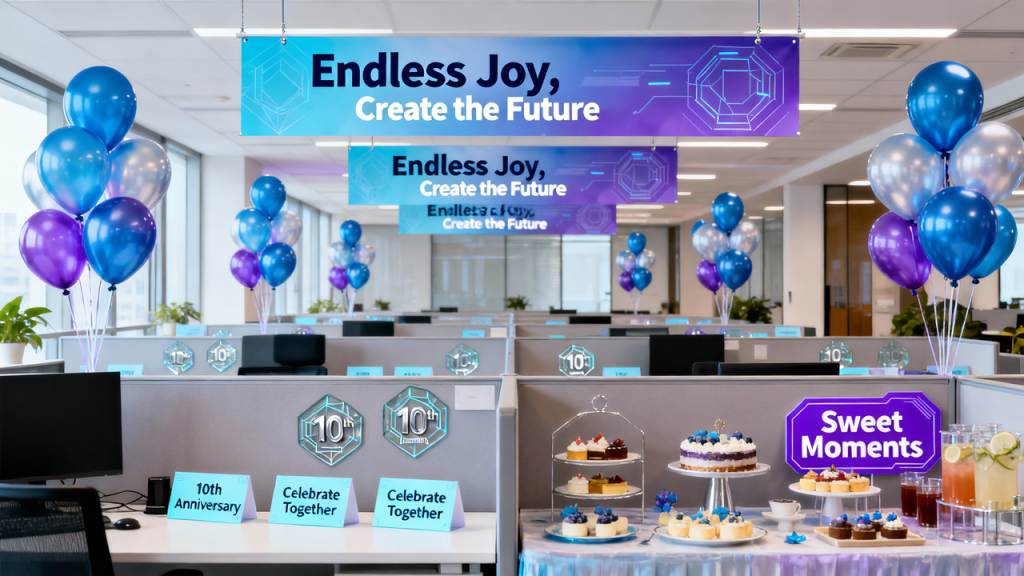
We wanted people to feel the anniversary before they showed up at the venue. So about 3–5 days before the event, we started decorating the office. The scope included:
- Anniversary theme banners and hanging flags
- Floor stickers as route guidance
- Small desk cards for each workstation
- Meeting room welcome screens
- Glass stickers with the anniversary theme
- Afternoon tea area table decor
- Balloons and a small photo zone in the office
The goal for this phase was simple:
When employees walk into the office, they should immediately feel,
“The anniversary is coming.”
How I used AI here
I used an AI image tool to quickly generate visual sketches, including:
- Draft KV (key visual) for the anniversary theme
- Rough mockups of office decoration layout
- Sticker and photo-spot graphics
- A visual idea for the afternoon tea setup
These weren’t final designs—they were fast concept boards. After I sent them to our design team, they could:
- Immediately understand the style direction
- Refine and professionalize the visuals
- Avoid endless back-and-forth like “So… what kind of vibe do you want?”
Result: we locked the overall style in about 30 minutes, and cut down a lot of iteration time.
2.2 Warm-Up and Benefits: Building Anticipation Before the Big Day
To make sure the event didn’t feel like “it just appears one day and disappears the next”, we designed a warm-up phase to gradually build hype.
Warm-up content included:
- Pre-event poster and countdown poster
- Small scratch-card benefits (instant surprise prizes)
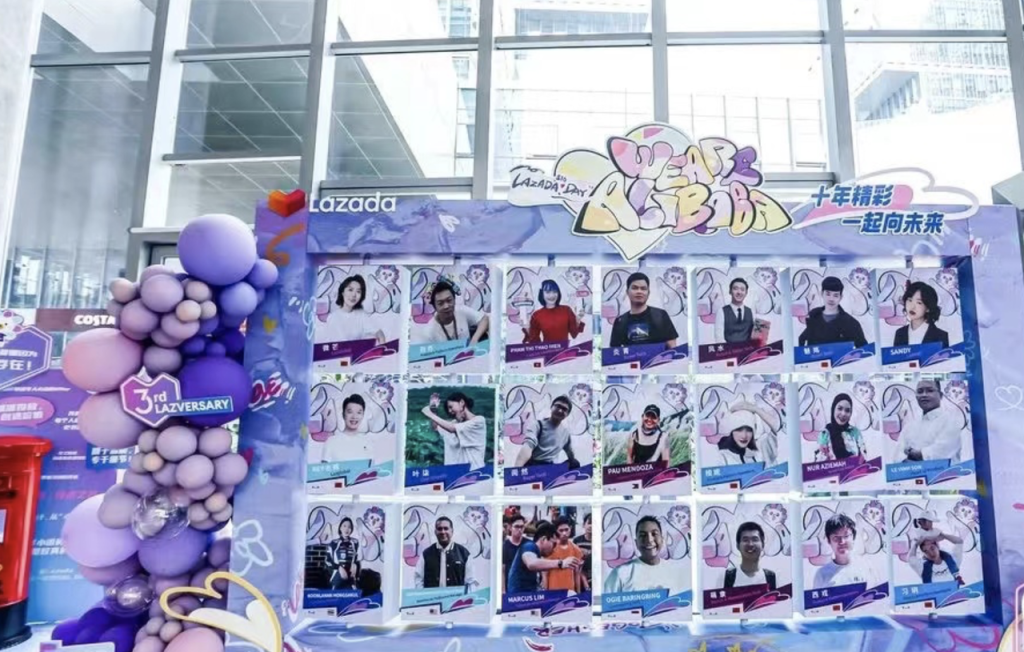
- A “veteran employees” photo wall to create a stronger sense of recognition
Here, I also let AI do the first draft:
- Ask AI for poster copy ideas and layout suggestions
- Get 3–5 directions, choose the best fit, then adapt to our tone of voice
- Hand over structured copy + references to design
This way:
- As an admin, I didn’t have to write all slogans from scratch
- Designers received clearer input instead of a loose “you can freestyle”
2.3 The Event Day: From Check-In to Awards (and an AI-Powered Sign-In System)
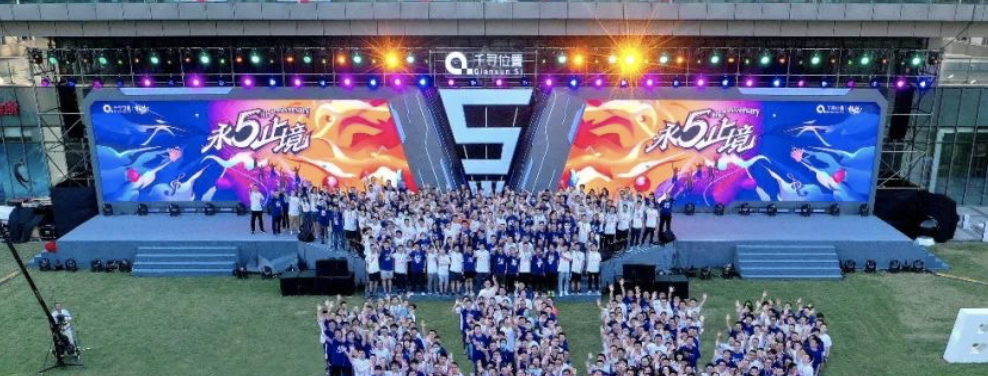
We chose an outdoor carnival format for this anniversary. The overall structure on the day looked like this:
- Check-in and free arrival
- CEO / founder opening speech & cake cutting
- Service-year recognition ceremony
- Team formation, team names & slogans, team showcase
- Main activity (e.g. baseball / frisbee / outdoor challenge)
- Lunch and refreshment stations
- Final championship round between top teams
- Award ceremony & group photo
AI check-in: from 10-minute queues to a 2-minute flow
Traditional check-in usually means:
- Printed lists or Excel on a laptop
- Long queues at the entrance
- Manual counting and checking, which is slow and error-prone
This time, we built a simple AI + QR code sign-in flow:
- Generate a unified check-in QR code
- Employees scan the code → fill in name / staff ID (or match from a database)
- AI automatically marks them as “checked in” and logs the timestamp
- The check-in data feeds directly into:
- Real-time headcount and peak time analysis
- Prize draw and team scoring later in the event
Benefits:
- Minimal queuing, smoother “arrival experience”
- No one needs to stand there and manually count people
- All data is structured and reusable for reporting and analysis
3. From 0 to 1: My Admin Playbook for a “Controlled but Fun” Large Event
After this anniversary, I summarized a simple large-event playbook for admins. It has four pillars:
- Theme & plan: give decision-makers 3–4 clearly different options
- Budget: use a three-tier budget structure to avoid waste
- Collaboration: let AI help you visualize the timeline and responsibilities
- Flow control: make every segment visible and have a Plan B
3.1 Theme & Concept: Use AI to Generate 3–4 Distinct Options
Instead of starting from a blank page, I first used AI for theme brainstorming, based on:
- Company tone and culture
- Number of participants
- Budget range
- Time of year and weather risk
For this event, the final proposal deck included options like:
- Baseball theme
- Farm carnival
- Water park
- Scenic area “mission challenge” / treasure hunt
Then we manually refined and combined ideas, and finally presented 3–4 well-packaged directions to leadership.
This has three clear advantages:
- Decision-makers can quickly choose a direction without getting stuck in micro-details
- We have built-in alternatives for different weather scenarios (indoor vs. outdoor)
- Risks like heat, light rain, or uncertain attendance can be mitigated upfront
3.2 Budget: “Three-Tier Budget” So It Looks Great but Doesn’t Waste Money
Most of the anniversary budget goes to:
- Custom gifts and goodie bags
- Event T-shirts or outfits
- Floor stickers, flags, posters, photo backdrops
- Game materials and prizes
- Lunch / dinner
- Venue and transportation
- Safety / insurance and on-site support
I like to present budgets using a three-tier structure:
- Basic plan – must-have items
- Safety, venue, basic food, minimal decor
- Upgraded plan – nice-to-have experience upgrades
- Better gifts, more decoration, more interactive spots
- Premium plan – “wow effect” but optional
- Premium venue, special shows, extra surprises
This makes it much easier for leaders to decide:
- They can see exactly what they get at each level
- Cutting or adding items becomes a structured choice, not emotion-driven
- As an admin, you won’t end up redoing the entire plan because of a vague “this is too expensive”
3.3 Collaboration: Don’t Try to Carry Everything Yourself—Let AI Draw the Gantt Chart
For a 200+ person event, one admin cannot and should not do everything alone. I usually split responsibilities like this:
- Admin / Office
- Overall coordination, venue, materials, suppliers, timeline
- HR
- Employee communications, service-year data, awardees
- Marketing / Design
- KV, posters, visual assets, photo & video planning
- Finance
- Budget approvals and payments
- Department heads
- Team formation, internal communication and motivation
Before execution, I always run a kick-off meeting where everyone sees:
- What the day will look like
- What they own
- When their deliverables are due
Here I let AI help me build a Gantt-style project schedule, including:
- All tasks (from “confirm theme” to “return rented equipment”)
- Owners
- Start and end dates
- Dependencies
- e.g. “Theme must be locked before we order gifts”
Once the schedule is visual, people naturally feel more responsible and time-aware. The last week is still busy, but much less chaotic.
3.4 Flow Control: Every Segment Needs an Owner and a Backup Plan
For the main event day, I prepare a visual timeline that includes:
- Each segment’s start and end time
- On-site owner for that segment
- Required materials and equipment
- “If X happens, we do Y” notes—for example:
- What if it rains?
- What if we’re 20 minutes behind schedule?
- What if a key piece of equipment breaks?
Large events feel uncontrollable when everything is in one person’s head.
Once you externalize the flow and the ownership, even a 200+ person anniversary can run surprisingly smoothly.
4. Results: Why This Anniversary Felt More Engaging Than Previous Ones
After the event, we ran a satisfaction survey and had follow-up conversations with employees. Here are the main reasons this anniversary scored higher than previous years:
4.1 Rich content, but not exhausting
We balanced:
- Physical activity (sports / games)
- Team interaction (team names, showcases, challenges)
- Ceremony (service-year recognition, cake, photos)
- Food and rest
People felt energized but not “drained by a full day of forced fun”.
4.2 Team competitions created emotional value
Team names, slogans, and the final championship round turned the event from:
“The company organized something we have to attend”
into:
“We really want our team to win this.”
That emotional investment made the atmosphere much stronger.
4.3 Strong sense of ritual around the anniversary
The combination of:
- Service-year recognition
- Anniversary cake cutting
- Office + venue decoration
made people feel seen and appreciated, not just “one of many employees”.
4.4 Gifts that were actually useful
Our custom gifts (bags, T-shirts, sun sleeves, masks, etc.) were:
- Immediately useful during the event
- Still usable back at the office or in daily life
This is much better than purely decorative souvenirs that end up in a drawer.
5. Reusable AI Prompts for Your Next Company Anniversary
If you want to bring AI into your own event planning workflow, here are some prompt templates you can copy into your favorite AI image or writing tools (or into Ima Studio if you’re using it).
5.1 Main Anniversary KV (Tech + Energy Style)
Design a key visual for a corporate anniversary event. The theme is “Play Without Limits, Create the Future”. Style: a mix of tech aesthetics and energetic sports. Main colors: blue and purple gradient. The image should show teamwork, celebration, energy light effects, and dynamic lines, with a reserved area for the company logo. The design should be clean, modern, and have an AI-generated look, suitable as the main visual for posters, banners, and online promotion.

5.2 Check-In Backdrop Prompt
Create a 3m-wide check-in backdrop for a company anniversary event. Include the anniversary number, the theme slogan “Play Without Limits, Create the Future”, and subtle tech elements like light particles and abstract shapes. The style should be bright, modern, and simple, with enough empty space for people to sign or stand in front for photos. This will be used at the outdoor check-in area.
5.3 On-Site Sticker & Photo Prop Prompt
Design a set of sticker-style graphics for on-site photo taking at a company anniversary carnival. Include baseball or sports elements, cheering hand gestures, team badges, and short energetic slogans such as “Let’s Go!” and “We Win Together!”. Use a cute, minimal line style with bold colors, suitable for printing as stickers and handheld props.
5.4 Office Decoration Layout Prompt
Generate an illustration showing an office decorated for a company anniversary. Include hanging flags, balloons, glass stickers, small desk cards, and an afternoon tea area setup. The overall style should be bright and festive with a light tech touch, using a consistent color palette in blue and purple with a few orange accents. This is for internal reference to align the decoration style with vendors.
5.5 Writing Prompts (Welcome, Rules, Safety, Awards)
- Opening welcome speech Write a 150-word Chinese welcome speech for a company’s 6th anniversary celebration. The tone should be warm and sincere, thanking employees for their effort and support, and emphasizing both looking back on the past year and moving forward together into the future.
- Game rules explanation Write a 100–150 word announcement explaining the rules for a team competition using baseball / frisbee / outdoor challenge activities. Mention that it is a points-based system with four tasks, higher completion means more points, referees will record scores and upload them, and an AI system will generate a live leaderboard. The tone should be friendly and clear.
- Safety reminder Write an 80–120 word safety reminder for an outdoor company event. Include points about staying hydrated, sun protection, avoiding dangerous movements or collisions, listening to staff instructions, and contacting staff immediately if anyone feels unwell.
- Award speech Write an 80–120 word award speech for the champion team of a company anniversary competition. Highlight their teamwork, strategy, speed, and the positive energy they brought to the event, with a celebratory but not overly exaggerated tone.
You can adapt these prompts to your own theme, slogan, and company culture.
6. Closing: Admin Work Is Not Just “Buying Things”—It’s Connecting the Organization and Its People
For me, a company anniversary is not just a “fun day” on the calendar. It’s:
- A concentrated moment of culture and emotion
- A chance for employees to feel genuinely appreciated
- A powerful touchpoint for employer branding
And the value of admin / office operations is also more than “procurement and logistics”.
We’re often the ones who connect organizational goals with real human experiences.
If you’re currently planning a company anniversary, annual party, or large team-building event, I hope this case study gives you some practical ideas. If you want templates for budgets, timelines, or material lists, feel free to adapt the ideas here or build your own internal playbook on top of them.
Author’s note
This article is based on my real experience planning and executing a 200+ person company anniversary event as an admin. AI tools were used to help generate visual drafts, copy ideas, and to polish the structure and wording of this English version—but all workflows, decisions, and learnings come from an actual project I led in our company.
About The Author