The first time I tried an AI video generator, I was pumped.
I typed something that sounded cinematic — “a man walking through a futuristic city at night.”
A few minutes later, I got my masterpiece.
Except… it looked like a fever dream.
The guy’s face melted, his body warped every few frames, and the lights flickered like a dying neon sign.
My first thought? “Wow, AI video tech still sucks.”
Then I stumbled onto a Reddit thread titled “Why are AI-generated videos usually so bad?”
Hundreds of people were complaining about the same thing.
But as I kept reading — and after digging into articles from DigitalBrew, Tagshop, and Higgsfield’s Sora 2 presets — I realized something that changed how I see this whole field:
AI videos aren’t bad because the AI is dumb. They’re bad because we don’t know how to talk to it.
AI Doesn’t Understand You — It Predicts You
AI doesn’t “see” your vision; it guesses what you mean.
Most people type prompts that are way too vague.
“A man walking in the city at night.”
That might sound fine to a human, but to an AI model? It’s like saying “draw something urban.”
There’s no direction, no tone, no motion cue.
Now try this:
“Cinematic close-up of a man walking under neon lights, camera tracking from behind, reflections on wet pavement.”
Suddenly, the AI knows where the camera is, what kind of lighting to use, how fast the movement feels.
That’s not a coincidence — that’s what Tagshop calls prompt literacy: the ability to give AI the same kind of instructions you’d give a film crew.
Most of us don’t have that skill yet. And that’s why so many AI videos look like broken dreams.
Why AI Video Quality Falls Apart
After weeks of experimenting (and breaking things), I learned how these systems really work.
Most AI video generators — like Sora 2, Seedance, or Vidu — are built on two key components:
- Diffusion models – they handle image quality and detail.
- Transformers – they handle motion and time consistency.
Sounds high-tech, right? But the problem is in the “in-between.”
AI doesn’t actually understand motion — it just predicts the next frame based on the last one.
If your prompt doesn’t give clear spatial or temporal clues, the AI starts guessing.
That’s when faces distort, lights flicker, or objects drift.
As DigitalBrew puts it: AI isn’t creating meaning — it’s filling gaps.
Every bad frame is a misunderstanding between you and the model.
Two Paths to Better AI Videos: Master Prompts or Use Presets
Once I realized this, I saw two possible paths forward:
- Spend weeks mastering the art of prompts.
- Use someone else’s already-perfect ones.
I chose the second.
And honestly? It was the smartest creative decision I made all year.
Platforms like Higgsfield show how Sora 2’s video presets already bake in cinematic composition, lighting logic, and camera rhythm.
If You’re Not a Prompt Nerd, Use Templates
Here’s the truth: most people just want to make something that looks good — fast.
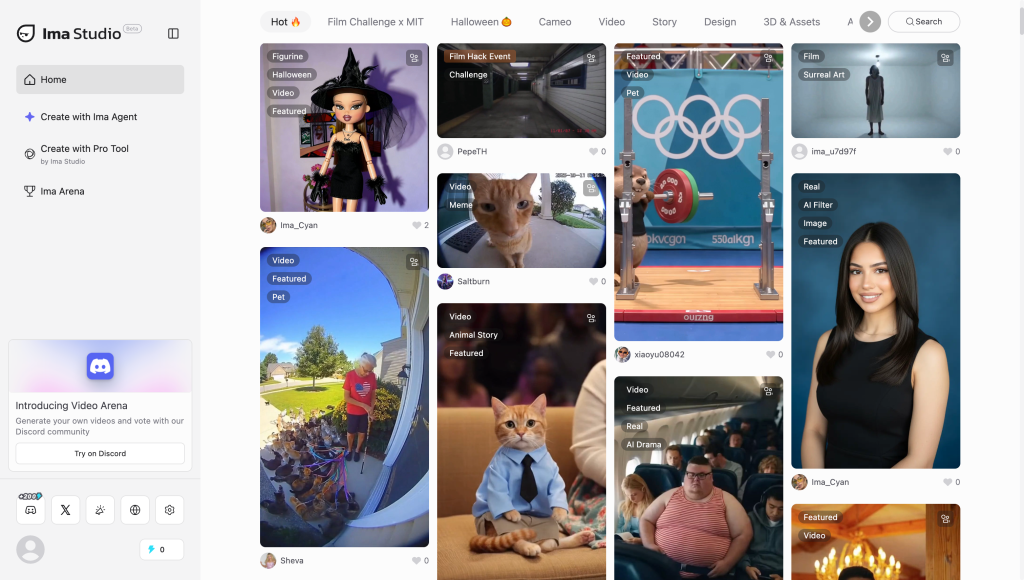
That’s why I started exploring the IMA Studio Community.
It’s packed with creator-made video templates, AI video presets, and TikTok-style templates that have already gone viral.
My personal favorites from the “Hot” section:
- 🎬 Cinematic Travel Story – perfect for city or adventure clips.
- 💫 Dreamy Portrait – soft-lit, portrait-style storytelling.
- 💃 Dance Loop – designed for TikTok trends with perfect looping motion.
What makes these templates special is that they aren’t just pretty visuals —
they’ve been engineered for AI.
Each one includes tuned prompts, camera logic, and pacing that help the model stay consistent across frames.
You can just swap in your subject, change a few details, and boom — you’ve got a clean, dynamic video that actually feels intentional.
No prompt wizardry required.
Sora 2 + IMA Template = Shockingly Good Results
One night I wanted to make a “sci-fi dreamscape” clip.
Instead of writing a full prompt, I went to IMA Community and grabbed the Sci-Fi City Night preset.
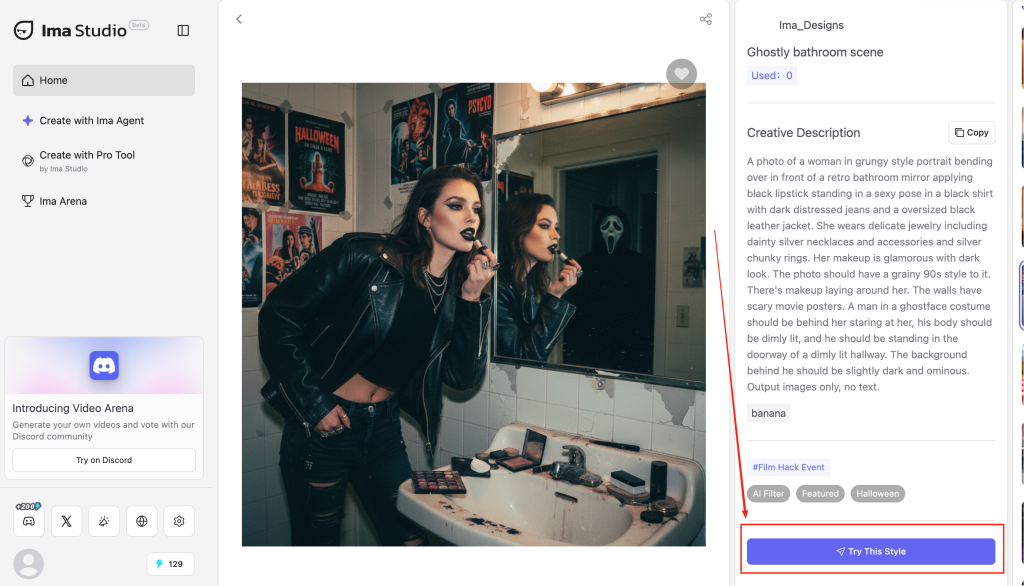
Here’s what I did:
1️⃣ Uploaded my own character image.
2️⃣ Changed the prompt tag “girl” to “astronaut.”
3️⃣ Enabled slow motion and HDR for better lighting.
4️⃣ Let Sora 2 handle the motion sequence.
The result was unreal — smooth motion, sharp detail, perfect neon reflections.
I exported it in 4K, uploaded to TikTok, and people actually asked if it was filmed in Unreal Engine.
That’s when it clicked: AI isn’t the limitation — we are.
You just need the right workflow to let it shine.
It’s Not About Smarter AI, It’s About Smarter Humans
Every time I hear someone say “AI videos all look the same,” I nod — because they do, when everyone feeds the same lazy prompts.
But when you start using strong presets, curated video templates, or community-tested TikTok templates, the difference is instant.
AI video generation isn’t about replacing creativity; it’s about accelerating it.
The real artistry is in how you guide the machine.
If you want to skip the technical headache and jump straight to professional-looking results, check out the IMA Studio Community.
That’s where creators share their best-performing templates — the kind of stuff that already understands how AI “thinks.”
You don’t need a PhD in prompts.
Just the right preset — and a vision worth animating.
About The Author