When I first looked into OpenClaw earlier this year, the answer to “how much does it cost?” seemed obvious: it’s open-source, so it’s free.
Then I actually set it up.
By the end of month one, I had three separate API bills I wasn’t expecting, a server invoice I’d half-forgotten about, and a growing suspicion that “free” was doing a lot of heavy lifting in that sentence.
So let me ask you something before we go further:
when you picture “free software,” do you also picture paying for the electricity, the building it runs in, and everyone who talks to it?
Because that’s closer to what “free” means with OpenClaw. The software itself has no license fee — but running it well is a different story entirely.
This is the honest breakdown nobody gives you upfront — including the hidden costs that catch people off guard after month one.
By the end of this breakdown, you’ll know exactly what your setup will cost — and which option gives you the most for your money.
What “Free” Actually Means With OpenClaw
OpenClaw is released under the MIT license (a permissive open-source license that lets you use, modify, and distribute the software at no cost). That part is genuinely free, forever.
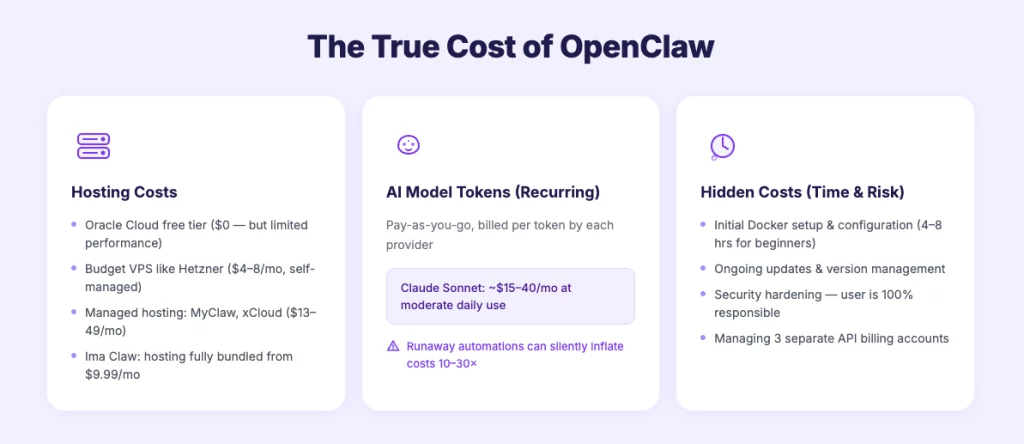
However, the moment you want it running 24/7 and actually doing things, you’re paying for three separate layers. Most pricing guides only mention the first one. Here’s the full picture:
- Layer 1 — Hosting: A server to keep OpenClaw online around the clock
- Layer 2 — AI Model Tokens: An LLM (large language model, i.e. the “brain” of your agent) for every message it processes
- Layer 3 — Creative Generation: APIs for images, video, or audio, if you want your agent to produce content
Stack all three together and you get the real number. Let’s go through each — with actual figures from real users.
Layer 1: Hosting — What It Costs to Keep OpenClaw Running
OpenClaw needs a machine that’s always on. It can’t run on a laptop you close at night. Your options range from free-but-limited to fully managed:
Oracle Cloud Always Free — $0/month
Technically a viable starting point.
Oracle’s free tier includes an ARM-based VPS (virtual private server — a cloud computer you rent) that’s powerful enough for basic OpenClaw use.
The catch? You’re handling every aspect of setup yourself: Docker configuration, security hardening, updates, and ongoing maintenance.
Many users also report that Oracle’s free tier resource limits cause performance hiccups under real OpenClaw workloads. Think of this as a learning environment, not a reliable production setup.
Budget VPS (Hetzner, Contabo) — $3–8/mont
The classic DIY route. Hetzner in particular is popular in the OpenClaw community for its price-to-performance ratio.
A standard setup runs $4–8/month and handles moderate workloads fine.
But — and this is important — you’re managing a Linux server yourself.
That means debugging Docker errors (the single most common topic on the OpenClaw GitHub), patching vulnerabilities, and staying current with every OpenClaw update.
If you’re comfortable with Linux administration, this is genuinely cost-effective. If you’re not, budget your time heavily.
Worth noting: there’s a known security vulnerability (CVE-2026-25253) that affects misconfigured OpenClaw instances. Self-hosters are responsible for patching this themselves.
Managed OpenClaw Hosting (MyClaw, xCloud, RunClaw) — $13–49/month
Companies like MyClaw ($19/mo), xCloud ($24/mo), and RunClaw ($13/mo) handle the server infrastructure, pre-configure Telegram, and manage updates automatically. Much lower maintenance overhead — and for non-technical users, this is often where the math starts to make sense.
The part that surprises people: AI model costs are still entirely separate. You’re paying for the shell. The brain is still on you.
Ima Claw — $9.99–$199.99/month (All-In-One)
Ima Claw takes a structurally different approach by bundling hosting, LLM tokens, and creative generation credits into a single plan. More on this in the full breakdown below.
Layer 2: AI Model Tokens — The Bill Nobody Warns You About
This is where most people get surprised. And sometimes, genuinely alarmed.
Every time your OpenClaw agent reads a message, reasons through a task, or writes a reply, it calls an external LLM and pays per token (roughly one token = ¾ of a word). You pay separately for input tokens (your prompt) and output tokens (the model’s response) — and output tokens typically cost 2–5× more than input.
How much does one interaction cost?
A single typical OpenClaw exchange — roughly 1,000 input tokens and 500 output tokens — costs about $0.0045 with Claude Sonnet or $0.00045 with a budget model.
At 1,000 interactions per month, that translates to $0.45 with a budget model versus $7.50 with a premium one. That gap compounds fast if your agent is doing anything meaningful.
Here’s what real-world moderate daily use actually costs across the main model options:
| Model | Estimated Monthly Cost (moderate daily use) |
|---|---|
| Claude Sonnet (Anthropic) | ~$15–40/mo |
| GPT-4o (OpenAI) | ~$20–50/mo |
| Gemini Flash (Google) | ~$3–10/mo |
| Local models via Ollama | $0 in tokens — but requires powerful hardware |
In my own testing, running Claude Sonnet at a comfortable daily pace came out to around $20–25/month on top of hosting.
But some users experience far worse. One developer shared an experience of accumulating a bill of $623 in a single month — driven by an unoptimized setup using premium models for every task, including simple ones that didn’t need it.
That’s not the norm, but it illustrates the range.
Model choice is, by far, the largest variable in your total OpenClaw cost.
A Note on “Runaway” Costs
A critical point beginners often miss: a workflow that triggers 10 times per day during testing may trigger 500 times per day once connected to live inputs. Heartbeat processes (background checks your agent runs on a schedule) and poorly configured automations can silently burn tokens around the clock. The community-standard advice: monitor your API dashboard daily for the first two weeks, then weekly once you’ve found your baseline.
Layer 3: Creative Generation — The Third Bill
This layer only applies if you want your agent to produce things — images for social content, short video clips, background music for videos. Each output type comes from a separate API with its own pricing:
| Output Type | Approx. Cost Per Unit |
|---|---|
| Image (Midjourney API) | ~$0.05–0.20 depending on quality |
| Short video clip (Runway / Kling) | ~$0.50–2.00 per clip |
| Music track (Suno) | ~$0.05 per track |
Fifty images and ten video clips per month adds roughly $5–25 on top of everything else. Not ruinous in isolation — but it’s a third account to manage, a third bill to track, and a third set of API keys to configure and maintain.
For content creators especially, this is often where the “I thought this would be simpler” moment hits.
The Real Monthly Cost: Putting All Three Layers Together
Let me run the full math for a realistic scenario: an active daily user running Claude Sonnet, generating around 50 images per month, doing moderate automation work.
| Setup | Hosting | AI Tokens | Image Gen | Real Monthly Total |
|---|---|---|---|---|
| DIY (Hetzner VPS) | $4–8 | ~$25 | ~$5 | ~$34–38 + your time |
| MyClaw Pro | $39 | ~$25 | ~$5 | ~$69 |
| xCloud | $24 | ~$25 | ~$5 | ~$54 |
| Ima Claw Plus | $29.99 | ✅ Included | ✅ Included | $29.99 |
| Ima Claw Pro | $49.99 | ✅ Included | ✅ Included | $49.99 |
The DIY route looks cheapest on paper — and it is, in dollars. But it consistently comes with a fourth cost that never shows up in any table.
Wondering what Ima Claw would actually cost for your use case? See all plans at imaclaw.ai →
The Cost Nobody Puts in a Table: Your Time
For non-technical users, the setup alone can take a full day or more. And it doesn’t stop there. Self-hosting OpenClaw is an ongoing maintenance commitment:
- Debugging Docker configuration errors (by far the most common issue on the OpenClaw GitHub)
- Staying current with OpenClaw updates without breaking your existing setup
- Hardening your server against known security vulnerabilities
- Juggling three separate billing dashboards and API accounts
One Reddit user in the OpenClaw community put it plainly: “I built a hosting service because I got tired of being everyone’s OpenClaw sysadmin.”
Here’s a useful way to think about it: if your time is worth $30/hour and setup takes 8 hours, you’ve already spent $240 before your first month begins. At that point, managed hosting at $30–50/month pays for itself in the first month alone — and every month after that.
How Does OpenClaw Compare to Other AI Tools on Cost?
It’s worth stepping back and asking: is OpenClaw even the right value comparison?
| Tool | Monthly Cost | What You Get |
|---|---|---|
| ChatGPT Plus | $20/mo | Chat interface, no persistent memory, no automation |
| Claude Pro (direct) | $20/mo | Better model, same browser-only limitation |
| Human virtual assistant | $500–2,000+/mo | Limited hours, time zones, requires management |
| OpenClaw (self-hosted, optimized) | ~$15–50/mo | 24/7 agent, persistent memory, full automation |
| Ima Claw Pro | $49.99/mo | 24/7 agent + image/video/audio generation bundled |
The comparison that matters most for creators: a human VA costs $500–2,000+/month for limited hours and specific time zones. OpenClaw runs 24/7. The tradeoff is setup complexity and the fact that it can’t make judgment calls that require emotional intelligence.
5 Ways to Reduce Your OpenClaw Costs (If You’re Going DIY)
If you decide to self-host, here are the highest-impact optimizations the OpenClaw community consistently recommends:
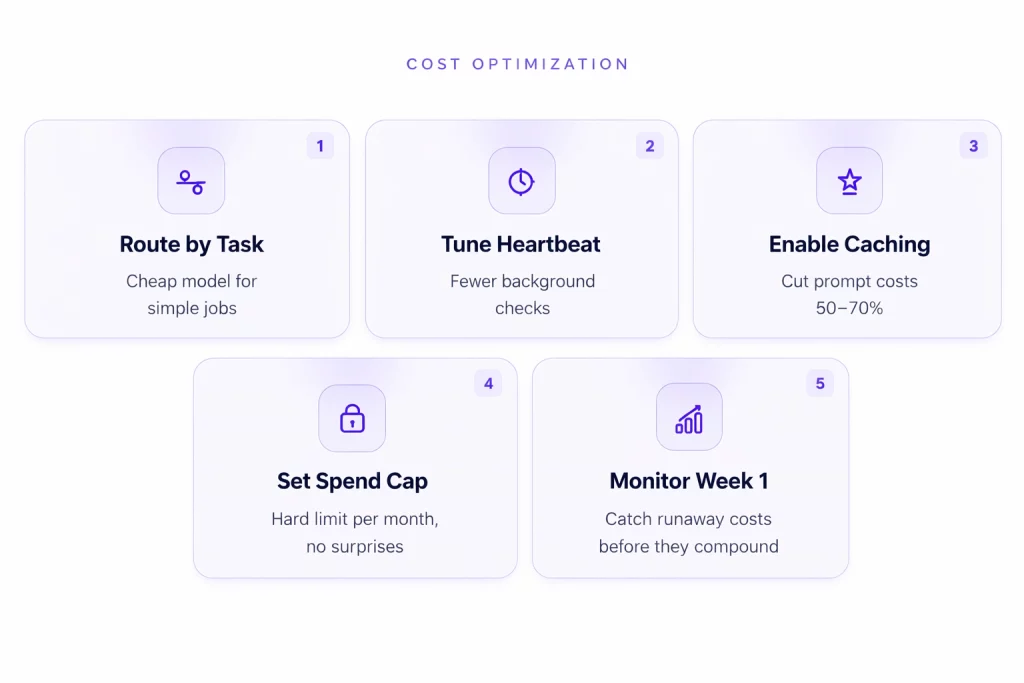
1. Use the right model for the right task. Don’t run Claude Sonnet for checking email or renaming files. Configure OpenClaw to route simple tasks to a budget model (Gemini Flash, Claude Haiku) and only escalate to premium models for complex reasoning. This single change reportedly cuts API bills by 25–40% for most users.
2. Optimize your heartbeat settings. The heartbeat (the interval at which your agent checks for tasks to run) is a common source of runaway costs. If it’s set to check every 5 minutes using a premium model, that’s 288 API calls per day doing essentially nothing. Extend the interval and use a lightweight model for heartbeat checks.
3. Enable prompt caching. Prompt caching alone can cut your bill by 50–70%. OpenClaw sends the same system prompt with every message — caching means you only pay full price for it once, then a fraction of that for every subsequent cached message.
4. Set spending caps on your API accounts. Every major provider (Anthropic, OpenAI, Google) lets you set a hard monthly spending limit. Set one before your first month. The community standard advice: start at $30–50 and adjust once you understand your usage pattern.
5. Monitor your first two weeks closely. In my experience, costs stabilize after the first month. The initial experimentation phase is the most expensive. Once you’ve dialed in your model choices and automation frequency, monthly costs become predictable.
Ima Claw: What “All-In” Actually Looks Like in Practice
The reason Ima Claw’s pricing looks structurally different is because it is. Instead of selling you a server and letting you piece together the rest, every plan bundles hosting, LLM tokens, and creative generation credits together. One subscription. One bill. No API configuration.
For a content creator who wants their agent to write scripts, generate thumbnails, produce video clips, and handle social scheduling — all without logging into five different platforms — that simplification has real dollar value.
Imagine telling your agent: “Create a thumbnail for today’s video, write the caption, and post it to my Discord.” With Ima Claw, that’s one message. No switching tabs, no checking API balances, no end-of-month surprises.
“I switched to Ima Claw after my third surprise API bill. First month I paid $49.99 and that was it — no spreadsheet, no three dashboards.” — shared in the Ima Claw Discord community
Basic — $9.99/month 888 credits/month (~220 images or videos), access to 40+ AI models, commercial use rights, standard processing queue. The lowest-friction way to test what an AI agent with real creative capabilities actually feels like, before committing to a larger plan.
Plus — $29.99/month 999 credits (~249 images/videos), cloud server (2-core 4GB), Telegram + WhatsApp + Discord + Feishu support, automated task workflows, 30-day data retention after expiry. The sweet spot for a personal AI assistant that also handles content creation on the side.
Pro — $49.99/month (most popular) 1,999 credits (~499 images/videos), cloud server (4-core 8GB), all channels, personal webpage auto-deployed, priority generation queue, Pro Discord community access, 90-day data retention. Built for creators using their agent seriously every day.
Ultra — $199.99/month 13,999 credits (~3,499 images/videos), cloud server (8-core 16GB), latest Claude models, highest priority queue, permanent data retention. For agencies and power users running intensive, multi-channel automation at scale.
You can explore current plans at imaclaw.ai.
So What’s the Right Setup For You?
Still deciding? Here’s a quick decision framework based on your situation:
Go DIY (Hetzner + API keys) if: You’re comfortable with Linux, you want maximum control over every cost variable, and your agent only needs to handle text. Budget $15–40/month in actual costs, plus meaningful setup and ongoing maintenance time.
Go with managed hosting (MyClaw, xCloud) if: You want a hands-off server but you’re already managing your own API keys and have no need for multimedia generation. Expect $50–80/month in realistic all-in costs.
Go with Ima Claw if: You want your agent to actually produce content — images, video, audio — without building or paying for a multi-vendor stack. Especially worth it if you’re automating YouTube workflows, social media content, or any process that benefits from multimedia output. For active daily use with creative generation, it consistently works out cheaper than the DIY math once APIs are factored in.
FAQ: OpenClaw Pricing Questions People Actually Ask
Q: Is OpenClaw completely free to use?
The software is free under the MIT license. However, running it 24/7 requires a server, and using it requires an AI model — both of which cost money. The realistic floor for a reliably running, capable agent is $10–35/month depending on your technical setup.
Q: What’s the absolute cheapest way to run OpenClaw?
Oracle Cloud’s free tier ($0) combined with Gemini Flash (which has a free usage tier for light use) can technically get you to near-zero in direct costs. That said, you’re accepting performance limitations, significant setup complexity, and ongoing maintenance responsibility. Most users who start this way end up paying something within the first two months.
Q: Why is MyClaw’s real cost so much higher than its advertised price?
MyClaw’s plans cover the server only. AI model tokens and any image or video generation are billed separately through third-party API accounts that you set up and manage yourself. For an active daily user running Claude Sonnet with occasional image generation, the realistic total lands between $69–94/month.
Q: Can I run OpenClaw without paying for an AI API?
Yes — using local models via Ollama (software that runs AI models on your own hardware). The catch is that running capable models locally requires powerful hardware: at minimum a modern Mac Mini, ideally something with a dedicated GPU. The hardware cost, amortized over time, often exceeds API costs for moderate users.
Q: Does Ima Claw’s price include the AI model?
Yes. LLM tokens for agent reasoning are bundled into every Ima Claw plan and don’t draw from your creative credits. Both the reasoning (thinking, responding) and the creation (images, video, audio) are included in a single monthly subscription.
Q: What happens if I go over my credits on Ima Claw?
Credits cover your creative generation (images, videos, audio). If you hit the monthly limit, you can upgrade your plan or wait for the next billing cycle. LLM tokens for conversation and task reasoning are separate and do not consume your creative credits.
Q: Can I set a spending cap to avoid surprise bills?
If you’re using API-based hosting (MyClaw, xCloud, DIY), yes — all major providers (Anthropic, OpenAI, Google) offer hard monthly spending caps. If you’re on Ima Claw, the price is fixed by design, so there are no variable API bills to cap.
About The Author