











Use AI Watermark Remover — Clean, Restore & Protect Your Media with Precision AI
Ever wished you could instantly remove watermarks, logos, or text overlays from your visuals?
With Ima Studio’s AI Watermark Remover, powered by creation agents and Arena benchmarks, you can upload images, videos, or PDFs and get a rights‑safe, texture‑preserving result in seconds — no signup required.
What Is AI Watermark Remover?
Ima Studio’s AI Watermark Remover is a smart cleanup engine that detects and removes visible marks, text, and logos from your visual media.
It doesn’t just blur or hide —
it understands the underlying texture and reconstructs clean backgrounds using benchmarked AI models.
- Auto‑detects watermark regions in images, videos, or PDFs
- Preserves fine texture, lighting, and color gradients
- Batch‑processes entire sets for consistent results
- Works fully online — rights‑safe, high‑quality, watermark‑free
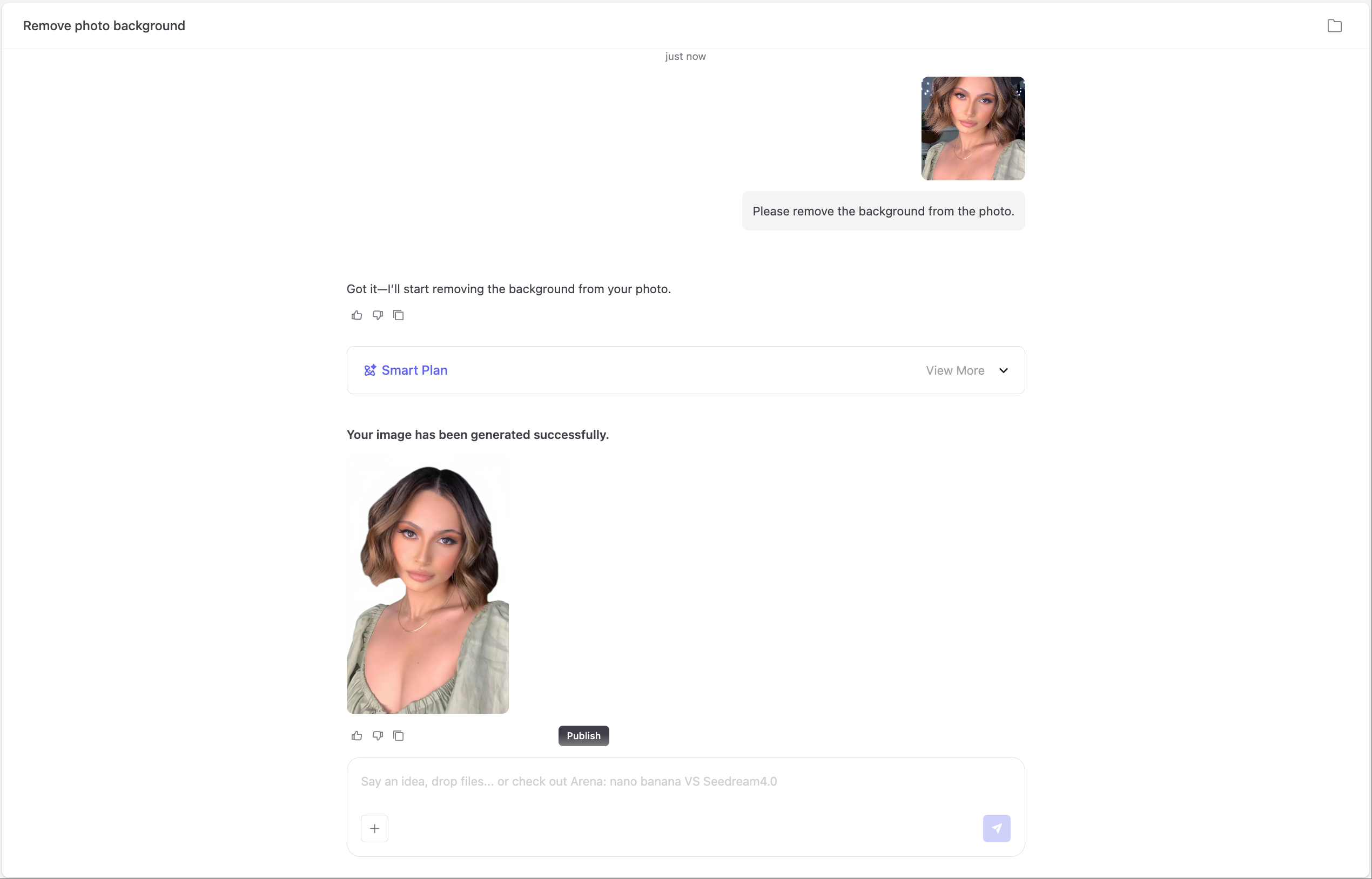
See How It Works
1. Upload or Paste a File
Drag and drop your image, video, or PDF, or paste a direct URL.
The agent auto‑detects watermarks and identifies file type for optimized processing.
2. Describe the Cleanup
Type a short instruction like “remove diagonal stock text but keep texture.”
The agent interprets your intent and routes to the best‑performing model chain using Arena data.
3. Preview & Download
Compare before/after with a slider preview.
Make fine brush touch‑ups if needed and export in original or optimized format.
4. Batch Processing & Presets
Apply watermark removal across multiple photos or video frames.
Save presets for repeating patterns or recurring projects.
5. Texture‑Preserving Quality
Our multi‑model ensemble reconstructs genuine background textures and lighting.
Benchmarked metrics ensure lifelike, distortion‑free results.
6. Privacy & Ethical Use
Your files remain private and are never used for model training.
Before processing, confirm you have rights to edit the content.
7. Explore Templates
Choose from ready‑made community presets:
diagonal text remover, corner logo cleaner, timestamp eraser, and more — one click loads all steps.
How to Use Ima Studio’s AI Watermark Remover

1. Upload Your File
Select an image, video, or PDF — drag it in or paste a URL.
Supported formats: JPG, PNG, WEBP, MP4, PDF.

2. Describe What to Remove
“Erase logo from bottom right”
“Remove diagonal stock text”
“Clean watermark but keep texture”
The AI analyzes watermark regions and preserves surrounding details.

3. Arena‑Guided Model Selection
Ima Arena benchmarks multiple AI models in real time and automatically selects the highest‑performing chain for your file type and watermark pattern.

4. Get Instant Results
Preview, fine‑tune, and export in seconds.
Optional brush tools and presets give you professional‑grade results without manual masking.
Why Choose Ima Studio’s AI Watermark Remover
⚔️ Arena‑Backed Accuracy
No need to guess which model performs best.
Ima Arena continuously tests and ranks removal models for texture fidelity, speed, and quality — automatically applying the top scorer to your content.

🧩 Creation Agents with Intent Understanding
Ima Agents interpret your cleanup instructions and route tasks intelligently — from logo removal to video mark repair — ensuring precision every time.
🌐 Community Templates
Join the Ima Community to explore and share templates for watermark, logo, and text overlay removal. Each preset includes creator credits, votes, and benchmark tags.
🛡️ Privacy & Security
Your media stays private and is automatically deleted after processing.
No reuse, no training, no third‑party access — ever.
⚡ High‑Fidelity, Rights‑Safe Results
Every output is clean, natural, and watermark‑free — ready for publishing, archiving, or reuse within your license permissions.
Popular Use Cases
Licensed Stock & Product Media
Ideal for agencies, e‑commerce, and design teams preparing licensed visuals.
- Remove stock watermarks and keep original texture
- Batch clean product sets for consistent catalogs
- Preserve lighting and color balance across shots
- Export print‑ready or web‑optimized results
Video & Social Content
Perfect for creators, marketers, and editors repurposing clips.
- Erase lower‑thirds, timestamps, or campaign labels
- Preserve motion continuity and frame texture
- Batch process multi‑clip timelines
- Export for YouTube, TikTok, or reels instantly
Documents & PDFs
Great for removing visible stamps or watermarks from documents you own.
- Process multi‑page PDFs consistently
- Preserve text sharpness and layout accuracy
- Export print‑ready, clear copies
- Available offline in Pro mode
Creative & Archival Workflows
For artists, photographers, and archivists restoring legacy or preview images.
- Clean old scans or sample previews
- Recover natural textures and tones
- Apply preset chains for repeated restoration tasks
- Maintain provenance and metadata integrity
FAQs About AI Watermark Remover
You can only remove watermarks from files you own, licensed, or have explicit permission to edit. Ima Studio enforces reminders to protect ethical use.
Supported formats include JPG, PNG, WEBP, MP4, and PDF. File size limits depend on plan tier — free users can try smaller files; Pro unlocks batch and high‑resolution support.
Yes. Batch processing lets you upload folders or multiple links, apply one preset, and export all cleaned results together.
No. The AI reconstructs fine details and textures using multi‑model routing, ensuring minimal distortion and natural blending across media types.
No. Files are temporarily cached for processing and automatically deleted afterward. Ima never trains on or shares user uploads.
Accuracy is benchmarked in real time through Ima Arena. Models are scored by PSNR, SSIM, and user votes to ensure realistic, artifact‑free cleanup.
Yes. The web app works seamlessly on desktop and mobile browsers with optimized upload, preview, and download experiences.
Please only process media you have rights to edit. The system may decline copyrighted or sensitive uploads to maintain compliance and integrity.
For best outcomes:
- Upload high‑quality, well‑lit files.
- Use specific instructions like “remove logo from top right.”
- Preview and refine with optional brush tools.
- Apply community templates for repeated patterns.