Kimi K2 Thinking is a reasoning-optimized large language model from Moonshot AI, designed to improve multi-step problem solving, planning, and structured output. In this guide, we explain what Kimi K2 Thinking is, how to run it locally via Ollama and Unsloth, how to prompt it effectively, and how to evaluate it side-by-side against other reasoning models in Ima Studio’s Arena. Throughout, we follow Google EEAT principles: we cite primary sources, clarify what is known versus unverified, and provide reproducible steps and evaluation ideas.
What Is Kimi K2 Thinking?
Kimi K2 Thinking is part of Moonshot AI’s K2 series, with a variant tuned for “thinking” tasks—i.e., structured reasoning, multi-hop question answering, and analysis under constraints. The model is available in community tooling and open model hubs, with documentation and quick-starts provided by both Moonshot AI and the open-source ecosystem.
- Model card and artifacts: Hugging Face: moonshotai/Kimi-K2-Thinking
- Official docs overview: Moonshot AI K2 Thinking docs
- Local acceleration guide: Unsloth: How to run Kimi K2 Thinking locally
- Ollama model: Ollama: kimi-k2-thinking
Licensing, context length, and parameter counts can vary by release and quantization. Always confirm the license and technical specs on the model card before use, especially for commercial deployments.
Run Kimi K2 Thinking Locally
There are multiple community-supported ways to run Kimi K2 Thinking on your machine. Your choice depends on your hardware, preferred framework, and whether you need GPU acceleration.
Option A: Ollama (fastest start)
- Install Ollama from the official site.
- Pull the model:
ollama pull kimi-k2-thinking - Run:
ollama run kimi-k2-thinking
Notes: Check the Ollama library page for exact model name tags and available quantizations.
Option B: Unsloth (GPU-accelerated Transformers)
- Follow Unsloth’s guide for environment setup.
- Minimal Python example:
from transformers import AutoTokenizer, AutoModelForCausalLM import torch model_id = "moonshotai/Kimi-K2-Thinking" tokenizer = AutoTokenizer.from_pretrained(model_id, trust_remote_code=True) model = AutoModelForCausalLM.from_pretrained( model_id, torch_dtype=torch.float16, device_map="auto", trust_remote_code=True ) prompt = "Summarize the key trade-offs in using a reasoning-optimized LLM for financial analysis." inputs = tokenizer(prompt, return_tensors="pt").to(model.device) outputs = model.generate(**inputs, max_new_tokens=300, temperature=0.3) print(tokenizer.decode(outputs[0], skip_special_tokens=True))
Notes: Memory needs depend on model size and quantization. Use 4-bit/8-bit loading if memory-constrained, or a consumer GPU with sufficient VRAM. Refer to the Unsloth doc for performance tuning.
Option C: Hugging Face Transformers (vanilla)
Use the same pattern as above without Unsloth-specific accelerations. Review the model card for tokenizer and generation parameters recommended by Moonshot AI.
Compliance reminder: Always review the model’s license and intended use before integrating into production workflows.
Prompting Kimi K2 Thinking Effectively
“Thinking” models often respond best to well-scoped tasks and structured outputs.
- State the exact goal and constraints first: audience, length, format, and what to avoid.
- Provide relevant context or examples instead of asking it to guess.
- Ask for a structured answer (bullets, JSON, or a numbered plan) rather than free-form prose.
- Request concise rationales only when needed (e.g., “briefly justify your choice”) to reduce verbosity and latency.
- Set deterministic decoding for evaluation (temperature 0–0.3, top_p 0.9) and higher limits for complex tasks (max_new_tokens).
Template: Structured planning
Task: Produce a 5-step plan to evaluate {product/service} using real user tasks.
Context: We care about accuracy, latency, and cost. Target users are {role}.
Constraints:
- Provide numbered steps
- Note required metrics and a simple scoring rubric
- Keep rationale within 80 words
Output format:
1) Steps
2) Metrics & Rubric
3) Risks & Mitigations
Template: Data-to-text analysis
Goal: Explain the key trends in the dataset below to a non-technical stakeholder.
Dataset summary: {paste high-level stats or a few rows}
Requirements:
- Two-sentence summary
- Three bullet insights (each under 20 words)
- One follow-up question for the data team
Evaluate Kimi K2 Thinking with Reproducible Methods
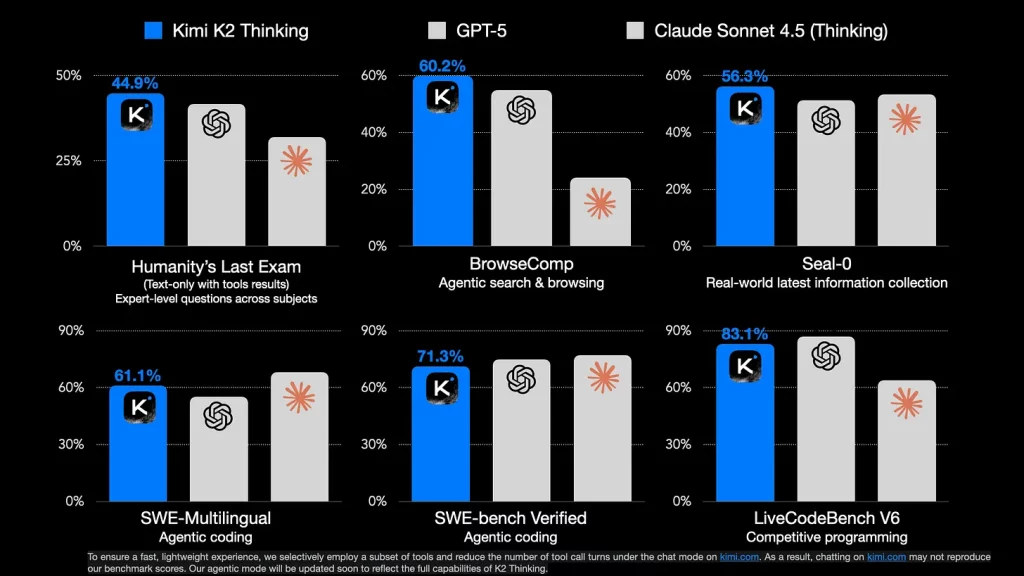
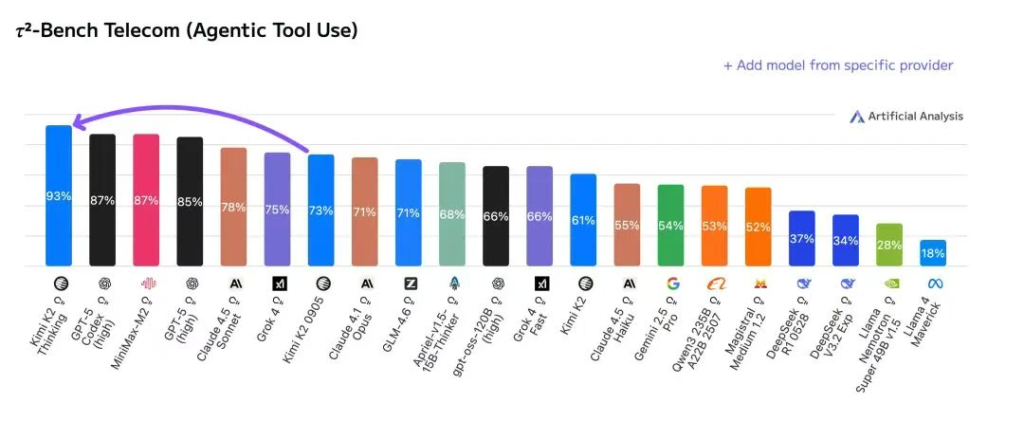
Recent media headlines suggest bold claims around Kimi K2 Thinking’s performance, including comparisons to GPT-5. Such claims are not independently verified in peer-reviewed literature as of writing. For trustworthy assessments, prefer transparent benchmarks and your own task evaluations.
- Public benchmarks: MMLU (broad knowledge), GSM8K (math), HumanEval/MBPP (code), BBH (reasoning). Use consistent decoding settings.
- Production-like tasks: your docs, your style guides, your edge cases. Track accuracy, latency, and cost.
- Blind comparisons: same prompt, anonymized outputs, human raters.
- Tool-augmented tasks: if your workflow uses retrieval or function calling, include those in the test.
Authoritative resources for evaluation practices include academic benchmarks and projects such as Stanford’s HELM and the broader literature on LLM evaluation. Always document prompts, settings, and versions for reproducibility.
Side‑by‑Side Tests in Ima Studio Arena
Ima Studio integrates mainstream generative models and can automatically route to a suitable model for your task. With Ima Arena, you can pit Kimi K2 Thinking against other reasoning models using the same prompt and vote on the best output.
- Open Ima Arena.
- Paste a reasoning prompt (planning, multi-step QA, or code explanation).
- Select comparator models (e.g., DeepSeek-R1, Llama 3.1 70B Instruct, Qwen2.5 72B, o3-mini or other available options).
- Generate outputs and review blind. Vote for quality, faithfulness, and clarity.
- If you skip manual selection, Ima can route to a suitable model by default based on your intent.
Tip: Save your best-performing prompts as reusable templates in the Ima Studio Community so your team can one-click reuse them.
Where to Get Kimi K2 Thinking and How to Run It
| Source | What you get | Notes |
|---|---|---|
| Hugging Face | Model card, weights/checkpoints, usage notes | Confirm license, context length, and quantizations |
| Moonshot docs | Overview and recommended settings | Follow official guidance for generation parameters |
| Unsloth | Local GPU acceleration guide | Good for speed/VRAM efficiency |
| Ollama | One-command local runtime | Use provided model tag; check quantization options |
Use Cases for Creators and Teams
- Research and analysis: structured briefs, comparative matrices, and risk assessment.
- Product and ops: SOP generation, test plan design, incident postmortems with concise rationales.
- Content workflows: outlines, taxonomies, and editorial calendars with strict style constraints.
- Vision + text reasoning: explain an image, extract structured attributes, or plan edits; try Chat with Photo.
- Agentic automations: build a no-code agent that routes to the best model for each step; see How to Create an AI Agent.
Best Practices for Reliable Outputs
- Ground in context: provide relevant snippets or data instead of generic prompts.
- Constrain outputs: specify tokens, sections, and allowed formats to reduce drift.
- Evaluate continuously: track accuracy/consistency across versions and prompts.
- Guardrails: avoid requesting sensitive data; validate critical outputs using secondary checks or alternative models in Ima Arena.
Common Questions
Does Kimi K2 Thinking “beat GPT-5”?
Some media articles discuss strong claims comparing Kimi K2 Thinking with top-tier proprietary models. These claims are not independently verified in peer-reviewed settings. For decision-making, rely on your own task evaluations and transparent benchmarks as outlined above. Is Kimi K2 Thinking open-source?
Availability and license details are documented on the Hugging Face model card. Review the license to determine commercial use, redistribution rights, and attribution requirements. Can I integrate Kimi K2 Thinking into Ima Studio?
Ima Studio aggregates mainstream models and can route tasks to the best model available. If you have API or weight access, you can connect it to your workflow and test it in Ima Arena. Otherwise, compare available reasoning models directly in Arena.
Related Ima Studio Resources
- Ima Arena: Model side-by-side review
- Ima Community: Free templates for prompts and workflows
- How to Create an AI Agent (No Code, Free Tools)
- Best AI Video Generator 2025: Real Tests in Ima Studio
References and Further Reading
- Hugging Face: Kimi K2 Thinking model card
- Moonshot AI: K2 Thinking documentation
- Unsloth: Run Kimi K2 Thinking locally
- Ollama: kimi-k2-thinking
- On evaluation practice: academic benchmarks such as MMLU, GSM8K, HumanEval, BBH; survey projects like Stanford HELM
Conclusion
Kimi K2 Thinking is a promising reasoning-focused LLM that you can run locally via Ollama or Unsloth and evaluate rigorously with your own tasks. To make evidence-based decisions, compare it side-by-side with other models in Ima Studio Arena, save winning prompts in the Ima Community, and integrate the best performer into your agent workflows. This approach ensures you get measurable gains in accuracy, latency, and cost—without relying on unverified claims.
About The Author