Credits run out. That is the quiet frustration of almost every AI image tool: you find your rhythm, you are three prompts into a good idea, and the meter hits zero. For a limited window, IMA Studio is removing that ceiling. Subscribe to Pro and you get 3 days of unlimited image generation on GPT Image 2. Subscribe to Ultra and you get 7 days. No credits deducted, no per-image counting, for the length of the window.
This guide covers exactly what the offer includes, what it does not, how the four IMA Studio plans compare, and how to pick the one that fits how you actually work.
What the limited-time unlimited access includes
The unlimited window applies to one model right now — GPT Image 2 (shown in the model list as “Image 2”). During your window, every GPT Image 2 generation runs without spending credits.
| Plan | Unlimited window | Model |
|---|---|---|
| Basic / Plus | Not included | Unlimited access is a Pro+ benefit |
| Pro | 3 days | GPT Image 2 — no credits |
| Ultra | 7 days | GPT Image 2 — no credits |
Two more models — Seedance 2.5 and Nano Banana Pro — are marked “coming soon” for the unlimited program. They are not part of the unlimited window yet, so treat GPT Image 2 as the model you can run without limits today.
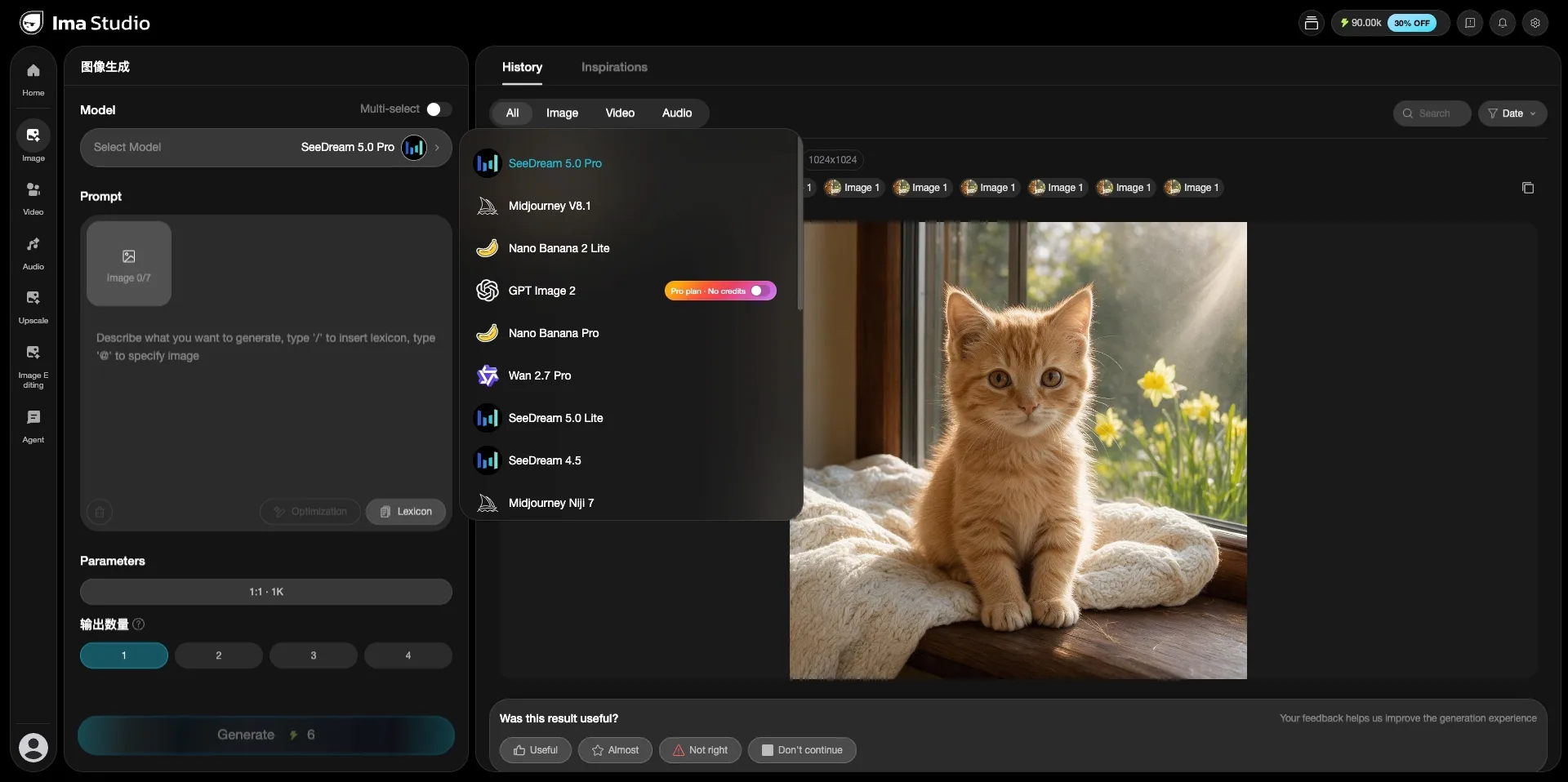
Inside the product, the benefit shows up plainly: open the model picker on the image page and GPT Image 2 carries a “Pro plan · No credits” toggle. That is the unlimited window in action — the generations you fire on that model during the window do not draw down your monthly credits.
Why one subscription is worth it: 40+ models in one place
The reason the unlimited window matters is what sits behind it. IMA Studio is not a single-model tool. One subscription gives you more than 40 creative models across image, video, and audio, plus an Agent that can run creative tasks for you. The image model list alone includes GPT Image 2, Midjourney V8.1 and Niji 7, SeeDream 5.0 Pro / Lite and 4.5, Nano Banana Pro and Nano Banana 2 Lite, and Wan 2.7 Pro.
So the unlimited window is not “unlimited runs on a mediocre model.” It is unlimited runs on one of the strongest image models in a library you would otherwise pay for piece by piece.
The four plans at a glance
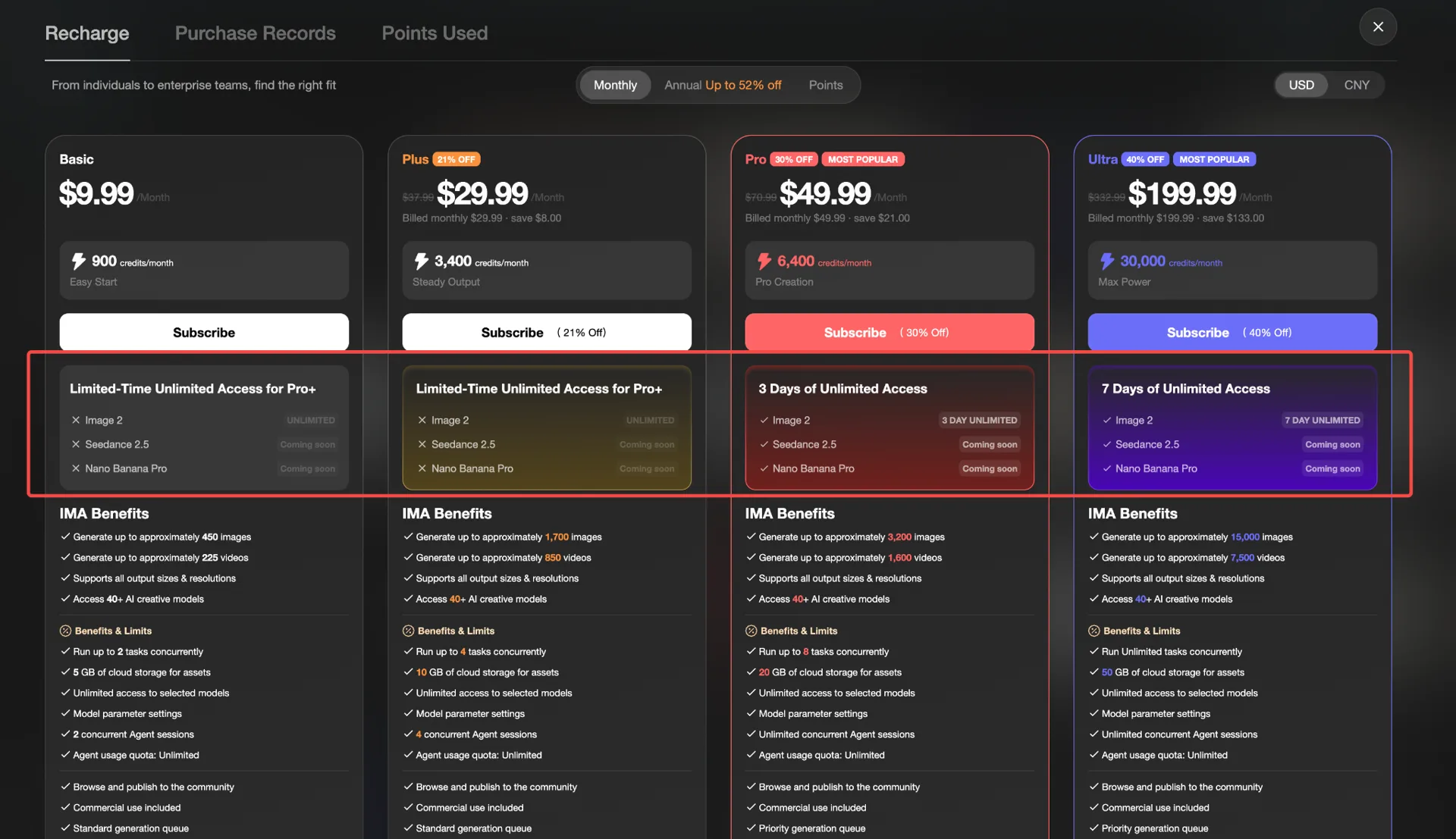
| Basic | Plus | Pro | Ultra | |
|---|---|---|---|---|
| Price / month | $9.99 | $29.99 (21% off) | $49.99 (30% off) | $199.99 (40% off) |
| Credits / month | 900 | 3,400 | 6,400 | 30,000 |
| Images (approx.) | ~450 | ~1,700 | ~3,200 | ~15,000 |
| Videos (approx.) | ~225 | ~850 | ~1,600 | ~7,500 |
| Concurrent tasks | 2 | 4 | 8 | Unlimited |
| Cloud storage | 5 GB | 10 GB | 20 GB | 50 GB |
| Unlimited window | — | — | 3 days | 7 days |
Every plan supports all output sizes and resolutions, access to the full 40+ model library, commercial use, and publishing to the community. Pro and Ultra add a priority generation queue.
How to choose
- Basic ($9.99) — you are trying AI creation out and want a low monthly commitment. Roughly 450 images a month.
- Plus ($29.99) — you create regularly and want steady output without watching the meter every day.
- Pro ($49.99) — you create professionally, want a priority queue and 8 concurrent tasks, and want the 3-day unlimited window to batch a big project on GPT Image 2.
- Ultra ($199.99) — high volume or a small team: unlimited concurrent tasks, 50 GB storage, ~15,000 images a month, and the longest 7-day unlimited window.
What credits actually get you
Credits are the shared currency across image, video, and audio. A rough translation: Basic’s 900 credits map to about 450 images or 225 videos a month; Ultra’s 30,000 credits map to about 15,000 images or 7,500 videos. Different models cost different amounts per run, so these are approximate — but they give you a sense of scale before you commit.
The fine print
- The unlimited window covers GPT Image 2 only today. Seedance 2.5 and Nano Banana Pro are coming soon and are not unlimited yet.
- The unlimited access is a limited-time offer. Check the current IMA Studio pricing page to confirm it is running and to see any end date before you rely on it.
- Image and video counts are approximate and depend on which models you run.
- Prices and discounts shown here reflect the current pricing page and can change.
FAQ
How do I use GPT Image 2 on IMA Studio? Open the Image page, choose GPT Image 2 in the model picker, type your prompt, set your size and count, and generate. During your unlimited window the “No credits” toggle means those runs are free of credit cost. For prompt ideas and what the model handles well, see our GPT Image 2 prompt guide and GPT Image 2 use cases.
Is it really unlimited? Within the window (3 days on Pro, 7 days on Ultra), GPT Image 2 generations do not deduct credits. It is time-boxed, not permanent.
What happens after the window ends? You keep your plan’s monthly credits and the full 40+ model library. GPT Image 2 simply returns to costing credits like the other models.
Which plan gets the longest window? Ultra, at 7 days. Pro gets 3 days. Basic and Plus do not include the unlimited window.
Exploring other models too? Browse our AI Model Guides hub for a guide to every model in IMA Studio.
Ready to start? Pick Pro or Ultra and make the most of your unlimited window on GPT Image 2 — plus the full 40+ model library on every plan.
About The Author