For one SKU, the usual production loop is simple but slow: find a designer, wait for the first draft, revise the copy, then wait for another round. The brief behind this case says one SKU can take two or three days, and the first thing that breaks is often the schedule. The designer is booked until next week; the campaign window is this week.
ecom-image-ads handles the first static ad creative pass. Upload a product image, choose an output ratio, platform, goal, and creative family, then provide a headline, subline, and CTA. The result is a static ecommerce ad concept with short overlay copy and ratio guidance.
This is not a promise that an image is ready to publish without review. The wireless-earbuds case below shows which waiting step it can replace, what the output proves, and what still needs a human check. If you are comparing product-image ads with a fuller ad-production workflow, see How to Turn a Product Image into an AI Avatar Ad.
Create Static Ecommerce Ads for Free
What does it replace?
It replaces the wait for a designer’s first direction, not media buying strategy or final legal review. If you are trying to get a campaign moving, that distinction matters. You can review a concrete creative direction first and then decide whether a designer should refine it, instead of starting with an empty brief and a queue.
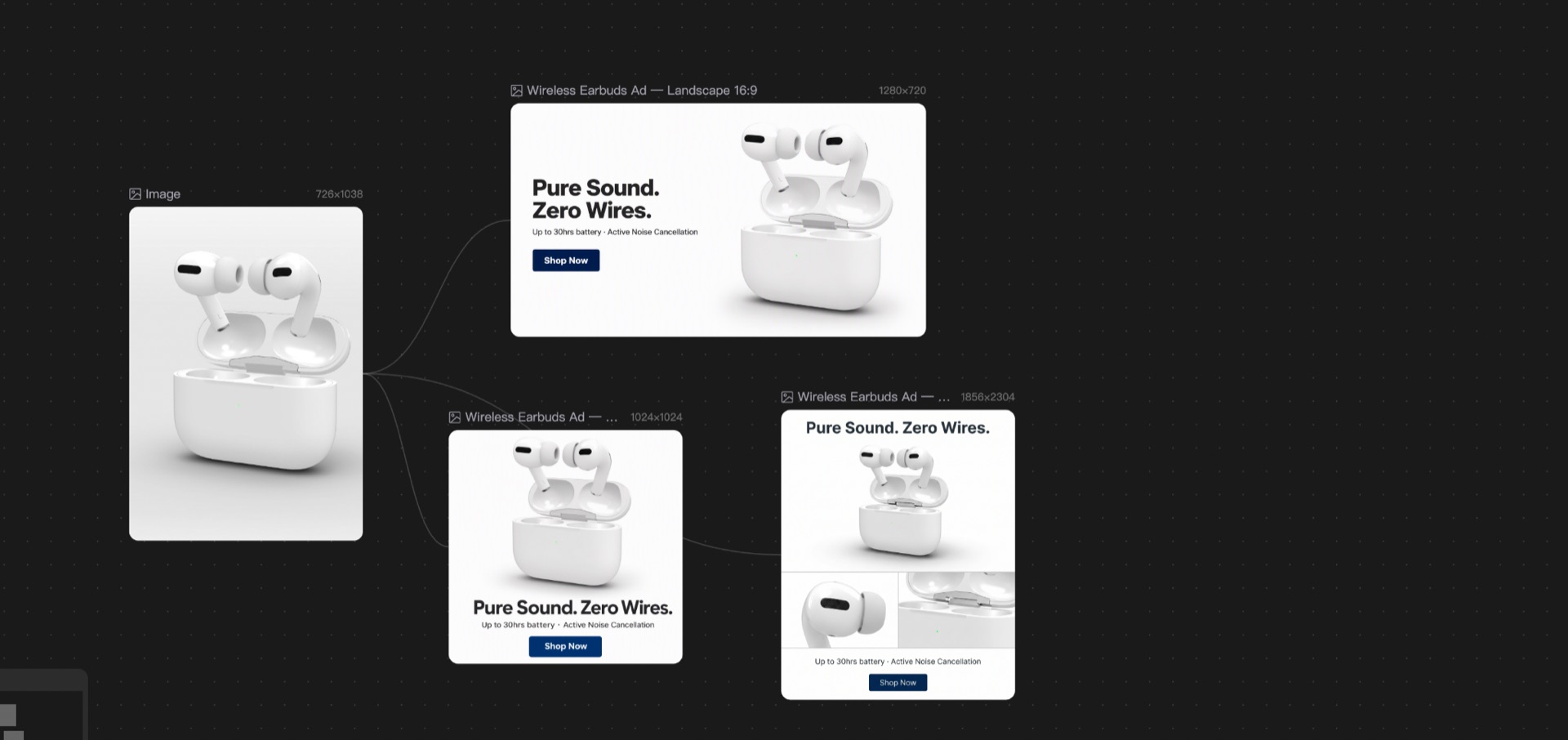
The case started with one image of white wireless earbuds and a matching charging case. The outputs kept the same product, English copy, and bright studio direction across square, portrait, and wide canvases.
If you need an eight-image product-detail-page set, a UGC video, ad-account setup, or bid and budget optimization, this is the wrong tool. It is for static ecommerce ad creative.
How to start with one product image
The minimum input is product_image. You can also add a reference ad image so the Skill can borrow its layout logic, hierarchy, and spacing. A reference image does not automatically authorize competitor branding, unverified sales numbers, reviews, or copied platform UI.
For the earbuds case, we fixed these inputs:
- Product: white wireless earbuds with a white charging case.
- Direction: clean, bright studio lighting with the product as the main subject.
- Headline:
Pure Sound. Zero Wires. - Subline:
Up to 30hrs battery · Active Noise Cancellation. - CTA:
Shop Now. - Brand mode: omit logos, brand names, and packaging text.
The important part is not writing a clever prompt. It is fixing the product facts and copy contract before checking the result. Product color, silhouette, material, headline, subline, and CTA become the checklist for the generated image.
This is the user-level brief from the case. Replace the product and copy, then copy it into the Skill:
Use one product image as the only product source.
Create three independent static ecommerce ads: 1:1, exact 4:5, and 16:9.
Keep the product treatment and copy consistent across all three.
Omit logos and unsupported claims.
Inspect the final dimensions before use.
Three ad ratios for one SKU
The Canvas project produced three independent outputs:
| Version | Actual dimensions | Layout job |
|---|---|---|
| Square 1:1 | 1024 × 1024 | Center the product and place the copy below it |
| Portrait 4:5 | 1856 × 2304 | Put the complete product above, two detail modules in the middle, and the CTA below |
| Landscape 16:9 | 1280 × 720 | Put copy on the left and the complete product on the right |
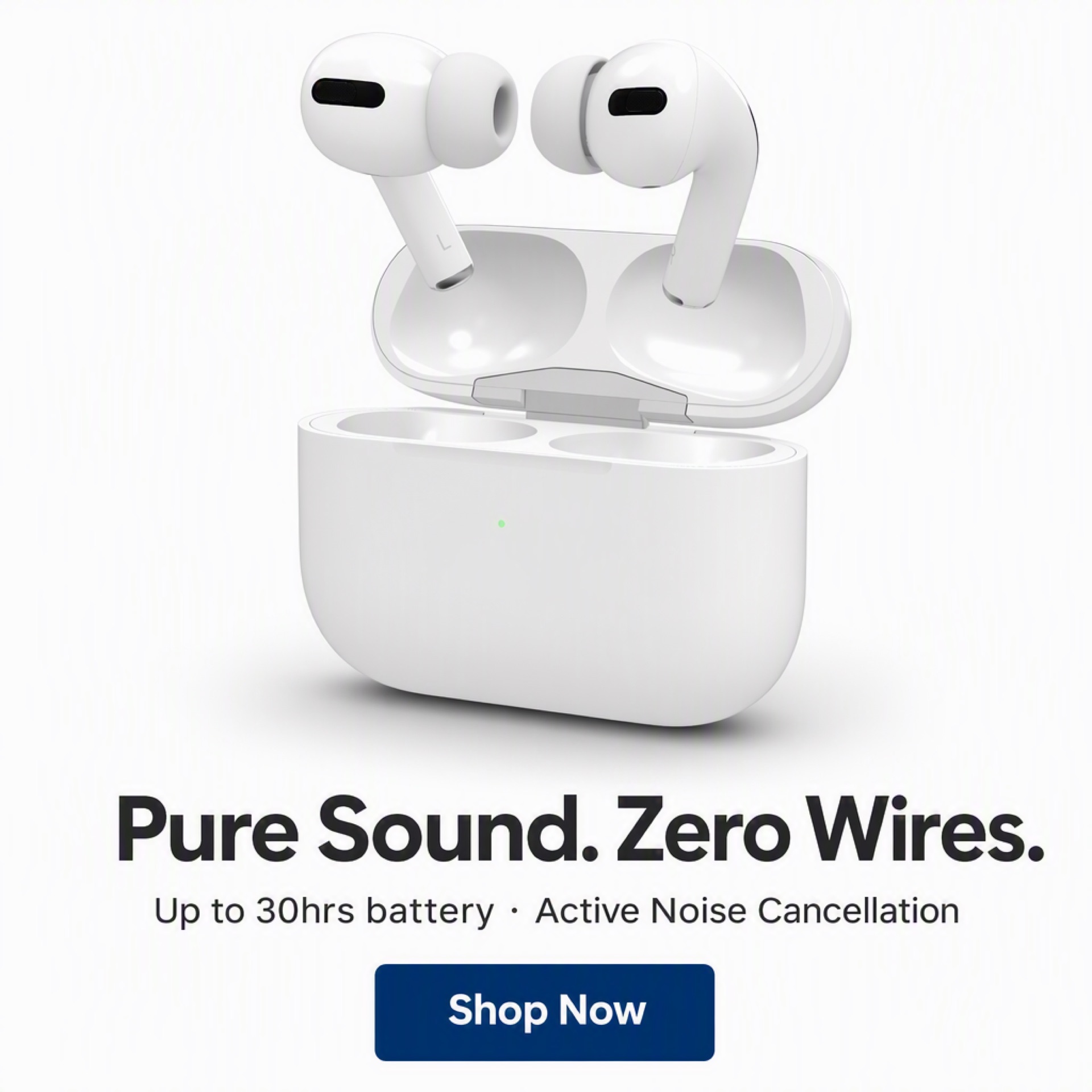
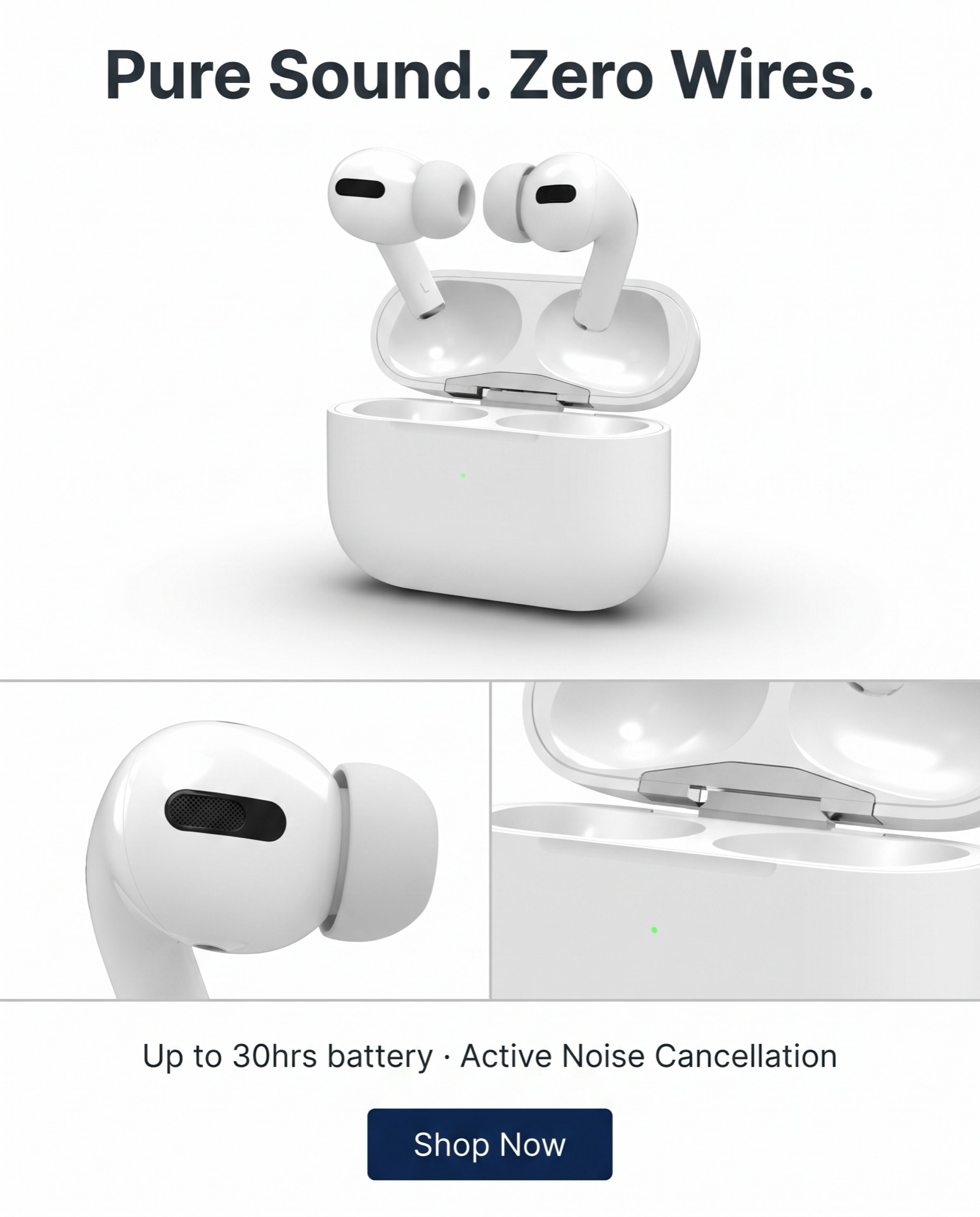
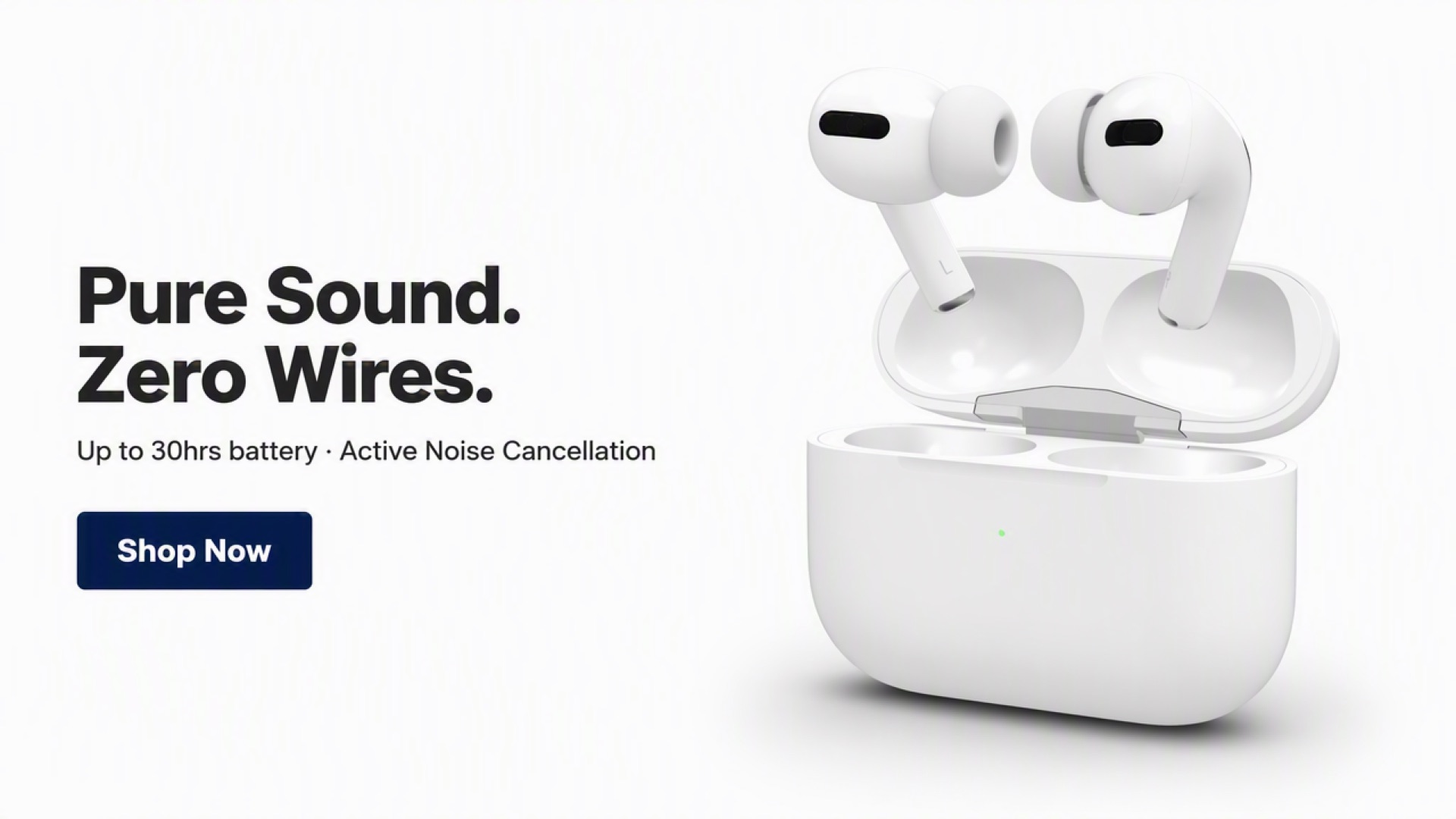
The evidence proves that one source image can produce three independent static ad formats for the same product. It does not prove that every three-format request completes in one turn, or that one ratio will produce a higher click-through rate. The Test record shows that the first square image completed first, while portrait and landscape required follow-up turns.
The practical workflow is simple: start with the ratio you need most, inspect that result, then generate the other formats. A successful case should not be rewritten as a guaranteed batch behavior.
What should you check for product accuracy?
The usual concern sounds like this: “If I change the color, will the color of the other item change too?” For the earbuds case, the equivalent checks are the white plastic, black sensor details, ear tips, metal hinge, charging case shape, and the exact copy.
Use four checks:
- Is the silhouette still the same product and charging case?
- Did the key materials and colors stay consistent?
- Was any copy rewritten, especially
Shop Now? - Do the actual dimensions match the requested ratio, especially the exact 4:5 output?
The three case images passed the dimension and copy checks and kept a product-first composition. The portrait version added two detail modules: one for the earbud and one for the charging case. Those modules were based on visible product details, not invented selling points.
Can you use it directly on a product detail page or in an ad account?
This article cannot make that guarantee.
The generated image can be a static ad candidate or a starting point for brand adaptation. Whether it belongs on a product detail page depends on the platform’s dimensions, text rules, brand assets, product facts, and local advertising requirements. Whether it can enter an ad account depends on that platform’s review rules. Google describes image ads as images created and uploaded to Google Ads, and Meta lists photo ads as an ad format, but platform support does not make every generated image automatically compliant. See Google Ads image ads and Meta photo ads before upload.
This case came from a public QA Canvas project, and its generated images had no watermark. That describes this case only; it does not establish the same entitlement for every account or environment. The current product note says the Skill is free to use, free outputs carry a watermark, and the free quota has not been measured. Check the current account entitlement before launch.
Who is it for?
It fits teams that already have a product image and need a first static ad direction before a campaign window closes. It also fits teams that want to adapt one SKU to several common ratios before deciding what deserves design refinement.
It does not replace product-detail-page image sets, UGC video, campaign setup, bid optimization, or final compliance review. If the source image does not show the product’s important details, the generated result has less factual ground to preserve. For a different problem, such as creating product photos without a model, see How to Photograph Clothes Without a Model.
The practical takeaway
This case did not measure time saved, cost saved, click-through rate, or conversion lift. It confirms something narrower: one product image produced independent 1:1, 4:5, and 16:9 static ecommerce ad candidates, and each result still needed product, copy, dimension, and platform checks.
If your bottleneck is the wait for a first design direction, start with one SKU and one ratio. Check the product facts and copy first. Then decide whether the other formats are worth generating.
Related read: For furniture and home-décor catalogs, see AI Product Photography for Furniture & Home Decor Brands — one approved room, category-aware SKU rules.
Create Static Ecommerce Ads for Free
About The Author