Krea is unusually broad: real-time generation, image and video models, upscaling, LoRA training, 3D, and a node editor live in one product. That also explains why there is no single best Krea replacement. The right choice depends on what you want to replace: Krea’s multi-model access, its live canvas, its design workflow, or its subscription.
For the broadest browser-based alternative, start with Ima Studio. For Adobe production, choose Firefly. For a collaborative node canvas, look at FLORA. Designers who need vectors should consider Recraft, while technical users who want local control should use ComfyUI. Ideogram, Canva, and Magnific each solve a narrower problem better than a generic all-in-one ranking suggests.
Try Image Models in Ima Studio
The best Krea alternatives at a glance
| Rank | Alternative | Best for | Starting paid plan* | Main trade-off |
|---|---|---|---|---|
| 1 | Ima Studio | Trying many image and video models in one browser workspace | $9.99/month | Does not reproduce Krea’s real-time generation interface |
| 2 | Adobe Firefly | Photoshop, Express, image, vector, video, and audio workflows | $9.99/month | Premium media features consume generative credits |
| 3 | FLORA | Collaborative node-based creative workflows | $18/seat/month | Costs rise with seats and generation usage |
| 4 | Recraft | Vectors, icons, logos, and production design assets | $12/month | Free-plan outputs are not licensed for commercial use |
| 5 | ComfyUI | Local workflows, custom nodes, and parameter-level control | Free self-hosted | You supply hardware and maintain the workflow |
| 6 | Ideogram | Typography, posters, logos, and text-heavy images | $20/month | More image-focused than Krea’s full media suite |
| 7 | Canva | Turning AI assets into finished social and marketing layouts | $180/year | Less granular generation control than specialist tools |
| 8 | Magnific (formerly Freepik) | AI creation plus a large stock-asset library and upscaling | $20/month | Annual discounts and unlimited-model rules need close reading |
*Regular monthly price where available. Canva is shown at its current annual individual price. ComfyUI software is free when self-hosted, but hardware, electricity, storage, and optional cloud/API use are separate.
Why creators look for Krea alternatives
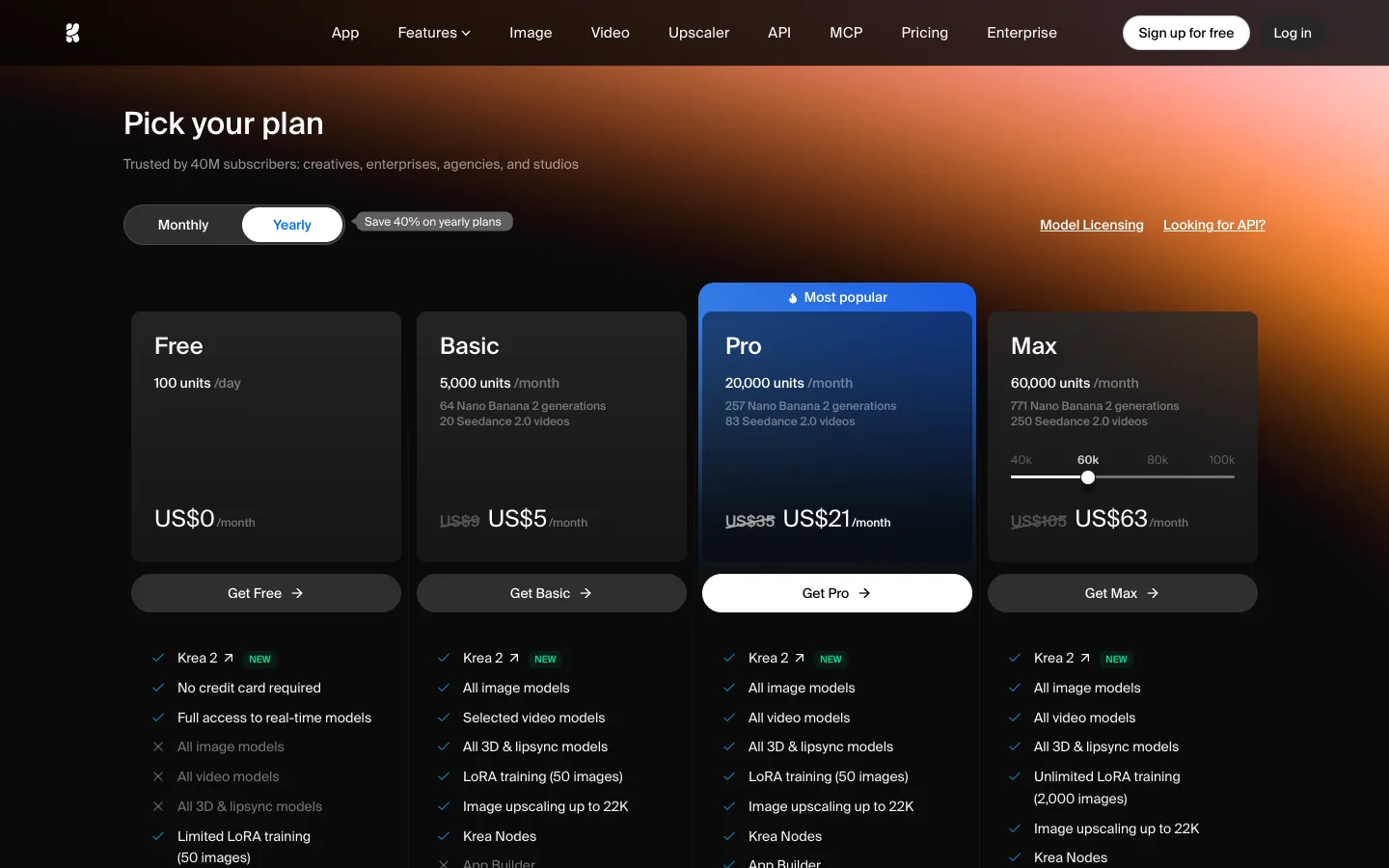
Krea’s current monthly plans start at $9 for Basic, $35 for Pro, and $105 for Max. The yearly view displayed $5, $21, and $63 per month respectively when we checked. The important dividing line is not only price: Basic includes selected video models, while Pro adds all video models plus Nodes and Apps. A creator who only needs image generation may pay for breadth they do not use; a creator who needs the full workflow may find the Pro tier reasonable.
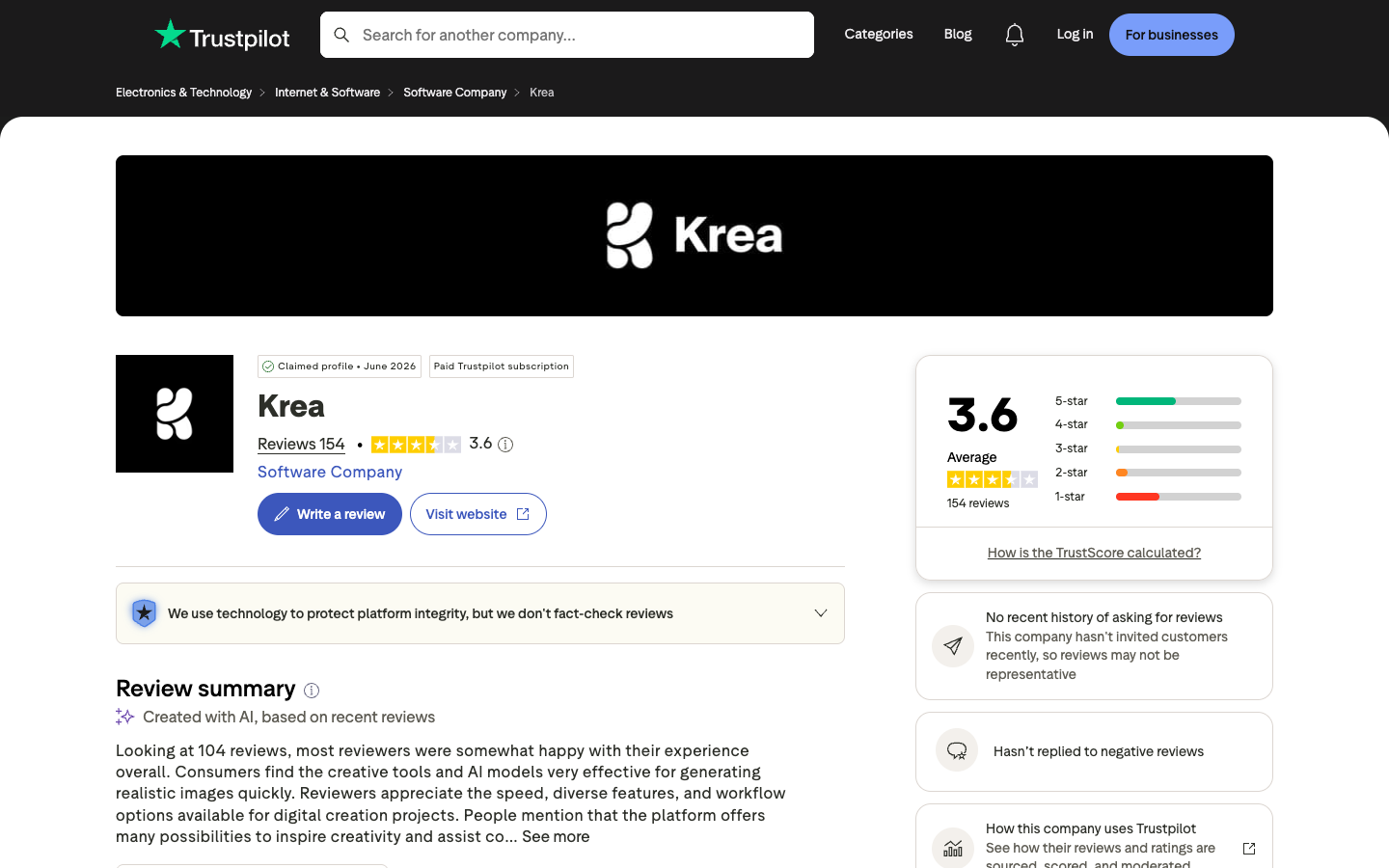
Public reviews show a more mixed reason to compare. Trustpilot displayed a 3.6 score from 154 reviews on our check date. Its summary highlighted praise for speed, model variety, and realistic generation, while some reviewers reported subscription cancellation, support, and inconsistent-result concerns. Review sites are self-selected samples, not controlled product tests, so use them to identify questions to verify rather than as a verdict.
How we compared these Krea alternatives
We compared the products across five practical questions: Can you generate both images and video? Does the workspace support iteration rather than one-off prompts? Is there a free way to evaluate it? What does the first paid commitment cost? What do you gain that Krea does not emphasize?
We did not normalize cost per identical output because credit systems, model markups, resolutions, and relaxed or unlimited modes do not map cleanly across all eight platforms. Where a platform changes prices by region, annual billing, or promotion, the table uses the clearest current public price and explains the caveat.
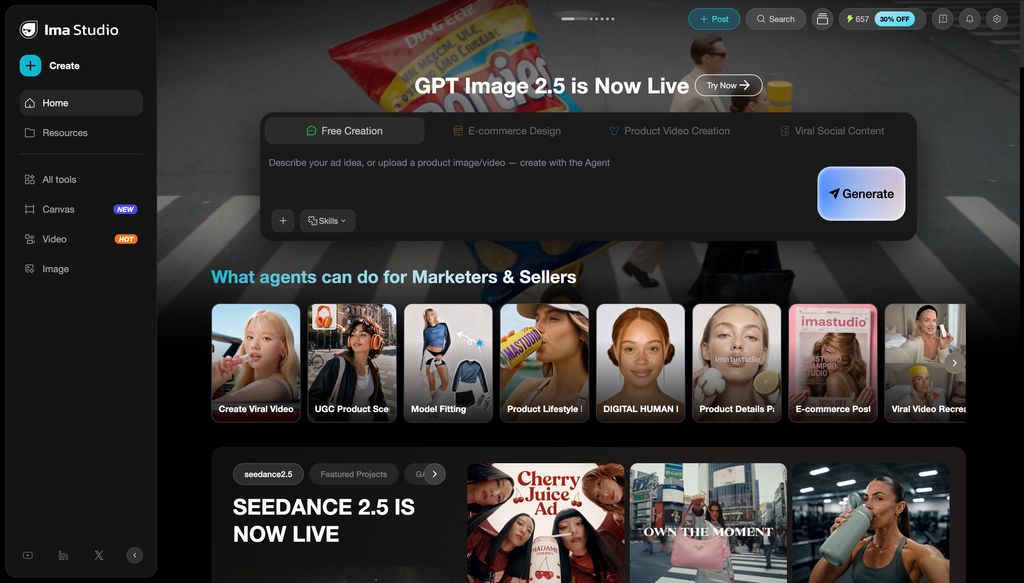
1. Ima Studio: best overall Krea alternative for multi-model creation
Choose Ima Studio if: you want one browser workspace for comparing image and video models, then moving into guided creation workflows without maintaining local software.
Ima Studio’s Basic plan starts at $9.99 per month and includes access to its model catalog through credits. The image workspace supports reference images, model selection, prompt assistance, multiple outputs, and resolution controls. It is a practical replacement when your main reason for using Krea is access to multiple generation models rather than Krea’s real-time canvas itself.
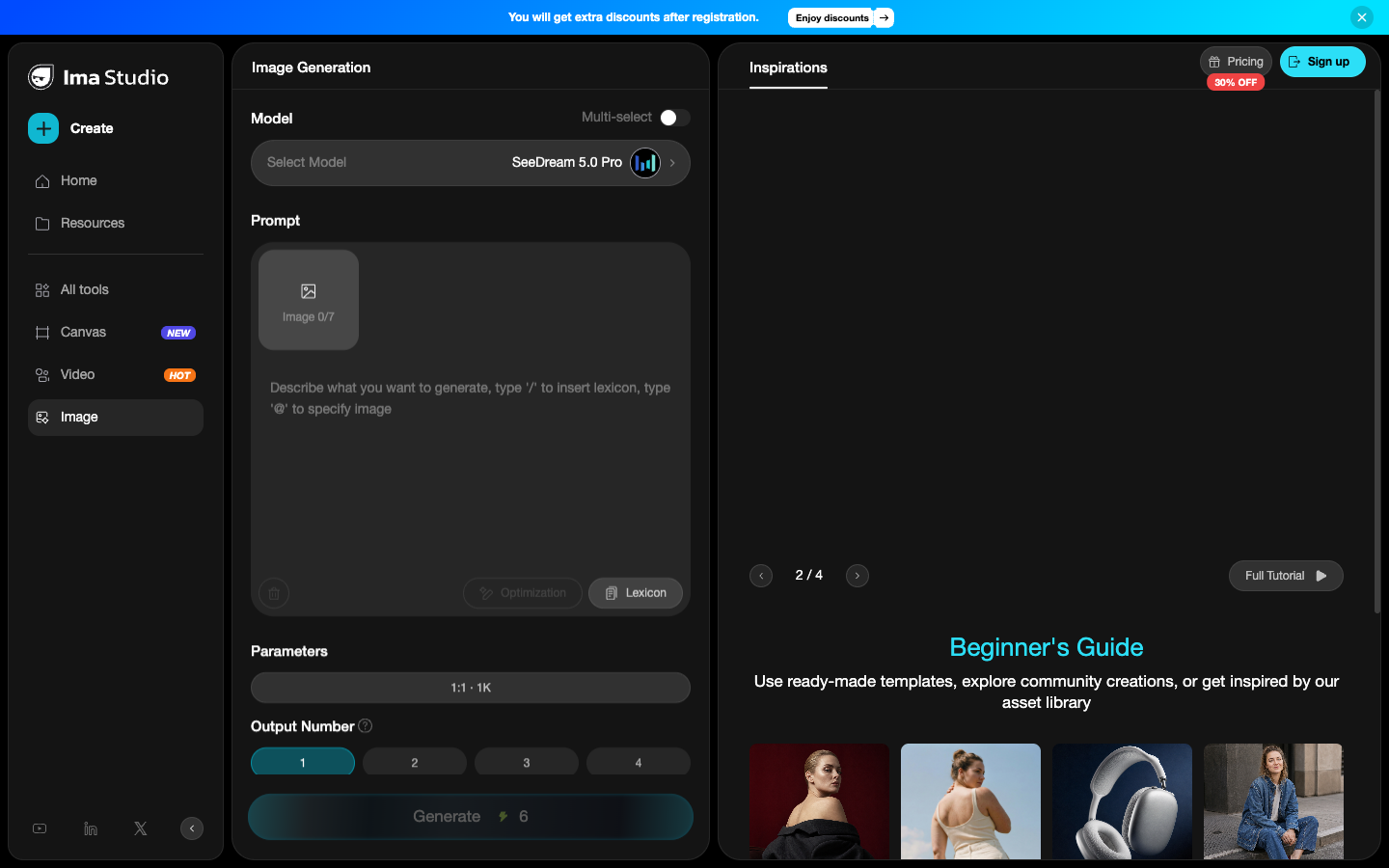
The limitation is equally clear: Ima Studio does not duplicate Krea’s live generation experience. If watching an image respond continuously while you type or draw is central to your process, keep Krea or test a canvas-first alternative.
Price checked: $9.99/month for Basic. Best fit: creators who switch between models and media types. Not ideal for: people specifically replacing Krea Realtime.
2. Adobe Firefly: best for Adobe-centered production
Choose Firefly if: your generated assets need to move directly into Photoshop, Adobe Express, vector work, or a broader Creative Cloud production process.
Firefly Standard is $9.99 per month with 2,000 generative credits. Adobe lists unlimited standard image features, while video, audio, translation, and partner-model generations draw from premium credits. Firefly Pro is $19.99 per month with 4,000 credits and adds more Adobe application access.
Firefly makes more sense than Krea when finishing, brand workflows, and Adobe integration matter more than real-time experimentation. The trade-off is that the plan and credit model becomes more complex as you add premium media generation.
3. FLORA: best for a collaborative node canvas
Choose FLORA if: you like Krea Nodes but need a shared visual workspace where teammates can inspect, comment on, and reuse the same creative graph.
FLORA’s free plan includes one seat, three active projects, text and image models, a canvas and layer editor, and limited generations. Starter is currently listed at $18 per seat per month and adds image and video models, pooled usage, unlimited projects, API access, MCP access, and real-time collaboration. Pro is $50 per seat per month with shared assets and usage controls.
This is a genuine workflow alternative, not merely another prompt box. Its main drawback is cost structure: seat fees and generation usage both matter, so a larger team should estimate a representative month before migrating.
4. Recraft: best for vectors and design-system assets
Choose Recraft if: your output is more likely to become a logo, icon set, vector illustration, packaging asset, or repeatable brand style than a cinematic clip.
Recraft is more specialized than Krea, and that is the reason to choose it. It supports raster and vector generation, editing, background operations, vectorization, and style creation. The entry paid plan has been listed at $12 per month; Recraft’s API currently prices standard raster generation at $0.04 per image and vector generation at $0.08 per image for its current V4 tier.
Check licensing before using the free tier for client work. Recraft states that free-plan images remain public and are owned by Recraft, while paid-plan images receive commercial rights and private generation.
5. ComfyUI: best free Krea alternative for local control
Choose ComfyUI if: you want to own the workflow, run open models locally, install custom nodes, and control seeds, samplers, conditioning, and every intermediate step.
ComfyUI is open-source software and can run locally on Windows, Linux, and macOS. Its graph interface supports image, video, 3D, and audio workflows, with optional API nodes for paid external models. Unlike a subscription platform, self-hosted ComfyUI does not charge a software plan fee.
Free software is not free production. You need compatible hardware or cloud compute, local model storage, installation time, and ongoing maintenance. Krea is easier for a creator who wants results immediately; ComfyUI is stronger for a technical team that values reproducibility and control.
6. Ideogram: best for typography and text-heavy images
Choose Ideogram if: posters, ad graphics, logos, packaging concepts, and readable text inside images are your main output.
Ideogram offers a free plan with weekly slow credits. Plus is $20 per month, or $15 per month when billed annually, with 1,000 priority credits, private generation, unlimited slow credits, and larger queues. Pro is $60 per month, or $42 on annual billing.
Ideogram’s narrower focus can be an advantage when typography is the brief. It is not a complete Krea replacement for people who need 3D, broad video-model access, or a live multi-tool canvas.
7. Canva: best for finished marketing layouts
Choose Canva if: AI generation is only one step before resizing, branding, scheduling, presenting, or publishing the finished asset.
Canva Free includes a drag-and-drop editor, templates, stock media, limited AI use, and 5GB of storage. Canva Pro is currently $180 per year for one person in the United States and adds more AI usage, premium assets, brand kits, background removal, resizing, translation, and social scheduling.
Krea gives generative exploration more room. Canva is stronger after the image exists and needs to become a campaign deliverable. It is the better alternative for social teams that care less about model parameters and more about getting an approved layout out the door.
8. Magnific: best for stock assets, generation, and upscaling in one plan
Choose Magnific if: you want generation, editing, upscaling, collaborative Spaces, and a large licensed stock library under one subscription.
Freepik has been renamed Magnific, so treating them as two separate alternatives would now be misleading. Magnific Premium is $20 per month or $14.50 per month billed annually, with image, video, and audio models, editing tools, commercial licensing, upscalers, and access to more than 250 million stock assets. Premium+ adds a larger annual credit pool and unlimited generation on selected models.
Read the model-level rules rather than relying on the word “unlimited.” Some premium models, video, audio, and editing operations still use credits. Magnific makes the most sense when the stock library and finishing tools replace separate subscriptions.
Which Krea alternative should you choose?
- Choose Ima Studio for browser-based access to many image and video models.
- Choose Adobe Firefly for Adobe production and commercially oriented workflows.
- Choose FLORA for a collaborative node canvas.
- Choose Recraft for vectors and reusable design assets.
- Choose ComfyUI for local control and custom workflows.
- Choose Ideogram for text inside images.
- Choose Canva for templates, brand systems, and finished marketing layouts.
- Choose Magnific when stock assets and upscaling are part of the same job.
If none of those gaps describe your problem, staying with Krea may be the better decision. Its real-time interface, Krea 2 model, integrated enhancer, LoRA training, and growing Nodes workflow are a distinctive combination.
Is there a free alternative to Krea?
Yes. ComfyUI is free and open source when self-hosted, although you pay for the hardware or cloud resources. FLORA, Canva, Ideogram, Recraft, Firefly, and Krea itself offer free evaluation paths with different limits. A free tier is useful for interface testing, but commercial rights, privacy, queue speed, and export limits often change on paid plans.
Frequently asked questions
What is the closest alternative to Krea AI?
Ima Studio is the closest fit for broad multi-model image and video creation. FLORA is closer to Krea Nodes, while ComfyUI offers more control for technical users. No alternative reproduces every Krea feature.
What is cheaper than Krea?
ComfyUI has no software subscription when self-hosted, but hardware and maintenance are separate costs. Krea’s Basic plan is already inexpensive at $9 monthly, so many alternatives compete on workflow rather than a lower entry price. Annual billing can change the comparison substantially.
What is better than Krea for professional design?
Recraft is stronger for vectors and design assets, Firefly for Adobe workflows, and Canva for turning generated material into finished marketing layouts. Krea remains stronger when real-time ideation and a broad creative suite matter most.
Can I replace Krea with one tool?
Only if your use is narrow. A designer may replace it with Recraft or Canva; a technical image team may use ComfyUI; a multi-model creator may use Ima Studio. Teams using real-time generation, video, upscaling, LoRA, and Nodes together may need Krea or a two-tool stack.
Continue comparing AI creative tools
For another image-first comparison, read our OpenArt alternatives guide. If video production is the priority, compare the tools in our Runway alternatives guide.
Compare Image Models in Ima Studio
Sources checked September 11, 2026: Krea pricing, Krea Trustpilot profile, Adobe Firefly plans, FLORA pricing, Recraft plans, Recraft API pricing, ComfyUI documentation, Ideogram pricing, Canva pricing, and Magnific pricing.
About The Author