If you’re leaving OpenArt because credits disappear faster than expected, Ima Studio is the first alternative to price-check. It was cheaper in several matching tasks we could compare directly, including Nano Banana 2 at 4K, Nano Banana Pro at 1K and 4K, Seedream 5.0 Pro, and Seedance 2.5. OpenArt remained cheaper on some other rows, including Nano Banana, Nano Banana 2 at 2K, and Seedream 4.5.
OpenArt does more than generate images. It combines image and video models, an editing suite, consistent-character tools, Director, and story workflows. A useful replacement must match the part you actually use, not just advertise a lower monthly plan.
Try AI Image Creation for Free
The best OpenArt alternatives at a glance
| Rank | Alternative | Best for | Starting paid plan* | Main trade-off |
|---|---|---|---|---|
| 1 | Ima Studio | Lower task prices on several shared image and video models | $9.99/month | OpenArt has a more established character-and-story workflow |
| 2 | Krea | Real-time creation and reusable node workflows | $9/month | Full video-model access starts on a higher tier |
| 3 | Leonardo AI | A recurring free allowance and personal model training | $12/month | Tokens don’t map cleanly to a fixed cost per image |
| 4 | Recraft | Editable vectors, logos, icons, and design assets | $12/month | It is less suitable as an all-in-one video replacement |
| 5 | Midjourney | Image-led aesthetic exploration and relaxed generation | $10/month | No general free trial and private work requires a higher tier |
| 6 | Runway | Video production, editing, audio, and upscale tools | $15/month | Shared third-party models can cost much more per task |
| 7 | Higgsfield | Cinematic camera controls and film-oriented workflows | $15/month | Some shared models cost more than Ima Studio or OpenArt |
*Lowest regular monthly price observed for an individual paid plan. Annual billing, model access, commercial rights, privacy, and promotional “unlimited” offers differ.
Why are creators looking for OpenArt alternatives?
OpenArt’s model catalog isn’t the main problem people describe. Cost predictability is.
On September 9, 2026, Trustpilot listed OpenArt at 3.8 out of 5 across roughly 1,450 reviews. Positive reviewers praised its breadth and ease of use. Recent lower-rated reviews described unexpected Director or video credit consumption, paying for tasks that didn’t produce a usable result, slow support, confusing add-on credit renewals, and subscription cancellation disputes.
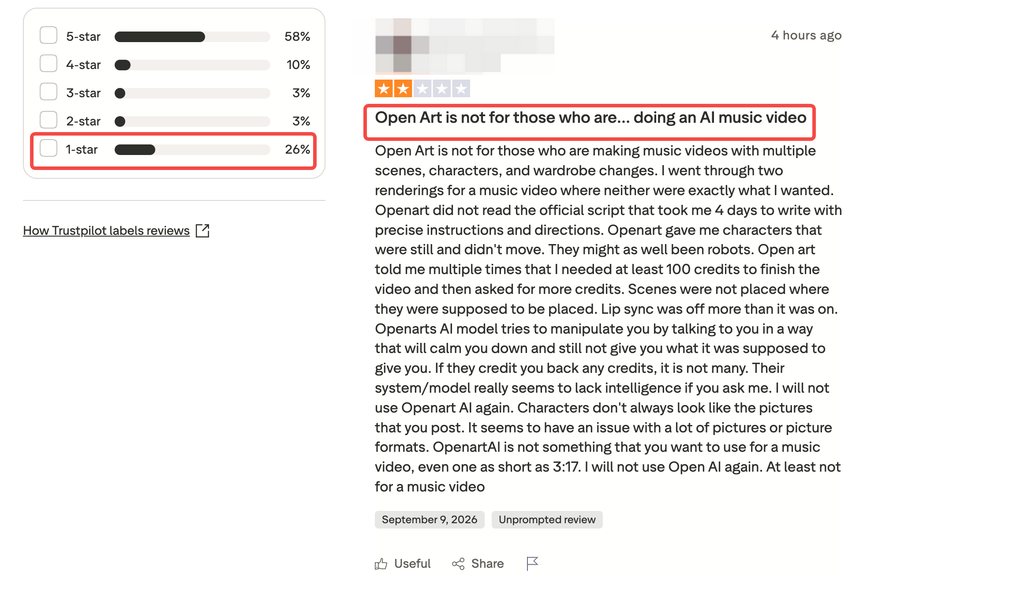
These are user reports, not proof that every account behaves the same way. They do explain why a creator who already likes OpenArt might still search for an alternative: the creator wants the same models with clearer task costs, a cheaper route for a repeated model, or a tool built around one specific output.
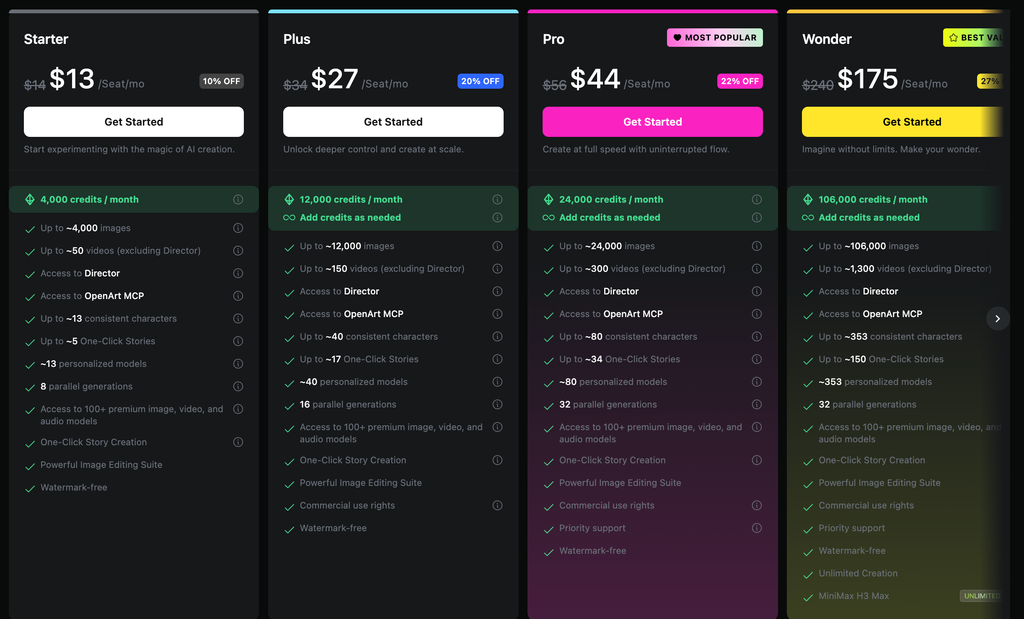
OpenArt’s current pricing page lists a $14 Starter plan with 4,000 credits, access to more than 100 image, video, and audio models, Director, consistent characters, story creation, and image editing. “Up to” output estimates are useful for orientation, but they don’t tell you what your chosen model, resolution, duration, references, or Director workflow will cost. Check the generation screen before starting a long job.
How we tested and ranked these OpenArt alternatives
This is a price-and-workflow test. It isn’t a blind image-quality contest.
For models sold by both platforms, we recorded the credits displayed for the closest matching model and specification. We converted those credits using the lowest regular monthly subscription price available for that task. Images are shown in dollars per image. Videos are shown in dollars per second using the real task duration. We did not compare raw platform credits because one OpenArt credit and one Ima Studio credit buy different amounts of work.
The snapshot was collected from September 4–7, reviewed September 9, and must be refreshed before publication. Temporary discounts, tax, unused-credit breakage, payment fees, and unpublished enterprise deals are excluded. A missing cell means we couldn’t verify a comparable configuration.
Our ranking weights are:
- 45% price and cost clarity: matching-task price, plan restrictions, credit expiry, and whether cost is visible before submission.
- 25% replacement breadth: image generation, editing, video, models, references, and the route from draft to export.
- 15% task specialization: whether the alternative solves a job OpenArt treats as one option inside a large suite.
- 10% free evaluation: recurring trial allowance, watermark, privacy, and commercial-use limits.
- 5% workflow portability: how easily assets move into the next stage or another tool.
Tested in this article means task-price capture and workflow verification. We don’t award an image-quality winner without running the same prompt, references, model version, resolution, and number of attempts.
OpenArt vs Ima Studio: matching task prices
| Model and specification | Ima Studio | OpenArt | Lower-priced option |
|---|---|---|---|
| Nano Banana, default image | $0.0666/image | $0.0525/image | OpenArt, about 21% lower |
| Nano Banana 2, 1K | $0.0666/image | $0.0700/image | Ima Studio, about 5% lower |
| Nano Banana 2, 2K | $0.1110/image | $0.1050/image | OpenArt, about 5% lower |
| Nano Banana 2, 4K | $0.1443/image | $0.1750/image | Ima Studio, about 18% lower |
| Nano Banana Pro, 1K | $0.1110/image | $0.1400/image | Ima Studio, about 21% lower |
| Nano Banana Pro, 2K | $0.1554/image | $0.1400/image | OpenArt, about 10% lower |
| Nano Banana Pro, 4K | $0.1998/image | $0.2800/image | Ima Studio, about 29% lower |
| Seedream 5.0 Lite, 2K/3K | $0.0444/image | $0.0525/image | Ima Studio, about 15% lower |
| Seedream 5.0 Pro, 2K | $0.1332/image | $0.2100/image | Ima Studio, about 37% lower |
| Seedance 2.0, 720p | $0.2270–$0.2283/sec | $0.2800/sec | Ima Studio, about 18–19% lower |
| HappyHorse 1.1, 720p | $0.1421/sec | $0.1225/sec | OpenArt, about 14% lower |
There is no honest “always cheaper” winner. Your model mix decides the bill. Ima Studio’s strongest captured advantage was Seedream 5.0 Pro at 2K; OpenArt won the captured Nano Banana default, Nano Banana 2 at 2K, Nano Banana Pro at 2K, and HappyHorse rows.
The useful calculation is monthly task mix. Multiply each matching task price by your expected number of attempts, then add any OpenArt-only work you would need to replace, such as Director or its character workflow.
1. Ima Studio — best overall OpenArt alternative for price
Ima Studio ranks first because it overlaps with OpenArt on the models driving many current image and video workflows, while offering lower captured prices on several expensive configurations.
The difference is clearest when resolution or video time compounds the cost. Nano Banana Pro at 4K was about 29% lower in the snapshot. Seedream 5.0 Pro at 2K was about 37% lower. Seedance 2.0 at 720p was roughly 18–19% lower per second. Those gaps matter after several revisions.
Try AI Image Creation for Free
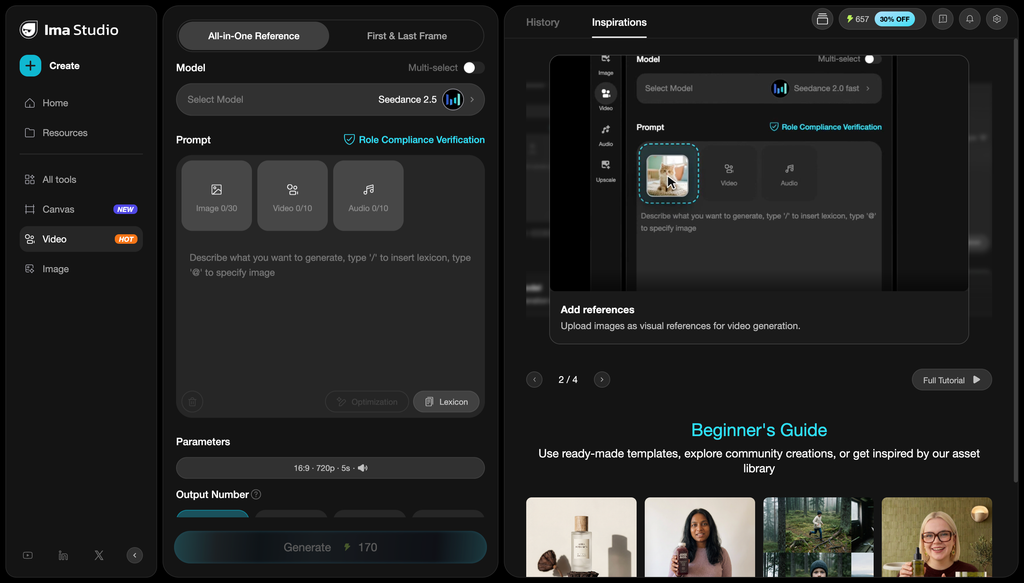
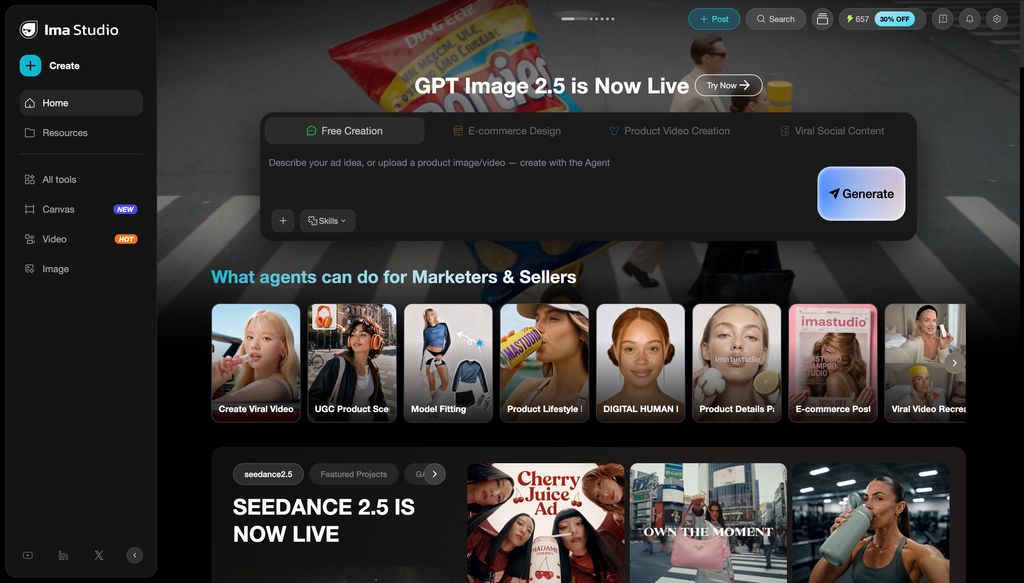
Ima Studio also connects model generation with image editing, video creation, product-video tools, AI ad workflows, and camera-movement presets. Its AI Camera Movement generator is a direct route when you want to animate a finished frame without building a full Director project.
OpenArt remains stronger for creators already invested in its persistent characters, story construction, personalized models, and Director workflow. Switching only to save five percent on one image configuration won’t justify rebuilding that process.
Choose Ima Studio if: your monthly work uses the models where the captured price gap is substantial, or you want one balance for image, video, editing, and commerce workflows.
Skip it if: OpenArt’s character-and-story system is the core of your production process.
2. Krea — best for real-time and reusable workflows
Krea is the closest alternative for creators who think on a live canvas and want to turn repeated steps into a reusable system. Its Nodes product chains image and video tools, runs models in parallel, and saves the sequence as a reusable workflow. See Krea Nodes.
The current plan table lists a free tier with 100 daily compute units, a $9 Basic plan, and a $35 Pro plan. Basic covers image, 3D, lip-sync, LoRA training, and selected video models. All video models and Nodes automation require Pro.
That access boundary matters. Krea may look cheaper than OpenArt at the headline level, but a creator replacing OpenArt’s broader video workflow should compare Krea Pro rather than Basic.
Choose Krea if: live image direction, side-by-side model runs, or reusable node workflows are the missing pieces.
Skip it if: you need OpenArt’s full character, story, and Director feature set on the lowest plan.
3. Leonardo AI — best recurring free alternative
Leonardo gives casual creators a genuine recurring evaluation path. Its current pricing lists 150 Fast Tokens per day on Free, 8,500 monthly tokens on the $12 Essential plan, and token-bank rollover on paid plans.
It covers image generation, design, motion, third-party models, references, real-time canvas work, presets, and personal model training. Premium and Ultimate add relaxed image generation for selected models; Ultimate adds relaxed video generation for selected Leonardo models.
The drawback is cost interpretation. Leonardo says a token doesn’t correspond to one fixed image or action. Complexity and compute change the charge. Compare the exact operation instead of dividing the subscription price by total tokens.
Choose Leonardo if: daily free experimentation, trained personal models, or unused-token rollover matters more than a single all-in-one Director flow.
Skip it if: you want a fixed, easy-to-compare dollar price for every generation type.
4. Recraft — best OpenArt alternative for vectors and design assets
Recraft should move to the top if your deliverable is an SVG, icon, logo, illustration, or branded design asset. It generates editable vectors rather than only flattened images, and its editor covers region changes, background work, vectorization, and upscale. See Recraft’s image and vector tools.
The free plan currently provides 30 daily credits, but free generations are public and owned by Recraft. Paid plans start at $12 monthly for 1,000 credits and grant private generation plus commercial rights. Top-up credits don’t expire. See Recraft paid plans.
This is a specialized win, not an all-in-one replacement. Recraft is a better tool for production-ready vectors; OpenArt remains broader across video, characters, and stories.
Choose Recraft if: editable design output matters more than having 100-plus creative models in one subscription.
Skip it if: video generation and long-form story assembly are central.
5. Midjourney — best for image-led aesthetic exploration
Midjourney is a focused choice for creators who value rapid visual exploration and a distinct image workflow over OpenArt’s wider toolset. Its current plan comparison lists monthly plans at $10, $30, $60, and $120. Standard and higher include unlimited image generations in Relax Mode; Pro and Mega add unlimited SD video in Relax Mode.
There is no general free trial on the web or Discord. Private Stealth Mode requires Pro or Mega, and unused Fast time doesn’t roll over. Those conditions can make the effective entry price much higher for commercial teams that need private work.
Choose Midjourney if: image ideation and relaxed generation are the job, and you don’t need OpenArt’s editing, character, and multi-model workflow in the same workspace.
Skip it if: privacy on a low-tier plan, recurring free use, or cross-vendor model comparison matters.
6. Runway — best for video production and finishing
Runway is a better OpenArt alternative when the project begins or ends with video. It combines proprietary and third-party models with audio, video editing, asset storage, upscale, and production formats.
The Standard plan includes 625 monthly credits; Pro includes 2,250. Standard and Pro credits don’t roll over, though purchased credits do. Runway’s official credit table lists model-specific charges, while its developer pricing publishes dollar-based rates for API tasks.
The warning is the same as in the Higgsfield comparison: Runway can be expensive when used mainly as a gateway to a third-party model. Buy it for Runway’s video production layer, not because every shared model is cheaper there.
Choose Runway if: video generation, editing, audio, upscale, and output formats justify the plan.
Skip it if: most of your work is still images or your only criterion is the lowest shared-model price.
7. Higgsfield — best for cinematic camera controls
Higgsfield is the film-oriented alternative. Its Camera Controls catalog includes dolly, orbit, crane, drone, tracking, pan, tilt, zoom, and other motion presets. Cinema Studio adds camera, lens, focal-length, and multi-shot direction around interchangeable video models.
Pricing still needs task-level inspection. Higgsfield’s Starter plan was $15 for 200 credits in our snapshot, and its documentation states that model, resolution, and duration change the generation charge. Subscription credits reset without rollover.
Higgsfield is not the obvious replacement for OpenArt’s image editing or community workflow. It is the better candidate when OpenArt’s video tools feel expensive or indirect and the real goal is controlled cinematic motion.
Choose Higgsfield if: film language and camera behavior are the center of the job.
Skip it if: your work is mostly image generation, vector design, or low-cost shared-model access.
For a deeper price comparison, see our tested Higgsfield alternatives.
Which OpenArt alternative is cheapest?
For recurring free image experiments, Leonardo, Krea, and Recraft have the clearest current free allowances. For a paid multi-model workflow, Ima Studio starts lower than OpenArt and was cheaper on several matching high-resolution image and video tasks. Midjourney’s $10 Basic plan can be attractive for focused image use, but unlimited Relax Mode begins on Standard.
Use this check before switching:
- Export the models and specifications you used most during the last billing cycle.
- Record the displayed task cost on OpenArt and the candidate platform.
- Include the plan tier required for that model, private output, and commercial rights.
- Multiply by attempts per usable result and include any second tool needed to finish the job.
The cheapest plan is rarely the cheapest finished workflow.
Is there a free alternative to OpenArt?
Yes. Krea offers daily compute units, Leonardo offers daily Fast Tokens, and Recraft offers daily credits. Each free tier has a different catch. Recraft free generations are public and not owned by the creator. Midjourney has no general web or Discord trial. Runway’s free credits are a one-time allocation rather than a daily refill.
Ima Studio also lets you try selected creative tools after signing up. Use free access to run one representative task, then compare the paid configuration you would actually need.
Should you leave OpenArt?
Switch when one repeated task costs materially less elsewhere, a specialized tool produces the file type you need, or OpenArt’s credit and support experience keeps interrupting paid work.
Stay when persistent characters, Director, image editing, and story creation already work as one production system for you. Reassembling those features from several cheaper subscriptions can cost more and add handoff work.
Our recommendation is simple: test Ima Studio first when price is the problem, Krea when workflow automation is the problem, Recraft when editable vectors are the output, and Runway or Higgsfield when the job has become video-first.
For model-specific price decisions, compare the best platforms for Nano Banana Pro and the AI model guides.
Try AI Image Creation for Free
About The Author