If price is the reason you’re searching for Higgsfield alternatives, start with Ima Studio and OpenArt. Ima Studio was cheaper than Higgsfield on several matching image and video jobs we could price directly, including Nano Banana 2 at 1K and Seedance 2.0 Fast at 720p. OpenArt is the stronger image-first choice. Runway is the better fit when its production tools matter more than the lowest cost.
There isn’t one universal replacement. Higgsfield combines third-party models with its own camera controls, Cinema Studio, ad tools, and character features. The right alternative depends on which part you use—and what each finished clip actually costs after retries.
The best Higgsfield alternatives at a glance
| Rank | Alternative | Best for | Starting paid plan* | Main trade-off |
|---|---|---|---|---|
| 1 | Ima Studio | Lower-cost access to several shared image and video models | $9.99/month | Higgsfield has a deeper branded cinema-control layer |
| 2 | OpenArt | Image-first creation, characters, and story workflows | $14/month | Video pricing changes sharply by model and workflow |
| 3 | Runway | Advanced video production and post-generation tools | $15/month | Some third-party models cost much more per task |
| 4 | Kling AI | Creators who mainly want Kling rather than an aggregator | Varies by market | Narrower model choice than a multi-model platform |
| 5 | Pika | Quick social video effects and lightweight experimentation | $8/month billed annually | Less suited to multi-model comparison shopping |
| 6 | Luma AI | Ray video, multimodal projects, and production formats | $30/month | Higher entry price for the current app plans |
| 7 | Pollo AI | Broad model access and occasional unlimited offers | $15/month | Subscription credits don’t roll over |
*Starting prices are the lowest regular paid plans captured during this review. Plan access and annual billing conditions differ. Check the linked pricing page before buying.
Why are creators looking for Higgsfield alternatives?
The loudest complaint isn’t that Higgsfield lacks models. It has plenty. The friction starts when creators try to predict how far a subscription will carry them.
On September 9, 2026, Trustpilot listed Higgsfield at 4.0 out of 5 across more than 4,200 reviews. Most reviews were positive, but 19% were one-star reviews at the time of our check. Recent lower-rated reviews repeatedly mentioned fast credit consumption, completed-but-unusable generations still consuming credits, renewal or refund disputes, slow generation, and inconsistent character or lip-sync results.
G2 showed a more positive 4.5 out of 5 across 33 reviews. Even there, some reviewers called out credits running out quickly or canceled jobs not being refunded. Others praised the all-in-one model access and the interface. Both sides matter. Higgsfield’s convenience is real; so is the need to understand its cost before committing to a production run.
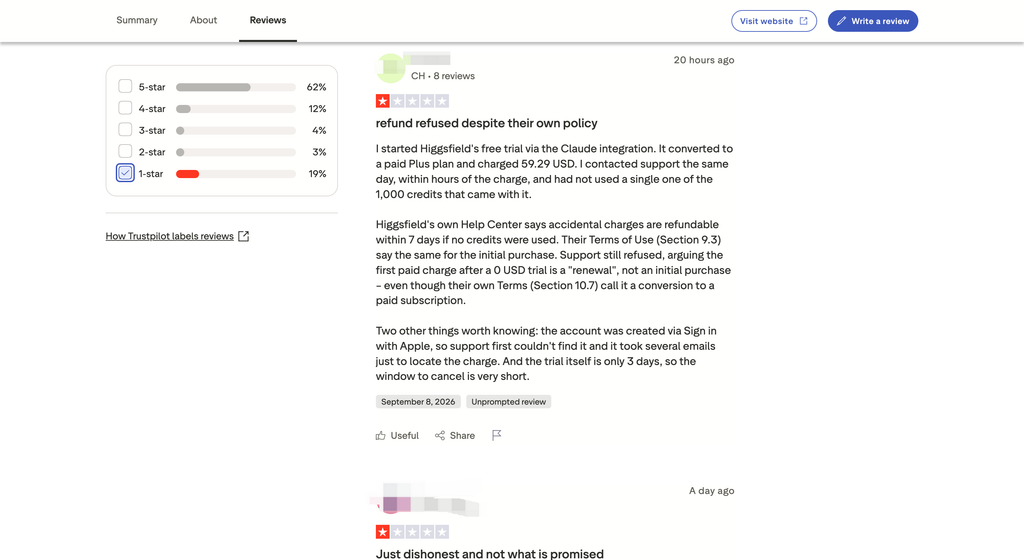
Higgsfield’s own documentation confirms that generation cost varies by model, resolution, and duration. Subscription credits reset and don’t roll over, while separately purchased credit packs expire after 90 days. The exact cost appears on the Generate button before submission. That makes the generation screen—not the headline plan price—the useful comparison point. See Higgsfield’s credit policy and plan explanation.
How we tested and ranked these Higgsfield alternatives
This is a pricing and workflow test. It isn’t a blind video-quality shootout.
For shared models, we opened each platform’s generation flow, selected the closest available model and output specification, recorded the credits charged for the task, then converted those credits using the lowest regular monthly subscription rate. Images are priced per image. Videos are priced per second using the actual duration shown for the task. We didn’t treat a four-second or eight-second charge as a universal per-video price.
The pricing snapshot was collected from September 4–7, 2026 and reviewed on September 9. We excluded temporary promotions, tax, payment fees, unused-credit breakage, and enterprise discounts. When a model wasn’t available on the lowest plan, the table says so. When two platforms exposed different specifications, we refused to force a comparison. The quoted task rows must be refreshed before publication.
Our ranking weights were:
- 50% price and usable output value: normalized task price, credit expiry, and documented failed-generation credit rules. We didn’t invent a retry rate where no comparable test existed.
- 20% model access: whether you can keep using the models that brought you to Higgsfield.
- 15% workflow fit: image, video, editing, references, and the route from draft to export.
- 10% billing clarity: whether task cost and credit rules are visible before generation.
- 5% trial access: whether you can test the fit before paying for a full plan.
No platform received an output-quality score without an equivalent-input generation test. A future update will add that layer after the same source image and camera brief have been run across the shortlisted tools.
Higgsfield vs Ima Studio: real task price examples
Plan credits are not interchangeable. One Higgsfield credit doesn’t buy the same work as one Ima Studio credit, so comparing “price per credit” would be meaningless. The table below compares the final price of matching tasks instead.
| Model and specification | Ima Studio | Higgsfield | Lower-priced option |
|---|---|---|---|
| Nano Banana, default image | $0.0666/image | $0.0750/image | Ima Studio, about 11% lower |
| Nano Banana 2, 1K | $0.0666/image | $0.1125/image | Ima Studio, about 41% lower |
| Nano Banana 2, 2K | $0.1110/image | $0.1500/image | Ima Studio, about 26% lower |
| GPT Image 2, 2K medium | $0.0777/image | $0.1500/image | Ima Studio, about 48% lower |
| Seedream 5.0 Lite, 2K/3K | $0.0444/image | $0.0750/image | Ima Studio, about 41% lower |
| Seedance 2.0 Fast, 720p | $0.1816–$0.1843/sec | $0.2625/sec | Ima Studio, about 30% lower |
| Nano Banana Pro, 2K | $0.1554/image | $0.1500/image | Higgsfield, about 3% lower |
| Wan 3.0, 720p | $0.1596–$0.1665/sec | $0.1350/sec | Higgsfield, about 15–19% lower |
That’s the honest price story. Ima Studio has a meaningful advantage on several high-interest shared models, but not every model and not every resolution. If most of your work uses Wan 3.0, Higgsfield may cost less under the captured plans. If you’re generating Nano Banana 2 images or Seedance 2.0 Fast video, Ima Studio deserves a price check before your next renewal.
1. Ima Studio — best overall Higgsfield alternative for price
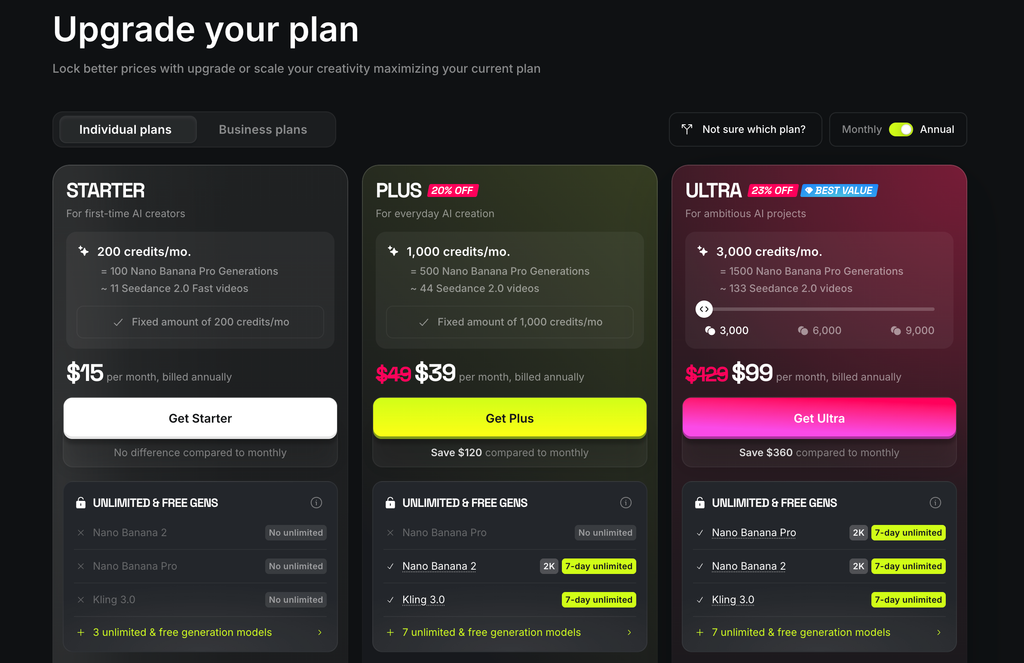
Ima Studio ranks first because its advantage is measurable on tasks that overlap directly with Higgsfield. The lowest regular monthly plan in our snapshot was $9.99 for 900 credits, compared with Higgsfield’s $15 plan with 200 credits. We don’t use that raw credit ratio as proof because the platforms spend credits differently. The matching-task table is the proof.
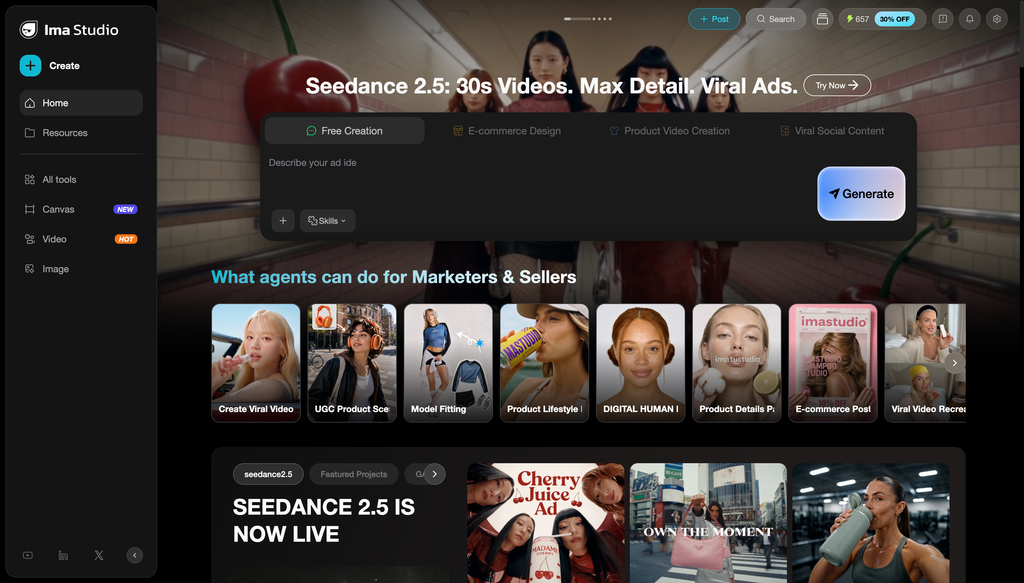
The strongest savings appeared on Nano Banana 2, GPT Image 2, Seedream 5.0, and Seedance 2.0 Fast. Ima Studio also gives you direct routes into image generation, image editing, video generation, product-video workflows, and one-click camera movements. The AI Camera Movement generator supports dolly, orbit, crane, drone, pan, tilt, handheld, and other moves without requiring you to write the camera prompt from scratch.
The compromise is depth. Higgsfield’s Camera Controls and Cinema Studio are built around a wider branded cinematography system. If you regularly choose camera bodies, lens character, focal lengths, and genre-driven multi-shot behavior, Higgsfield may still be the more natural workspace.
Choose Ima Studio if: you use the same popular models, want lower task prices on the proven rows, or prefer a direct tool for camera movement and model generation.
Skip it if: Higgsfield’s proprietary cinema interface is the reason you subscribed.
You can also use these 20 AI camera movement prompts before testing the same move in both platforms.
2. OpenArt — best Higgsfield alternative for image-first workflows
OpenArt starts at $14 per month in the pricing snapshot and lists 4,000 monthly credits on its Starter plan. Its public pricing page describes access to more than 100 image, video, and audio models, an image editing suite, consistent characters, Director, and one-click story creation. See OpenArt’s current plans.
It earns second place because it covers the work before video particularly well: generating a character, editing the frame, building a sequence, and then moving into video. If your Higgsfield workflow begins with still-image iteration rather than a camera preset, OpenArt is a closer match than a video-only tool.
Price still needs model-level attention. OpenArt can be cheaper on one image model and more expensive on the next. Its plan-level estimate of “up to” a certain number of videos excludes Director and can’t replace checking the generation screen.
Choose OpenArt if: images, characters, and story assembly take up more of your week than final video rendering.
Skip it if: you want the lowest verified price for Seedance 2.0 Fast or a simple camera-move tool.
3. Runway — best for a deeper video production toolset
Runway ranks third despite weaker prices on several third-party model rows. The reason is control after generation. Its current plans include its own video models, third-party models, asset storage, audio tools, upscale options, and higher-tier production formats.
Runway’s official model pricing lists Gen-4.5 at 12 credits per second, Gen-4 Turbo at 5 credits per second, and Wan 3.0 from 5 to 20 credits per second depending on resolution. The consumer Standard plan includes 625 monthly credits, while Pro includes 2,250. Monthly Standard and Pro credits don’t roll over, though separately purchased credits do. See Runway’s credit rules.
Runway’s disadvantage shows up when you treat it mainly as a gateway to someone else’s model. In our captured table, Seedance 2.0 Fast at 480p was $0.696 per second on Runway, compared with about $0.081–$0.083 on Ima Studio and $0.1125 on Higgsfield. That’s a bad fit for price-first Seedance work. Runway makes more sense when you need Runway’s own models and production features.
Choose Runway if: timeline-adjacent tools, proprietary video models, upscale, audio, and production formats justify a higher task cost.
Skip it if: you’re shopping only for the cheapest place to run a shared third-party model.
4. Kling AI — best if Kling is the whole reason you’re switching
Kling is the direct route for creators who don’t need Higgsfield’s model collection. That removes one layer from the decision: you’re choosing the model family itself, not an aggregator that also happens to carry it.
The trade-off is obvious once your project expands. A direct Kling subscription won’t replace Higgsfield’s access to Seedance, Sora, Veo, Nano Banana, and other model families. It also won’t answer the question “which model should I use for this shot?” by giving you several vendors in one balance.
Our aggregator snapshot found Ima Studio and Higgsfield very close on several Kling 3.0 task prices. That means switching platforms purely for Kling may produce a small saving rather than the dramatic gap seen with Nano Banana 2 or Seedance Fast. Check the exact Kling mode, resolution, duration, and audio setting before deciding.
Choose Kling if: you already know Kling is your production model and want a focused path.
Skip it if: you compare several model families during the same project.
5. Pika — best for quick social video effects
Pika is easier to recommend for a creator making short, effect-driven social clips than for a studio comparing many third-party models. Its current pricing page lists a paid plan from $8 per month when billed annually, with 700 monthly video credits. Pika’s tools include Pikascenes, Pikadditions, Pikaswaps, Pikatwists, and Pikaffects. See Pika pricing.
This is a different shape from Higgsfield. Pika’s strongest reason to switch is a specific social-video workflow, not broad model access. And because its credits pay for Pika-specific operations, we can’t honestly convert them into the same-model table above.
Choose Pika if: short transformations, additions, swaps, and social effects are the deliverable.
Skip it if: your priority is comparing Seedance, Kling, Wan, and image models under one subscription.
6. Luma AI — best for Ray and multimodal production
Luma has moved beyond the older Dream Machine framing. Its current product centers on the Luma app, Ray video models, UNI image models, and an agent-led workflow that can coordinate image, video, and audio tasks. Luma’s official information lists Ray3.2 as its current video model and notes access to third-party models such as Seedance 2.0, Kling 3.0, and Nano Banana. See Luma’s current product information.
The current app FAQ lists plans from $30 per month with 10,000 credits. Luma also separates app subscriptions from API billing, which matters if you’re comparing a creator plan with a production integration.
Luma ranks below the cheaper options because of that entry price. It moves up the list if Ray, HDR output, video modification, or its agent workflow is central to your project.
Choose Luma if: you’re buying into the Ray production path rather than looking for the lowest monthly entry point.
Skip it if: your first filter is a sub-$20 creator plan.
7. Pollo AI — best for broad access when its plan matches your models
Pollo looks close to Higgsfield on paper: multiple image and video models, a credit subscription, and rotating unlimited offers for selected models. Its lowest regular monthly plan in our snapshot was $15 for 400 credits.
Pollo’s official pricing FAQ says task credits vary by model, duration, number of outputs, and resolution. Subscription credits don’t roll over. Add-on credits don’t expire but are non-refundable. See Pollo AI pricing.
The platform belongs on this list because model variety is a real replacement path. It ranks seventh because the price advantage wasn’t consistent across our matching rows. For example, Nano Banana’s captured task price was $0.15 on Pollo versus $0.0666 on Ima Studio and $0.075 on Higgsfield.
Choose Pollo if: an unlimited offer covers the exact model you use heavily, or its model catalog fills a gap in your current stack.
Skip it if: you’re assuming every model is cheaper because one is promoted as unlimited.
Which Higgsfield alternative is cheapest?
Ima Studio was the cheapest option in our matching-task sample for Nano Banana, Nano Banana 2 at 1K and 2K, GPT Image 2 at several quality levels, Seedream 5.0 Lite and Pro, and Seedance 2.0 Fast. Higgsfield was cheaper for the captured Wan 3.0 rows and narrowly cheaper for Nano Banana Pro at 2K.
That answer will change as model prices move. Use this four-step check before switching:
- Write down the three models and specifications you actually used last month.
- Open the same task in each candidate platform and record the displayed credits.
- Convert the task credits using the plan you would really buy, including model-access restrictions.
- Multiply by expected attempts per usable result, not just the first generation.
A low monthly price can lose quickly when the required model is locked to a higher tier or a usable clip takes four tries.
Is there a free alternative to Higgsfield?
Ima Studio’s camera movement tool is free to try after sign-up. Runway offers a one-time allocation of 125 free credits, and Pika lists a free plan with limited model and resolution access. Luma also lets users try the app before selecting a paid plan.
Free tiers are evaluation tools. Check watermarks, commercial rights, queue limits, model availability, and whether credits refill before using one for client work.
Should you leave Higgsfield?
Switch if your last month of work is measurably cheaper elsewhere, or if one recurring frustration—credit burn, failed-output cost, model access, or workflow fit—keeps getting in the way.
Stay if Cinema Studio, Higgsfield’s camera system, or its proprietary character and ad workflows save more time than the price difference. Rebuilding a working process across several cheaper subscriptions can cost more than it saves.
Our recommendation is practical: rerun one representative task before canceling. Use the same model, input, resolution, duration, and audio setting. Ima Studio is the first alternative to test when price is the problem; Runway is the first to test when production control is the problem; OpenArt is the first to test when your process begins with images and characters.
For model-specific buying decisions, compare the best platforms for Nano Banana Pro or review the best Sora 2 video generators.
About The Author