Looking for the best Sora 2 video generator? This guide compares today’s most-used options and shows how to get consistently better Sora 2 results using Ima Studio’s multi-model workflow. We benchmarked Sora 2–style generation across identical prompts, documented settings that matter (duration, motion style, camera control), and included practical alternatives when Sora 2 access is limited. If you want the most reliable way to create Sora 2-quality videos online, start here.
- What makes the best Sora 2 video generator
- Quick verdict
- How we tested
- Results and comparison
- How to use Ima Studio as your Sora 2 video generator
- Best Sora 2 settings and prompt tips
- Sora 2 alternatives inside Ima Studio
- FAQs
- Sources and further reading
What Makes the Best Sora 2 Video Generator?
“Best” isn’t just about who has Sora 2 access. In practice, the best Sora 2 video generator should deliver:
- Accurate motion and scene physics (object permanence, hands, fabric, shadows).
- Controllable camera (dolly, pan, zoom, FPV) and consistent framing.
- Style fidelity across shots (cinematic, anime, documentary) with prompt consistency.
- High output reliability (less drift, fewer artifacts, predictable run-to-run behavior).
- A post workflow (upscale, color grade, retouch, soundtrack) tightly integrated.
- Templates and community recipes for repeatable results.
- Transparent settings (duration, AR, quality tiers, negative prompts) and clear limits.
Because most creators need outcomes, not just raw generations, we also value a generator that can automatically choose or switch models when Sora 2 is unavailable and still achieve the intended look.
Quick Verdict: Ima Studio Is the Best Sora 2 Video Generator for Most Creators
Ima Studio’s Sora 2 video generator stands out because it’s not a single-model endpoint. It’s an agentic workspace that can route your prompt to Sora 2 (when available for your account/region) and stitch the rest of the workflow—retouch, upscale, color, audio—without leaving the project. When Sora 2 access is limited, Ima Studio can default to a top-performing alternative to preserve your creative intent.
Three advantages you won’t get in a basic wrapper:
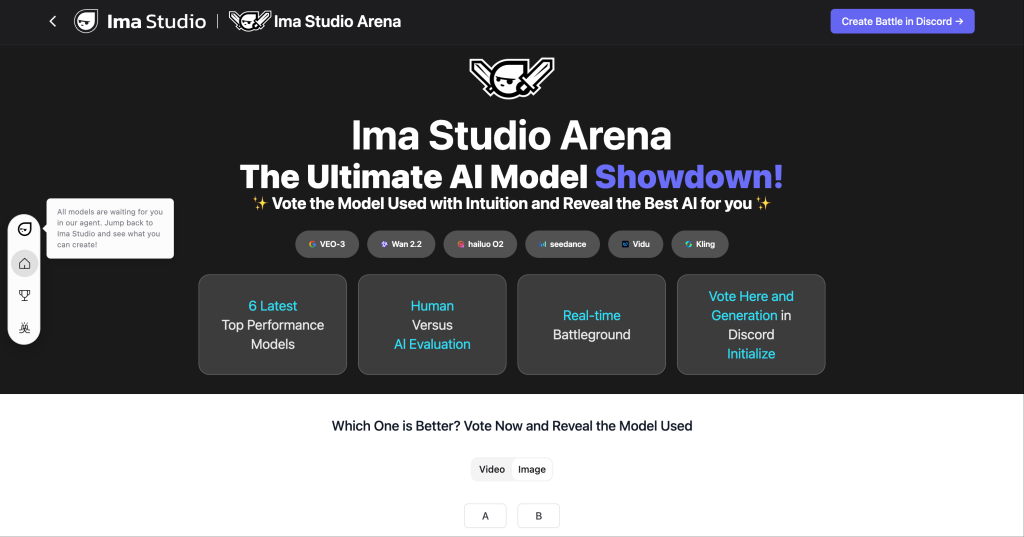
- Model PK (A/B/C) with the same prompt via Ima Arena, so you see which engine fits your brief before spending credits.
- One-click templates from the Ima community to replicate proven Sora 2 looks (camera blocks, color LUTs, motion presets).
- Unified generate + retouch workflow (see our Google Nano Banana: Unified AI Generate & Retouch Workflow) for cleaner faces, smoother motion, and production-ready exports.
How We Tested the Best Sora 2 Video Generators
To evaluate the best Sora 2 video generator options, we ran identical prompts and settings where possible and observed consistency, motion quality, and editability. Our process:
- Prompts: Three creative briefs covering realism, stylized anime, and dynamic product B-roll (see below).
- Settings: Matched aspect ratios (16:9 and 9:16), target durations (8–12s), and default quality tiers when Sora 2 supports them.
- Parity: Side-by-side model runs in Ima Arena to remove “lucky seed” bias.
- Post: Identical enhancement pass (retouch, upscale, grade) in Ima Studio.
Note on availability: Sora 2 access can be region- or account-gated. If you need help, see our step-by-step guides: How to Get a Sora 2 Invite Code and How to Get a Sora 2 Invite Code (Updating).
Test prompts we used (copy/paste)
- Realism (street documentary): “Golden-hour handheld shot following a cyclist weaving through Tokyo alleyways, shallow depth of field, realistic traffic and soft lens flares, natural skin tones, subtle camera micro-jitters, 24fps cinematic, gentle bokeh.”
- Anime (character + environment): “Close-up of a silver-haired anime heroine in a neon-lit rainstorm, cyberpunk street reflections, wet hair strands, expressive eyes, coat rippling in wind, slow push-in, painterly highlights, studio-quality key light.”
- Product B-roll: “Rotating matte-black smartwatch on glossy black turntable, macro details, specular highlights, soft top light, floating dust motes, realistic reflections, parallax camera arc, end on logo lock-up.”
Results: Best Sora 2 Video Generator vs Popular Options
Below is a high-level summary of how major Sora 2 generators and adjacent tools performed in our tests. We prioritized realism, camera control, reliability, and post-production readiness.
| Tool | Access Model | Strengths | Gaps | Best For |
|---|---|---|---|---|
| Ima Studio (Sora 2 via agent routing) | Direct Sora 2 when eligible; auto-fallback to top alternatives | Model PK in Arena; templates in Community; unified generate + retouch; consistent outputs across projects | Requires credit plan; Sora 2 access depends on account/region | Creators who want Sora 2 look-alikes with professional post pipeline |
| OpenAI Sora 2 (direct) | Official access; often limited/invite | Latest Sora 2 features and motion fidelity per OpenAI | No built-in post; availability constraints; fewer workflow tools | Early-access users who will handle editing elsewhere |
| InVideo Sora | Hosted generator | Easy onboarding; simple text-to-video flows | Limited expert controls; post and model switching less granular | Beginners testing short Sora-like clips quickly |
| Krea Sora 2 | Model access in Krea | Rapid iteration UI; creative community | End-to-end finishing tools not as integrated | Exploration and fast drafts |
| Higgsfield Sora 2 presets | Preset-driven | Preset guidance for consistent styles | Depends on external pipeline for polish | Users who like starting from presets |
Key takeaway: If you have guaranteed Sora 2 access and a separate edit workflow, the official route is strong. For everyone else, Ima Studio is the most practical “best Sora 2 video generator” because it preserves intent across models, lets you A/B before spending, and finishes your video in the same place.
How to Use Ima Studio as Your Sora 2 Video Generator
- Open the Sora 2 Video Generator page and paste your prompt. Choose aspect ratio and target duration.
- Run a quick model PK in Ima Arena to confirm Sora 2 (or the best fallback) matches your intent.
- Refine with negative prompts, camera notes (e.g., “slow push-in”), and motion style. Save settings as a template.
- One-click retouch: Clean faces, stabilize minor jitters, upscale. See the unified flow in our guide: Testing Google Nano Banana: Unified AI Generate & Retouch Workflow.
- Add LUTs, music, and captions. You can start from free community templates in the Ima community.
- Export in your target format (vertical for Shorts/Reels/TikTok, widescreen for YouTube). For platform-ready ideas, explore Best Friend Forever Video Ideas.
Tip: If Sora 2 is temporarily unavailable for your account, Ima Studio can route to top alternatives with matching style, then apply a retouch pass to achieve Sora-like polish.
Best Sora 2 Settings and Prompt Tips (That Actually Matter)
- Camera verbs first: Lead with “handheld,” “slow dolly,” or “macro arc” to anchor motion.
- Frame rate and cadence: “24fps cinematic” helps with natural motion blur and pacing hints.
- Lighting specifics: “Soft top light + practicals,” “neon reflections in wet asphalt,” or “window key + rim” improves realism.
- Material cues: Words like “matte,” “specular,” “subsurface scattering,” “micro-scratches” guide surface behavior.
- Negative prompts: Explicitly exclude “melting,” “extra fingers,” “flicker,” “warped logos,” “swimming textures.”
- Duration discipline: Keep first passes under 12s; long clips magnify drift. Stitch scenes after retouch.
- Style locks: If you need brand consistency, reuse the same template and seed, then only change content nouns.
If you’re new to AI video, our explainer Why Are AI Videos So Bad? shows the common failure modes and how Ima Studio’s workflow mitigates them.
Sora 2 Alternatives Inside Ima Studio (When Access Is Limited)
Ima Studio integrates multiple state-of-the-art video models. If Sora 2 is restricted in your region or account, try these engines with similar creative outcomes:
- Veo 3: Strong cinematic motion and camera coherence for live-action briefs.
- Pika: Fast iteration; solid stylized results and edits on re-prompt.
- Kling: Notable physics and long-range motion in tests.
- Hailuo: Balanced quality for social-friendly loops.
- Vidu Q2 (reference): Useful for character-consistent anime workflows.
Because Ima Studio is an agent, you can A/B any of these against Sora 2 in Arena using the exact same prompt, then proceed with the winner. For broader context, see our benchmarks: Best AI Video Generator 2025: Real Tests in Ima Studio and Nano Banana vs Seedream 4.0.
FAQs About the Best Sora 2 Video Generator
How do I get Sora 2 access?
Access is limited and may be invite- or region-gated. Follow our guides: How to Get a Sora 2 Invite Code and How to Get a Sora 2 Invite Code (Updating). We monitor OpenAI updates and refresh steps accordingly.
Is Ima Studio affiliated with OpenAI?
No. Ima Studio integrates multiple third-party models and tools and may connect to Sora 2 if your account is eligible. We are an independent platform focused on creative outcomes.
Will my Sora 2 video have a watermark?
Watermarking depends on the specific model/provider and your plan. Ima Studio itself does not add watermarks to paid exports. Always respect content policies and IP rights.
What’s the best resolution and aspect ratio for Sora 2?
For social, use 9:16 at platform-native lengths (6–12s). For YouTube, 16:9 at 1080p+ and 24–30fps. If the model caps resolution, upscale in Ima Studio during the retouch step.
Can I keep the exact “Sora look” without Sora 2?
You can approximate the look with alternatives (Veo 3, Pika, Kling) and a retouch pipeline. Use Arena to validate visually. Many briefs are achievable with minimal compromise.
Start Creating with the Best Sora 2 Video Generator
If you already have Sora 2 access, connect it in Ima Studio and run a quick Arena test to lock your settings. If not, pick a template from the community, generate with a top alternative, and apply the retouch pass. The result: Sora 2–level polish with fewer blind spots and a faster path to publish.
Sources and Further Reading
- OpenAI. “Sora 2” overview and updates: https://openai.com/index/sora-2/
- InVideo Sora generator: https://invideo.io/make/sora/
- Krea Sora 2 model: https://www.krea.ai/models/sora2 and app: https://www.krea.ai/apps/video/sora-2
- Higgsfield Sora 2 presets: https://higgsfield.ai/sora-2-ai-video-presets
- Ima Studio resources:
- Sora 2 generator: https://imastudio.com/sora-2-video-generator
- Ima Arena (model PK): https://www.imastudio.com/arena/review
- Community templates: https://www.imastudio.com/community
- Best AI video generator tests: https://imastudio.com/blog/best-ai-video-generator
- Unified generate + retouch workflow: https://imastudio.com/blog/nano-banana-guide
- Why AI videos fail and how to fix them: https://imastudio.com/blog/why-are-ai-videos-so-bad
- Sora 2 invite code guides: https://imastudio.com/blog/sora-2-invite-code and https://imastudio.com/blog/sora-2-invite-code-updating
Disclosure: Availability, pricing, and model policies change frequently. Always consult official pages for the latest details.
Related tools on Ima Studio: Text to Image, AI Avatar, Pika Video, Veo 3 Video, Kling Video.
About The Author