If Runway’s credit cost is pushing you to compare Runway alternatives, start with Ima Studio. In our matching-task snapshot, Ima Studio cost less on most shared image and video configurations we could verify, including Nano Banana 2, Seedance 2.0, Seedance 2.5, Kling 3.0, Wan 3.0, and MiniMax H3 Max. Runway remained cheaper on Nano Banana Pro at 2K and 4K.
Runway is more than a model gateway. Its own Gen-4.5, Aleph, Act-Two, audio, upscale, asset management, and production formats can justify the price. The right replacement depends on whether you need Runway’s production layer or only cheaper access to a repeated generation task.
The best Runway alternatives at a glance
| Rank | Alternative | Best for | Starting paid plan* | Main trade-off |
|---|---|---|---|---|
| 1 | Ima Studio | Lower task prices across several shared image and video models | $9.99/month | Runway has deeper proprietary video and finishing tools |
| 2 | Kling AI | Direct Kling video generation and multi-shot work | Varies by market | Narrower model choice than a multi-model studio |
| 3 | Pika | Fast social effects, swaps, additions, and short clips | $8/month billed annually | Less suited to production finishing and model comparison |
| 4 | Luma AI | Ray video, HDR-oriented production, and multimodal projects | $30/month | Higher starting price than lightweight creator plans |
| 5 | Higgsfield | Cinematic camera presets and film-oriented direction | $15/month | Some shared models cost more than Ima Studio |
| 6 | OpenArt | Image-first character, story, and editing workflows | $14/month | Video and Director costs need task-level checking |
| 7 | Pollo AI | Broad model access and model-specific unlimited offers | $15/month | Subscription credits don’t roll over |
*Lowest regular paid individual plan observed in the current evidence. Annual billing, model access, commercial rights, and promotional unlimited offers differ.
Why are creators looking for Runway alternatives?
Runway’s technology isn’t the only factor in a renewal decision. The number of usable seconds you receive for your monthly spend matters just as much.
Runway’s official credit guide says its Free plan includes a one-time 125-credit deposit. Standard includes 625 credits, Pro 2,250, and Max 9,500. Standard and Pro monthly credits expire on the billing date; Max can roll over up to one month. Purchased credits don’t expire. A Gen-4.5 video uses 12 credits per second, so five seconds costs 60 credits and ten seconds costs 120. See Runway’s current credit rules.
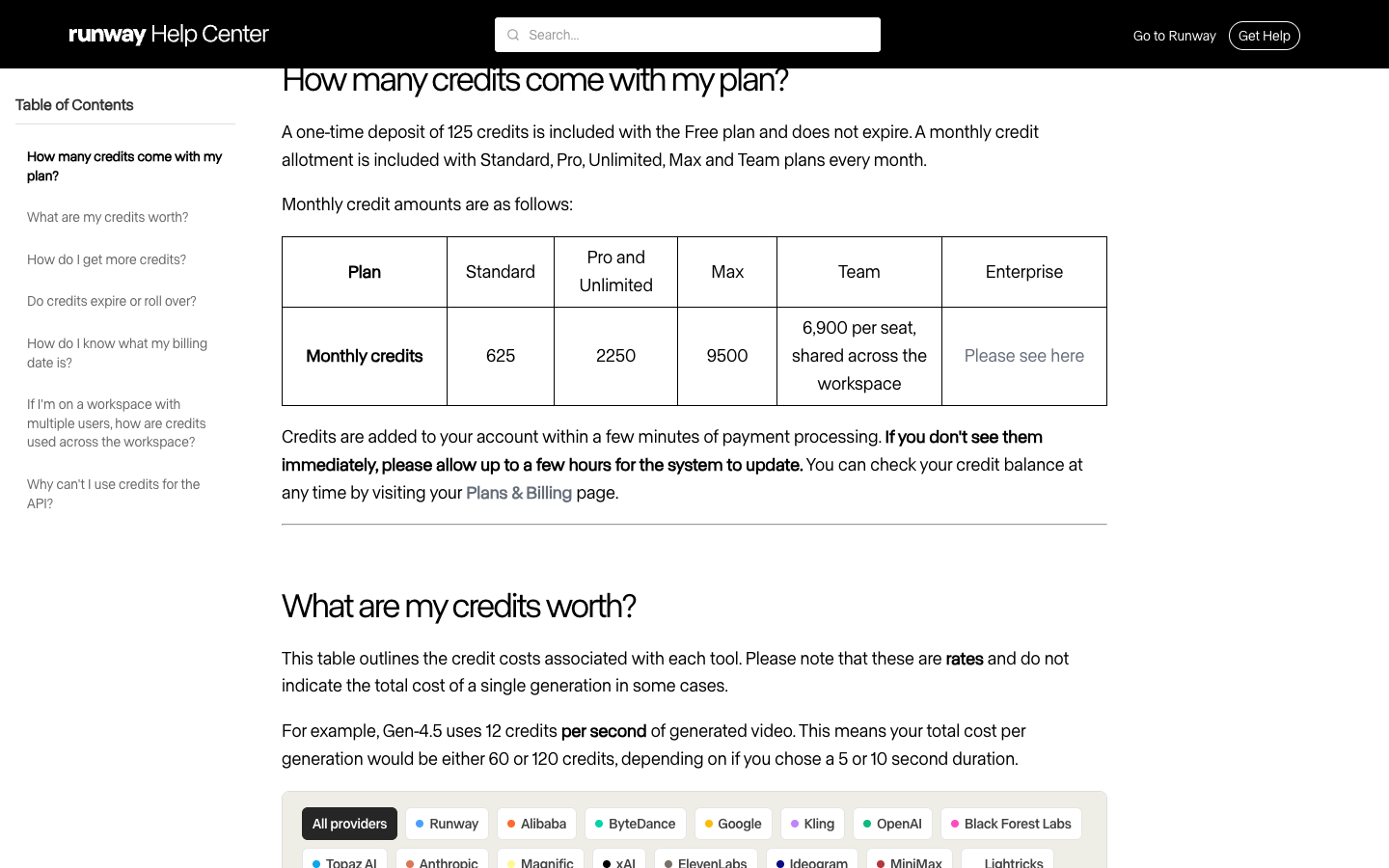
That arithmetic leaves limited room for retries on an entry plan. And retries dominate current review complaints.
On September 11, 2026, Trustpilot listed runwayml.com at 1.1 out of 5 across 326 reviews. Trustpilot warns that the company has no history of asking for reviews and that the sample may not represent all customers. Still, recent reviewers repeatedly described credits consumed by outputs that missed prompts or reference material, the cost of repeated corrections, support and refund problems, and paid features changing during an active subscription. A few reviewers also acknowledged that some creative tools or individual outputs worked well.
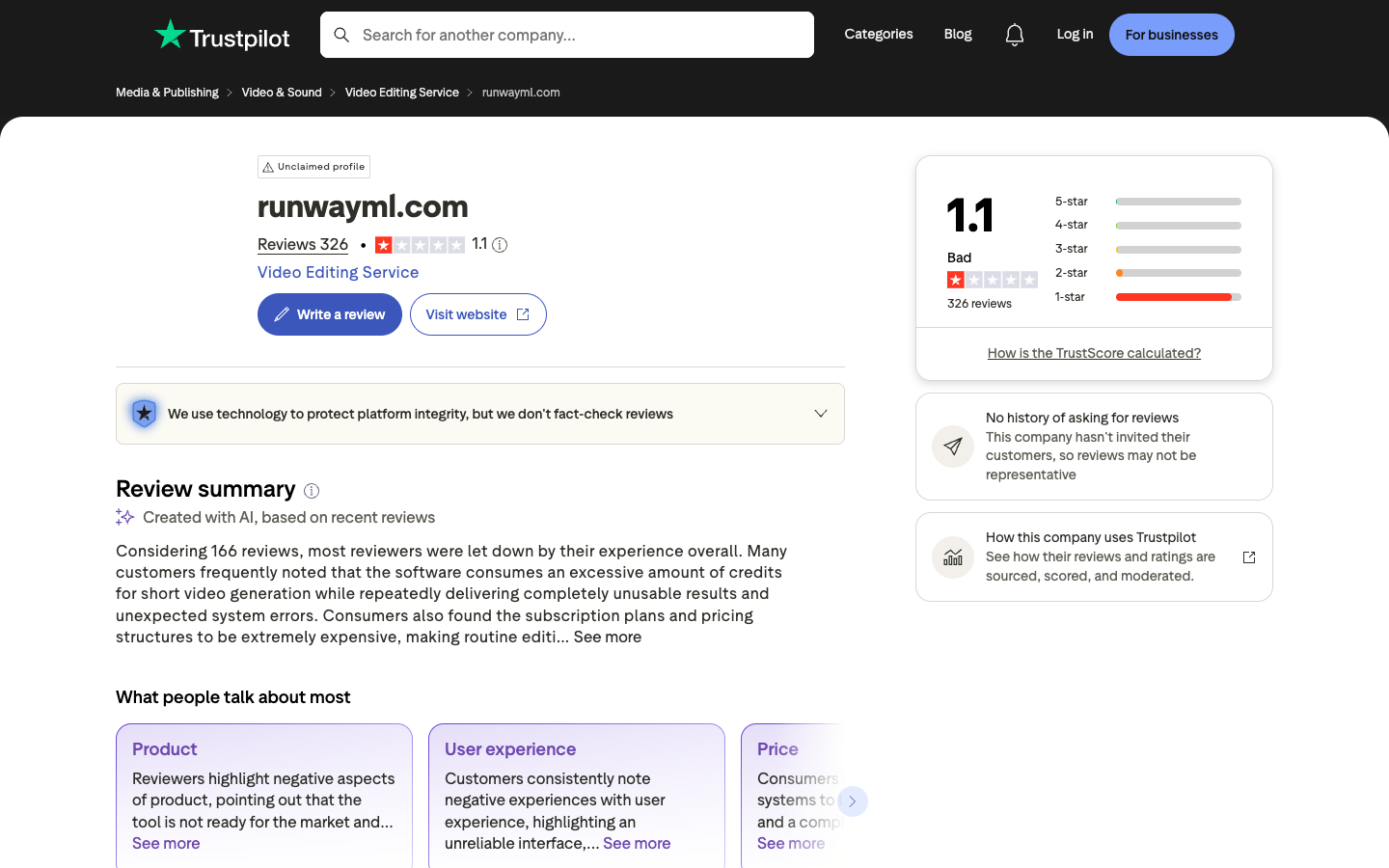
These reports don’t prove that every generation fails. They identify the jobs a serious comparison must measure: cost per usable clip, treatment of failed generations, prompt and reference adherence, and whether the plan keeps the features you bought it for.
How we tested and ranked these Runway alternatives
This article tests price and workflow. It isn’t a blind video-quality shootout.
For models available on both platforms, we selected the nearest matching model and output specification, recorded the displayed task credits, and converted them using the lowest regular subscription price that allowed the task. Images are shown in dollars per image. Videos are shown in dollars per second using the actual duration. Raw credit counts are never compared across platforms.
The price snapshot was collected September 4–7 and reviewed September 10. Temporary promotions, tax, unused-credit breakage, payment fees, and unpublished enterprise deals are excluded. Missing or incompatible specifications are left out.
Our ranking weights are:
- 50% matching-task price and cost clarity: generation cost, plan access, expiry, and failed-task rules.
- 20% video workflow: text, images, video and audio as inputs; editing; upscale; and export.
- 15% model choice: proprietary and third-party model access.
- 10% free evaluation: how much testing is possible before a paid commitment.
- 5% specialization: whether the platform solves one job better than a broad suite.
Tested means task-price capture and workflow verification. No alternative receives an output-quality score without an equivalent-input test using the same prompt, reference, model version, duration, and number of attempts.
Runway vs Ima Studio: matching task prices
| Model and specification | Ima Studio | Runway | Lower-priced option |
|---|---|---|---|
| Nano Banana, default image | $0.0666/image | $0.1200/image | Ima Studio, about 45% lower |
| Nano Banana 2, 1K | $0.0666/image | $0.1680/image | Ima Studio, about 60% lower |
| Nano Banana 2, 4K | $0.1443/image | $0.3840/image | Ima Studio, about 62% lower |
| Nano Banana Pro, 2K | $0.1554/image | $0.1200/image | Runway, about 23% lower |
| Nano Banana Pro, 4K | $0.1998/image | $0.1200/image | Runway, about 40% lower |
| GPT Image 2, 2K medium | $0.0777/image | $0.1200/image | Ima Studio, about 35% lower |
| Seedream 5.0 Pro, 2K | $0.1332/image | $0.2160/image | Ima Studio, about 38% lower |
| Seedance 2.0, 720p | $0.2270–$0.2283/sec | $0.8640/sec | Ima Studio, about 74% lower |
| Seedance 2.0 Fast, 720p | $0.1816–$0.1843/sec | $0.6960/sec | Ima Studio, about 74% lower |
| Seedance 2.5, 720p | $0.3515–$0.3774/sec | $0.7200/sec | Ima Studio, about 48–51% lower |
| Kling 3.0 standard | $0.0999–$0.1443/sec | $0.2160–$0.3120/sec | Ima Studio, roughly 53–54% lower |
| Wan 3.0, 720p | $0.1596–$0.1665/sec | $0.2400/sec | Ima Studio, about 31–34% lower |
Runway isn’t universally expensive. Its captured Nano Banana Pro price was lower at 2K and 4K. But if you use Runway mainly to access Seedance, Kling, Wan, or several shared image models, the gap can compound quickly across a production week.
1. Ima Studio — best overall Runway alternative for price
Ima Studio ranks first because the price advantage appears across both image and video jobs rather than one isolated model. The largest captured differences were on Seedance 2.0 and Nano Banana 2, while Kling 3.0, Wan 3.0, Seedance 2.5, and Seedream 5.0 also cost less under the measured plans.
Ima Studio provides direct access to Runway Gen-4 and Gen-4.5 as well as other video families. Its Runway AI video generator is useful when you want to try Runway alongside other models without making Runway’s subscription your only route. Ima Studio also links video generation with image creation, commerce workflows, templates, and model-specific pages.
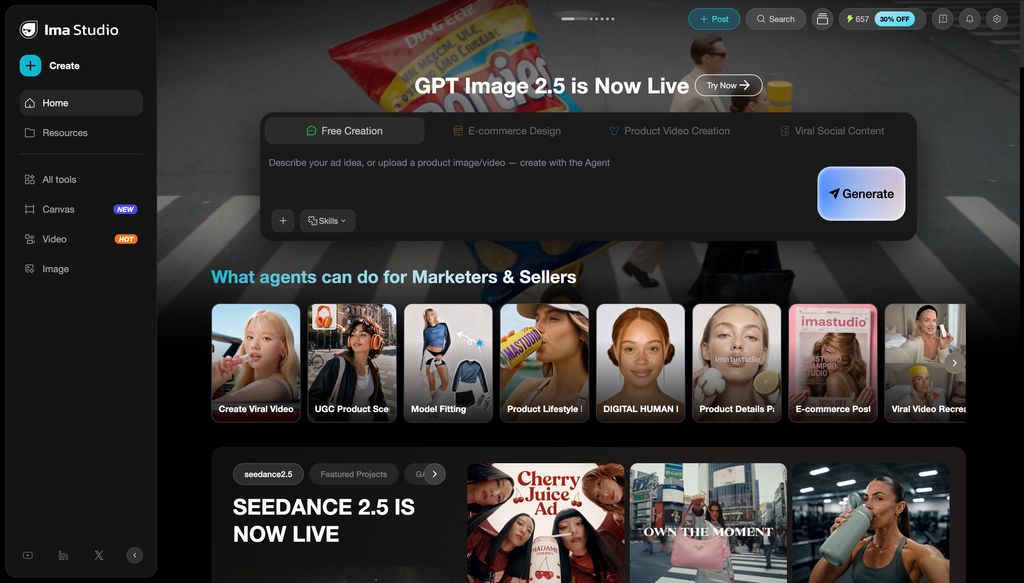
The trade-off is production depth. Runway’s native app has its own models, asset system, audio tools, video editing, upscale, professional output formats, and higher-tier collaboration features. If those tools replace other software in your stack, a lower per-generation price elsewhere may not lower total project cost.
Choose Ima Studio if: you repeatedly use shared third-party models, want to compare options under one balance, or need lower measured prices on Seedance, Kling, Wan, and several image models.
Stay with Runway if: Gen-4.5, Aleph, Act-Two, finishing tools, or production formats are central to the job.
2. Kling AI — best direct alternative for generative video
Kling is a focused alternative when you want Kling’s own video family rather than Runway’s production suite. It supports text-to-video, image-to-video, multi-shot generation, and model-specific motion controls without requiring a second platform to expose the model.
Going direct simplifies one question and creates another. You avoid paying Runway as the access layer for Kling, but you lose Runway’s editing ecosystem and its broader model catalog. The right choice depends on whether you already know which model should make the shot.
Choose Kling if: Kling is already your main generation model and most work happens after export.
Skip it if: you rely on Runway for editing, audio, asset organization, or rapid switching between vendors.
3. Pika — best for quick social effects
Pika is built around short, playful transformations. Its current plans include Pikascenes, Pikadditions, Pikaswaps, Pikatwists, and Pikaffects. The paid Standard plan starts at $8 per month when billed annually and includes 700 monthly video credits. See Pika’s current pricing.
That makes Pika a better fit for a creator who needs frequent swaps, additions, and effect-driven social clips than a team replacing Runway’s full production workflow.
Choose Pika if: the deliverable is a short social effect and speed matters more than a deep editor.
Skip it if: you need Runway’s proprietary models, finishing tools, or professional formats.
4. Luma AI — best for Ray and multimodal production
Luma’s current platform centers on Ray video models, UNI image models, and agent-led multimodal workflows. Its official product information lists Ray3.2 as the current video model and describes access to third-party video and image models. See Luma’s current model information.
Luma is a serious Runway alternative when HDR, video modification, Ray, or a multimodal project matters. The current app plans start higher than lightweight creator options, so this is not automatically the budget choice.
Choose Luma if: Ray or its production formats solve the job better than Runway’s stack.
Skip it if: your first filter is the lowest monthly entry price.
5. Higgsfield — best for cinematic camera controls
Higgsfield turns cinematography choices into a product surface. Its camera-control library includes dolly, orbit, crane, drone, tracking, pan, tilt, zoom, and other presets. Cinema Studio adds camera, lens, focal-length, and multi-shot direction around interchangeable models.
Higgsfield and Runway overlap, but their center of gravity differs. Runway offers a broad creation and finishing suite. Higgsfield makes film language and preset-driven direction more visible at the point of generation.
Choose Higgsfield if: camera behavior and fast cinematic setup are the reason you’re switching.
Skip it if: your complaint is simply the cost of shared models; compare the exact task first.
See our tested Higgsfield alternatives and price comparison.
6. OpenArt — best for image-first stories and characters
OpenArt fits creators whose video begins with character design, image editing, personalized models, or story assembly. Its current Starter plan is $14 per month and lists 4,000 credits, Director, consistent characters, story creation, image editing, and access to more than 100 image, video, and audio models. See OpenArt pricing.
OpenArt can replace more of the pre-video process than a dedicated generator. Its weakness is the same one driving people away from Runway: video and agent-led tasks can become hard to predict without checking the displayed cost at every step.
Choose OpenArt if: your process is image-first and recurring characters or story assembly matter.
Skip it if: video cost predictability is your only reason for leaving Runway.
Read the full OpenArt alternatives price comparison.
7. Pollo AI — best when an unlimited offer matches your model
Pollo combines multiple image and video models with credit plans and rotating unlimited offers. Its pricing FAQ says credits vary by model, duration, output count, and resolution. Subscription credits don’t roll over; separately purchased add-on credits don’t expire but are non-refundable. See Pollo AI pricing.
An unlimited offer can beat Runway for a high-volume month, but only when it covers the exact model and mode you use. Treat the offer terms as part of the model specification.
Choose Pollo if: the current unlimited model is already your production model.
Skip it if: you’re assuming “unlimited” applies to the entire catalog.
Which Runway alternative is cheapest?
Ima Studio was cheaper across most matching tasks in our sample. Pika has one of the lowest paid entry prices for short social-video workflows, while Kling can be economical when you only need its own model. The cheapest option changes when privacy, commercial rights, resolution, audio, and model access force a higher plan.
Use this four-step check:
- List the three models and specifications that consumed most of last month’s credits.
- Capture the displayed task cost on Runway and each candidate.
- Include the subscription tier required for that model and output format.
- Multiply by attempts per usable clip, then add editing or upscale tools you would need elsewhere.
Price per usable clip beats price per credit.
Is there a free alternative to Runway?
Runway itself offers 125 one-time credits. Pika has a free plan with limited access, while Luma lets users test its app before committing. Ima Studio lets visitors try selected model and video tools after signing up.
Free tiers are good for one representative test. Before client work, verify watermarks, commercial rights, privacy, queue limits, output resolution, and whether credits refill.
Should you leave Runway?
Switch if shared models cost materially less elsewhere, paid corrections consume too much of your balance, or a focused tool better matches the only video job you perform.
Stay if Runway’s own models and production tools replace enough of your workflow to offset the generation price. Moving generation, audio, editing, upscale, and asset management into separate subscriptions can erase the apparent saving.
Our recommendation is practical: test Ima Studio first when shared-model price is the problem, Kling when one generation model is enough, Pika for social effects, and Luma or Higgsfield when a specific film workflow matters more than entry price.
For broader model selection, use the Ima Studio AI model guide or compare the best AI video generators.
About The Author