What is Doubao AI? Doubao AI is ByteDance’s AI assistant and model ecosystem. It covers chat, writing, reasoning, image generation through Seedream, and video generation through Seedance. If you have been searching for what is Doubao, what is Doubao AI, or a clear Doubao AI assistant introduction, this page gives the fastest answer.
Many users also search for Doubao AI what is it because the brand can be confusing outside China. That confusion gets bigger when people see names like Cici and Dola. In this guide, we explain what Doubao is, what its international version is called, how Doubao AI image generation works, and what the real difference is in the Dola vs Doubao discussion.
Quick answer: Doubao AI is ByteDance’s AI assistant and model ecosystem. Its international chatbot brand is Dola, formerly Cici. Its image model is Seedream, and its video model is Seedance.
- Doubao = ByteDance AI assistant + model family
- Dola = international chatbot brand
- Seedream = Doubao AI image generation model
- Seedance = Doubao AI video generation model
What is Doubao AI?
Doubao AI is ByteDance’s consumer-facing AI assistant and underlying model ecosystem. In practical terms, it is both:
- A chat assistant that can answer questions, write, summarize, translate, and help with everyday tasks
- A model family that includes text models, multimodal models, and media generators such as Seedream for images and Seedance for video
So when people ask what is Doubao AI, the best answer is: it is not just one chatbot app. It is ByteDance’s wider AI stack, including assistant experiences, creative models, and hardware integrations.
Here is the fast version:
- Doubao = the main China-facing assistant and AI model family
- Dola = ByteDance’s international consumer chatbot brand, formerly known as Cici
- Seedream = Doubao-family image generation model
- Seedance = Doubao-family video generation model
What is Doubao? Why is everyone talking about it?
Doubao has become one of ByteDance’s most important AI brands because it connects several fast-growing product layers:
- Assistant use cases like chat, search, writing, summarization, and coding help
- Creative generation through models such as Seedream and Seedance
- Device integration through projects like the ZTE × Doubao AI phone
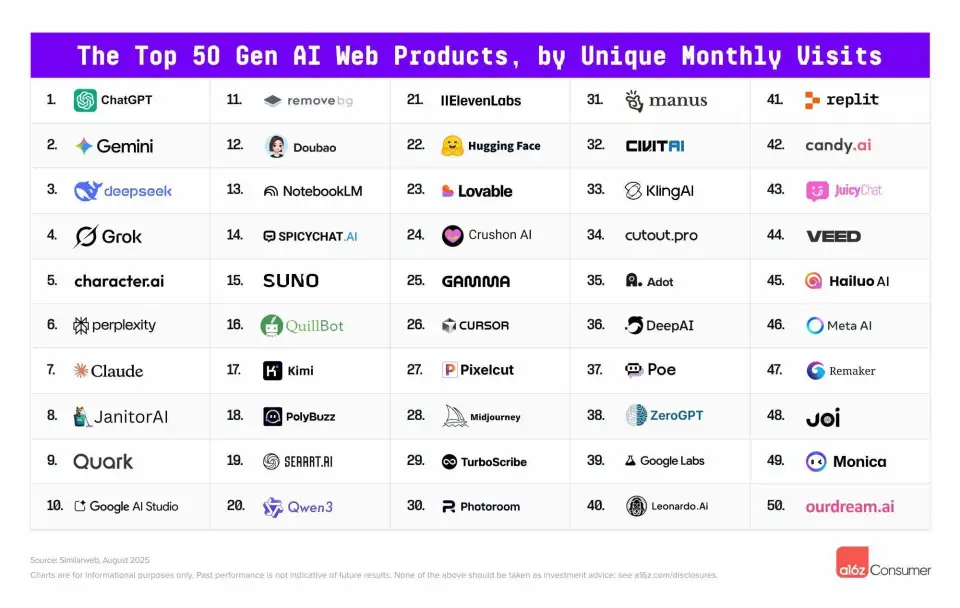
That is why keyword interest is not limited to one single question. People search for “what is doubao,” “what is doubao ai,” “doubao ai image generation,” and even brand-comparison terms, because Doubao now sits across assistant, image, video, and device experiences.
What is the international version name of Doubao?
One of the most common searches right now is Doubao international version name. The answer is that ByteDance’s international chatbot brand is Dola, which was previously called Cici.
So if you are wondering whether there is an “English version of Doubao,” what you usually find is Dola, not an app literally named “Doubao English.” That is why a lot of global users see the brand transition from Cici to Dola and get confused about whether they are looking at the same product family.
Dola vs Doubao: what’s the difference?
The Dola vs Doubao question shows up a lot because users see different names in search results, app stores, and discussions. In reality, the relationship is closer to global brand vs China-facing brand experience. That is why someone searching “what is Doubao AI” can easily end up on pages about Dola instead.
- Doubao is the main AI assistant and model identity used inside China
- Dola is the international-facing consumer chatbot brand
- Cici was the earlier international branding before the Dola rename
So when users search doubao vs dola or dola vs doubao, the practical answer is this: Dola is the overseas-facing chatbot brand, while Doubao refers more broadly to ByteDance’s AI assistant ecosystem and model family.
Doubao vs Dola vs Seedream vs Seedance
| Name | What it is | Main use | Best keyword intent |
|---|---|---|---|
| Doubao | ByteDance’s AI assistant and broader AI brand | Chat, writing, reasoning, general assistant tasks | what is doubao / what is doubao ai |
| Dola | ByteDance’s international consumer chatbot brand, formerly Cici | Global-facing chat assistant experience | doubao international version name / dola vs doubao |
| Seedream | Doubao-family image model | Image generation, posters, covers, structured layouts | doubao ai image generation |
| Seedance | Doubao-family video model | Text-to-video and image-to-video generation | doubao video model / seedance |
Why do strange searches like “hello doubao. do you know what my name is?” appear?
Some Doubao-related keywords look strange at first glance. A query like “hello doubao. do you know what my name is?” is not really a brand-definition search. It is usually a user-behavior search.
These queries often appear for three reasons:
- People are testing the assistant: they want to see how Doubao responds to personal, memory-like, or conversational prompts.
- People are searching copied prompt examples: they saw a demo, a screenshot, or a viral conversation and pasted the exact line into search.
- People are comparing assistant behavior: they want to know whether Doubao behaves more like ChatGPT, Claude, or other AI assistants in natural conversation.
From an SEO perspective, this matters because not every keyword is a pure “what is it?” keyword. Some are interaction-intent queries. They reveal how users actually test AI assistants in the real world. For Doubao, that means search demand is split between:
- definition intent — “what is doubao”
- brand navigation intent — “doubao international version name”
- behavioral intent — “hello doubao. do you know what my name is?” and similar prompt-style searches
In practical terms, these odd keywords tell us that users are not only asking what Doubao is. They are also trying to understand how Doubao behaves as an AI assistant — whether it remembers context, how natural its responses feel, and what happens when you talk to it conversationally.
Does Doubao support English?
Yes. Doubao’s models support English. That matters because many users assume Doubao is only usable in Chinese, but that is not true. If you can access the relevant interfaces, you can prompt in English for chat tasks, writing, and many creative workflows.
This is especially relevant for people interested in Doubao AI image generation and video generation, because the underlying creative models are already reaching global users through tools that expose them in English.
Doubao AI image generation: Meet Seedream
When people search for Doubao AI image generation, they are usually looking for the image model inside the Doubao family. That model is Seedream.
Seedream is known for strong visual quality, layout control, and good handling of text inside images. That makes it particularly useful for:
- posters and covers
- marketing visuals
- UI and product mockups
- social visuals with structured composition
If your main interest in Doubao is image creation rather than chat, Seedream is the part of the ecosystem you should pay most attention to. You can try it through Ima Studio’s Seedream image generator.
In other words, if a user types doubao ai image generation into Google, the most useful answer is not just “Doubao can make images.” The clearer answer is that Seedream is the image-generation branch of the Doubao ecosystem.
Doubao AI video generation: Meet Seedance
On the video side, the Doubao family includes Seedance. While search demand is stronger right now for “what is Doubao” and “Doubao AI image generation,” Seedance matters because it shows that Doubao is not just a chatbot brand — it is also part of ByteDance’s larger multimodal generation strategy.
Seedance focuses on short, cinematic clips with support for text-to-video and image-to-video workflows. It is particularly relevant for creators who want to turn still images, prompts, or storyboards into short-form video content. You can explore it through Ima Studio’s Seedance video generator.
What is the ZTE × Doubao AI phone?
Another reason Doubao attracts attention is that it is moving beyond software. The ZTE × Doubao AI phone brings Doubao into the operating system itself. Instead of behaving only like a chat assistant, it can work more like a system-level agent with awareness of screen context and app-level actions.
This matters because it shows ByteDance is positioning Doubao not only as an assistant app, but as a broader AI layer that can appear across chat, media generation, and hardware experiences.
Why try Doubao-family models through Ima Studio?
If you are a creator, editor, or marketer, the easiest route is often not raw model APIs. It is a ready-to-use environment where the creative workflows are already exposed clearly. That is where Ima Studio becomes useful.
- Use Seedream for image generation
- Use Seedance for video generation
- Explore broader creation options through the Ima Studio tools hub
That setup is often better for non-developers because it reduces infrastructure friction. Instead of dealing with raw API configuration, you can focus directly on prompts, image generation, and video generation.
Search intent map: what users usually mean by these Doubao keywords
| Keyword | Likely intent | Best short answer |
|---|---|---|
| what is doubao | Basic definition | Doubao is ByteDance’s AI assistant and model family. |
| what is doubao ai | Broader explanation | Doubao AI includes chat, writing, Seedream image generation, and Seedance video generation. |
| doubao international version name | Brand navigation | The international chatbot brand is Dola, formerly Cici. |
| dola vs doubao | Brand comparison | Dola is the overseas-facing chatbot brand; Doubao is the broader AI ecosystem. |
| doubao ai image generation | Creative use case | Seedream is the image-generation branch of the Doubao ecosystem. |
| hello doubao. do you know what my name is? | Behavioral / prompt-style query | The user is testing how the assistant behaves in real conversation. |
FAQ
1. What is Doubao AI?
Doubao AI is ByteDance’s AI assistant and model ecosystem. It includes chat, writing, reasoning, image generation through Seedream, video generation through Seedance, and hardware integration through projects like the ZTE × Doubao AI phone.
2. What is Doubao?
Doubao is the broader ByteDance AI brand used for its assistant and model ecosystem, especially in the China market. Many people use “Doubao” to refer both to the chatbot and to the wider AI platform behind it.
3. What is the international version name of Doubao?
The international consumer chatbot brand is Dola, formerly known as Cici. That is why searches for an English version of Doubao often lead to Dola instead.
4. Dola vs Doubao: are they the same?
Not exactly as brand names, but they are closely related. Doubao is the broader ByteDance AI identity, while Dola is the international-facing chatbot brand for global users.
5. What is Doubao AI image generation?
In most cases, people mean Seedream, the Doubao-family image model used for high-quality image creation, layout control, and stronger text rendering.
6. Can I use Doubao in English?
Yes. Doubao’s models support English, and global users can also access Doubao-family image and video models through English-friendly tools like Ima Studio.
7. Where can I try Seedream and Seedance?
You can try Seedream through Ima Studio’s image workflow and Seedance through its video workflow.
About The Author