











 Ima Studio
To use Seedance 2.5 in Claude, connect ImaStudio to Claude, then ask for Seedance 2.5 by name and say the length, aspect ratio and resolution you want. Claude calls ImaStudio’s tools, the video is made on your points, and the result lands on a canvas in your ImaStudio account. This guide gives you the settings Seedance 2.5 accepts, the price of each resolution, and a real run.
Connecting takes a few minutes and is covered step by step in our first guide, how to generate AI videos in Claude with ImaStudio. Come back here once Claude can list ImaStudio’s video models.
What Claude can do through ImaStudio
ImaStudio’s server hands Claude a set of tools. When we listed them on November 19, 2026 there were 28, in four groups:
- Media (7): generate, list models, check a task, make an upload link, import a public link, remove a background, upscale.
- Canvas (11): create, list, read, rename, arrange, group, add media, write text, update or delete nodes, delete a whole canvas.
- Templates (5): search, get, place, save, delete.
- Asset packs (5): create, get, search, update, delete.
The approval screen spells out what you’re allowing. When we approved Codex, it listed three things: view your canvases and what’s on them; create canvases and add, edit and delete nodes on them; use your points to generate images, videos and audio. You can revoke access later in Settings → Connected apps. Keep the word “delete” out of your prompts unless you mean it.
Seedance 2.5 settings in ImaStudio
These are the options in ImaStudio’s model catalog on November 19, 2026. Models change, so ask Claude to confirm before a big run.
| Task | Aspect ratios | Resolutions | Length |
|---|---|---|---|
| Text to video | 16:9, 9:16, 1:1, 4:3, 3:4, 21:9, adaptive | 480p, 720p, 1080p, 4k | 4 to 30 seconds |
| Image to video | adaptive only | 480p, 720p, 1080p, 4k | 4 to 30 seconds |
| First and last frame | adaptive only | 480p, 720p, 1080p, 4k | 4 to 30 seconds |
| Reference images | 16:9, 9:16, 1:1, 4:3, 3:4, 21:9, adaptive | 480p, 720p, 1080p, 4k | 4 to 30 seconds |
Every task also lets you turn sound on or off (it’s on by default) and choose MP4 or MOV.
Image-to-video is the one that surprises people. Ask for 9:16 with a starting image and ImaStudio only accepts adaptive, so the video takes the shape of your image. For a vertical video, start from a vertical image.
What a 5-second clip costs
Price depends on length and resolution. For a 5-second clip, ImaStudio’s price list showed this on November 19, 2026:
| Resolution | Seedance 2.5 | Seedance 2.5 Flash |
|---|---|---|
| 480p | 96 points | 60 points |
| 720p | 204 points | 133 points |
| 1080p | 468 points | Not offered |
| 4k | 714 points | Not offered |
Longer clips cost more. Across every length and resolution, text-to-video runs from 78 to 4,278 points on Seedance 2.5 and from 49 to 742 on Flash. Runs that use reference images are priced separately and cost more, so ask Claude for the quote first.
A sensible habit: draft at 480p or with Flash, then rerun the version you like at 720p or 1080p. And check the price before you spend it:
Using ImaStudio, show me the Seedance 2.5 settings for text to video and the price of a 5-second 720p clip. Don't generate anything yet.Ask for Seedance 2.5 by name
Name the model, the length, the ratio and the resolution, and set a limit on what Claude may spend. Change the scene and send it:
Using ImaStudio, make one 5-second 16:9 video with Seedance 2.5 at 720p, with sound. Show me the price first and stop if it's over 250 points. Scene: A slow dolly-in on a steaming cup of coffee on a wooden table beside a rainy window, warm light, shallow depth of field, no people, no text.A real run, step by step
To see what Claude would see, we ran a request against ImaStudio’s server with Codex, because we could drive it from a terminal. Claude and Codex talk to the same server, so the tools are the same. We didn’t run this exact session in Claude.
We asked for one text-to-video clip with Seedance 2.5: 5 seconds, 16:9, 720p, with a 300-point limit. Here is the request, shortened:
Generate one text-to-video clip with Seedance 2.5: 5 seconds, 16:9, 720p, prompt: "A slow dolly-in on a steaming cup of coffee on a wooden table beside a rainy window, warm light, shallow depth of field, no people, no text." You may spend up to 300 points. Check the price first. If a canvas is needed, create one.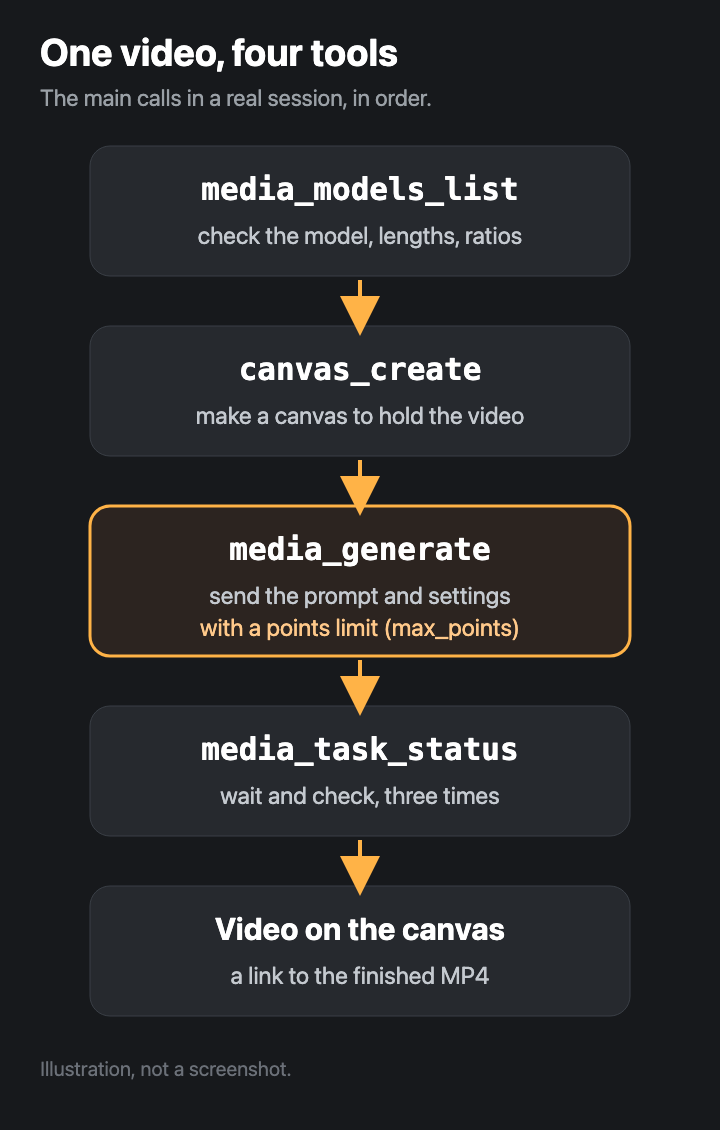
media_models_listread the settings fordreamina-seedance-2-5-260628, the catalog ID for Seedance 2.5.canvas_createmade a canvas, because every generated video lives on one.media_generatestarted the task with duration 5, aspect ratio 16:9, resolution 720p and a limit of 300 points. The call reports the price as the task starts.media_task_statuschecked the task three times, waiting up to 50 seconds each time. The third check returned the link to the MP4.
From request to finished link took about four minutes, most of it waiting for the video.
Two things to notice. Codex turned sound off on its own, even though sound is on by default, and the file has no audio track. If you want sound, say so. And our run used ImaStudio’s test site, where prices differ from the live ones in the table above.
Four things to watch
- Set a points limit. The generate tool’s own description calls it the most points you agreed to spend. Put a number in your prompt.
- Mind the aspect ratio. With a starting image, only
adaptiveis accepted. - Say what you want. Claude fills in settings you leave out, as sound showed above.
- Keep deletes deliberate. The server can delete nodes and whole canvases. Its canvas-delete tool asks to confirm the canvas name first.
FAQ
Is Seedance 2.5 free in Claude?
No. Every run uses your ImaStudio points, at the prices in the table above. Check the live price list before a long clip.
How long does a 5-second clip take?
About two to three minutes of generation in our run. Claude may check the task several times before the link comes back.
Can I start from my own image?
Yes, image-to-video takes a starting image. The server can import a public link, or give you a one-time upload link for a local file. The upload is a file transfer from your computer, so you may need to run it yourself or use Claude Code.
Should I use Flash or the full model?
Flash is cheaper and tops out at 720p. The full model goes up to 4k. Draft with Flash, finish with the full model.
Where to go next
For connecting Claude, see how to generate AI videos in Claude with ImaStudio. If your work lives in a terminal, see how to turn a local image into a video with Codex and the ImaStudio CLI. For turning the clips into ads, see how to build video ads with Seedance 2.5, and for camera wording to borrow, see these 20 AI camera movement prompts.
How this guide was put together: the settings and prices were read from ImaStudio’s live model catalog and price list on November 19, 2026. The example run used Codex CLI 0.166.0 connected to ImaStudio’s MCP server on its test site, so the tool names and the clip come from that run. We didn’t run this exact session in Claude. The cover and the clip were made in ImaStudio.
About The Author


 Will Your Amazon Listing Video Be Live Before Black Friday 2026?
 How to Generate AI Videos in Codex with ImaStudio
 Seedance 2.5 Flash vs Seedance 2.5: How Fast Can You Get a Usable Product Video?
