











 Ima Studio
To use ImaStudio in Cursor, add it as a remote MCP server in your mcp.json file, approve the ImaStudio sign-in in your browser, then ask Cursor’s agent to list the video models and make a clip. This guide gives the config, the sign-in details, how to check it worked, and what to ask first.
Cursor doesn’t make video itself. It calls ImaStudio’s tools, which run video models on your ImaStudio points.
What you need
- An ImaStudio account with points. Every generation costs points, and the next sections show how to check the price first.
- The Cursor desktop app.
- A browser on the same computer, because the sign-in happens there.
- On a company Cursor account, check with your admin. Cursor’s docs say admins can restrict which remote MCP URLs are allowed.
Add ImaStudio to mcp.json
Cursor reads MCP servers from ~/.cursor/mcp.json for every project, or from .cursor/mcp.json inside one project. Add ImaStudio under mcpServers:
{
  "mcpServers": {
    "ima": {
      "url": "https://api.imastudio.com/mcp"
    }
  }
}
The name ima is yours to choose. Copy the URL from ImaStudio’s connection page rather than retyping it. The page has a Cursor tab, and if its instructions differ from this guide, follow the page.
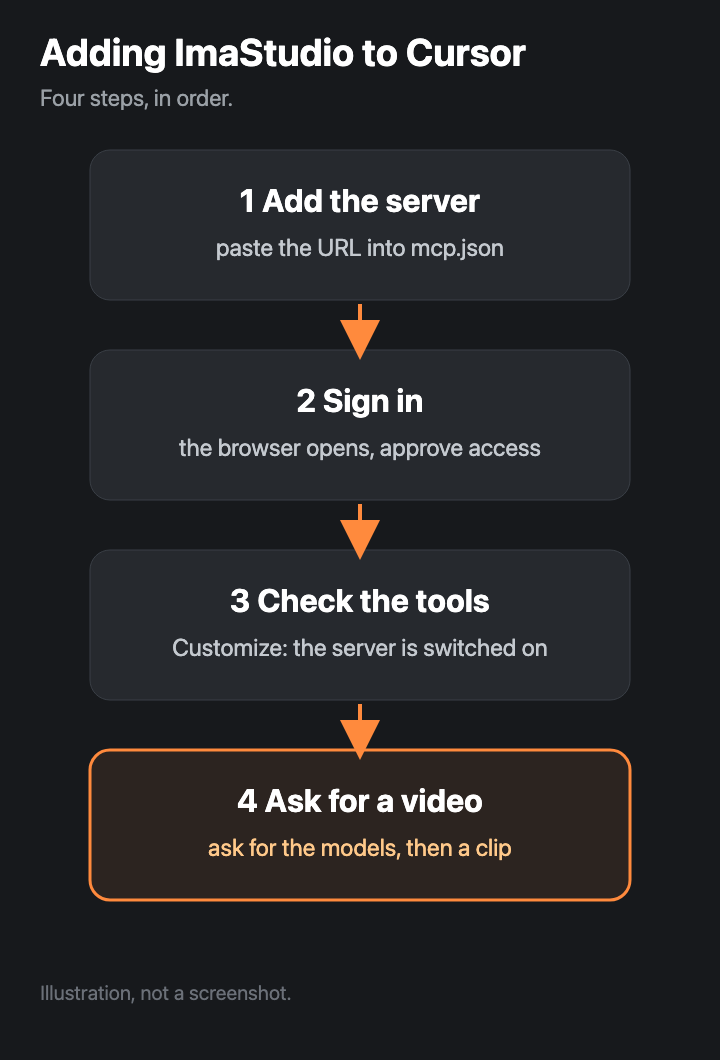
Sign in
Cursor signs in to remote servers with the OAuth authorization code flow, using PKCE. When the server allows it, Cursor registers itself as a public client, so you don’t enter a client ID. ImaStudio’s server publishes a client registration endpoint and asks for three permissions: read your canvases, write to them, and generate media.
When the browser opens, approve the connection. ImaStudio’s approval screen lists what you’re allowing. When we approved Codex, it said the app could view your canvases, create canvases and add, edit and delete nodes on them, and use your points to generate images, videos and audio. You can revoke access later in Settings → Connected apps.
If you ever need a fixed client ID, Cursor accepts an auth block with CLIENT_ID on the server entry. ImaStudio’s Claude Code and Codex setups use the IDs claude-code-ima and codex-ima, but we haven’t seen one published for Cursor, so don’t guess. Use the default sign-in.
Check that it works
- Open Customize in Cursor’s sidebar, find the server and make sure its toggle is on. A disabled server doesn’t load.
- In chat, ask a question before you ask for a video:
Which video models can you use through ImaStudio? For each one, tell me the durations and aspect ratios it supports.A list of models means it works. If nothing happens, open the Output panel (Cmd+Shift+U on a Mac) and choose MCP Logs to see connection and sign-in errors.
Make your first clip
Cursor asks before running MCP tools by default, so expect an approval prompt for each generation. Name the model, the length and a spending limit:
Using ImaStudio, make one 5-second 16:9 video with Seedance 2.5 at 720p. Show me the price first and stop if it's over 250 points. Scene: a slow dolly-in on a steaming cup of coffee on a wooden table beside a rainy window, warm light, shallow depth of field, no people, no text.The settings, the price of each resolution and a real run are in our guide to use Seedance 2.5 with ImaStudio. The server and its tools are the same in Cursor.
Using it with your project files
Cursor’s agent can also run terminal commands, so the ImaStudio CLI is an option when a file from your project goes in or a video file has to come out. We tested that route with Codex, not Cursor. See how to turn a local image into a video with Codex and the ImaStudio CLI.
Three things to watch
- Set a spending limit in your prompt, as above.
- Keep deletes deliberate. The server can delete nodes and whole canvases, so read each approval prompt.
- Mind your organization’s rules. Remote MCP URLs can be restricted by an admin.
FAQ
Do I need an API key?
ImaStudio’s connection page says you sign in with your account in the browser and no key is pasted into the chat. You still need an account with points.
Which Cursor version do I need?
Cursor’s MCP page doesn’t name a minimum version. Use a current release.
Can I add it for one project only?
Yes. Put the entry in .cursor/mcp.json in that project. A project file can be shared with your team, but the sign-in is still personal.
How much does a video cost?
It depends on the model, the length and the resolution. The price list and a 5-second table are in our Seedance 2.5 guide, and the request above sets a limit.
Where to go next
For the same setup in a chat app, see how to generate AI videos in Claude with ImaStudio. For the model’s settings and prices, see how to use Seedance 2.5 with ImaStudio. Using VS Code instead? See how to add ImaStudio to VS Code.
How this guide was put together: the Cursor steps follow Cursor’s MCP documentation as we read it on November 19, 2026, and the ImaStudio details come from its server and connection page. We haven’t run Cursor ourselves, so menu names may differ in your version. The cover was made in ImaStudio.
About The Author


 SeeDream 5.5 vs GPT Image 2.6 Sunburst vs Nano Banana 2.1 for Realistic Portraits
 MAGI-2 Explained: What Sand.ai’s New 480B Video Model Can Do
 How to Add ImaStudio to VS Code and Generate Videos
