









 Ima studio
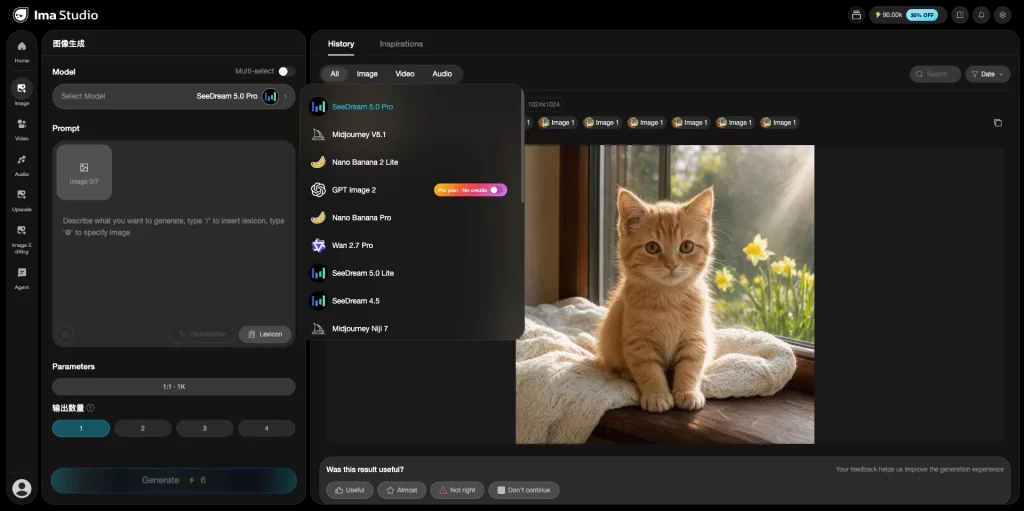
IMA Studio gives you 40+ image, video, and audio models under one subscription — GPT Image 2, Nano Banana, SeeDream, Seedance, Wan, Midjourney and more. This hub is the shortcut: pick a model, jump straight to a hands-on guide, and start creating. Every guide below is written against the model as it actually runs inside IMA Studio.
Start here: limited-time unlimited access
Right now, Pro and Ultra members get a limited-time unlimited window on GPT Image 2 — generate without spending credits for the length of your window (3 days on Pro, 7 on Ultra).
Image models
GPT Image 2
OpenAI’s image model, strong at prompt-following and text rendering.
Nano Banana (Google Gemini)
Google Gemini’s image model, known for detail retention and precise edits. Available in IMA Studio as Nano Banana Pro and Nano Banana 2 Lite.
- How to use Nano Banana (step by step)
- Nano Banana Pro overview & guide
- Nano Banana 2 review
- Where to use Nano Banana Pro
- Nano Banana vs SeeDream 4.0
SeeDream
ByteDance’s image family (5.0 Pro / Lite / 4.5), a fast all-rounder for commercial visuals.
Video models
Seedance
ByteDance’s video model, popular for UGC-style commercial clips.
- Seedance 2.5 prompt tutorial (UGC ad)
- Seedance 2.5 vs 2.0 mini — commercial video test
- Seedance 2.5 release date
Wan
Roundups
How to pick a model
The advantage of a multi-model studio is that you do not have to pick once. Run the same prompt across two or three models and keep the best result — GPT Image 2 for prompt precision and text, Nano Banana for detail-preserving edits, SeeDream for fast commercial images, Seedance and Wan for video. One subscription covers all of them.
About The Author


 SeeDream 5.5 vs GPT Image 2.6 Sunburst vs Nano Banana 2.1 for Realistic Portraits
 MAGI-2 Explained: What Sand.ai’s New 480B Video Model Can Do
 How to Add ImaStudio to VS Code and Generate Videos
