When Seedance 2.5 arrived, the first thing everyone talked about was the 30-second video length.
That number sounds simple, but it changes the whole workflow. A 5-second AI video can be a nice shot. A 30-second AI video has to behave like a real piece of content. It needs a hook, a product reveal, a small story, a voiceover, a few camera moves, and an ending frame that can actually sell something.
That is why I wanted to test Seedance 2.5 with a real commercial task instead of another cinematic demo: can one product image become a 30-second UGC-style ad that looks close to something a brand would normally pay a creator or a small production team to shoot?
So I built a skincare UGC ad inside Ima Studio, using Seedance 2.5 together with an Ima Canvas workflow. The goal was not just to make a pretty video. The goal was to control the product, the creator, the bathroom scene, the timing, the voice, the camera, and the final product shot.
The result surprised me. The final video felt much closer to a creator-shot skincare ad than a typical AI video test. The character stayed consistent, the product stayed readable, and the whole 30 seconds followed a believable routine. A similar creator shoot could easily cost thousands of dollars once you count talent, location, reshoots, editing, and revision time. This test cost me around $10 in generation credits.
Below is the exact thinking behind the workflow: what references I used, how I separated constants from variables, how I wrote the timeline, and why the negative constraints matter more than most people think.
What Seedance 2.5 Changes for Product Videos
Before Seedance 2.5, most AI video workflows were built around short clips. You generated a few 5-10 second shots, picked the usable ones, stitched them together, added voiceover, and hoped the product did not change too much between cuts.
That works for mood videos. It is much harder for ads.
A UGC product ad needs continuity. The viewer has to believe the same person is using the same product in the same place. If the bottle changes shape, the label mutates, or the bathroom suddenly becomes another room, the ad stops working.
Seedance 2.5 is interesting because its longer-video and multi-reference direction makes it more useful for production-style work: product ads, tutorials, short drama, product demos, and creator-style social videos. On Ima Studio, this becomes even more useful when combined with Ima Canvas, because you can organize references, prompt blocks, and workflow steps instead of treating everything as one giant text box.
The Mistake: Writing a 30-Second Prompt Like a 5-Second Prompt
The biggest mistake is thinking that a longer model only needs a longer description.
For a 5-second clip, you can write something like:
A woman in a bright bathroom applies skincare serum, soft natural light, realistic UGC style, handheld camera.That might be enough for a single attractive shot. But it is not enough for a 30-second ad.
A 30-second UGC ad contains multiple jobs:
- open with a relatable problem;
- introduce the product without making it feel forced;
- show the product clearly;
- show realistic usage;
- create a small emotional change;
- end with a stable product-and-face frame;
- keep the voice natural;
- keep the character and product consistent.
If you only describe the general scene, the model has to guess the timeline. That is when you get character drift, duplicated bottles, warped labels, strange hands, random camera jumps, and a final frame that is not usable for an ad.
The better way is to write the prompt as a production plan.
The Core Principle: Constants and Variables Must Be Separate
This is the most important idea in the whole workflow.
In a 30-second commercial video, some things should never change. Other things should change on purpose. If you mix them together, the model does not know what to protect.
Constants: What Must Stay Locked
- the creator’s face and body identity;
- the product bottle shape, pump, label, logo, color, and scale;
- the outfit;
- the bathroom layout;
- the morning lighting direction;
- the overall UGC smartphone look.
Variables: What Should Evolve
- the creator’s expression;
- the product interaction;
- the shot size;
- the camera movement;
- the spoken line;
- the emotional state;
- the final CTA composition.
Once I separated those two groups, the prompt became much easier to control. The identity lock protects the ad. The timestamped storyboard creates the story.

The 8-Part Prompt Framework I Used
Here is the framework I used for the Seedance 2.5 UGC ad:
- Reference Asset Roles: tell the model what each image, video, or audio reference is allowed to control.
- Global Scene: define the whole 30-second video as one continuous UGC ad.
- Identity Lock: protect the same person, product, outfit, room, and lighting.
- Timestamped Storyboard: break the ad into six 5-second segments.
- Camera and Transition Rules: explain how the viewer sees every action.
- Audio Direction: define voice, room tone, sound effects, and music level.
- Negative Constraints: block the exact mistakes that usually break AI product videos.
- Ending State: force the final 2-3 seconds into a clean product-and-face composition.
The formula for each timeline segment is simple:
Time segment + shot size + character action + product action + emotion + dialogue/audio + camera movementDo not only write what happens. Write how the viewer sees it.
My Reference Setup
For this test, I did not want Seedance 2.5 to invent everything. I wanted each reference to have a job.
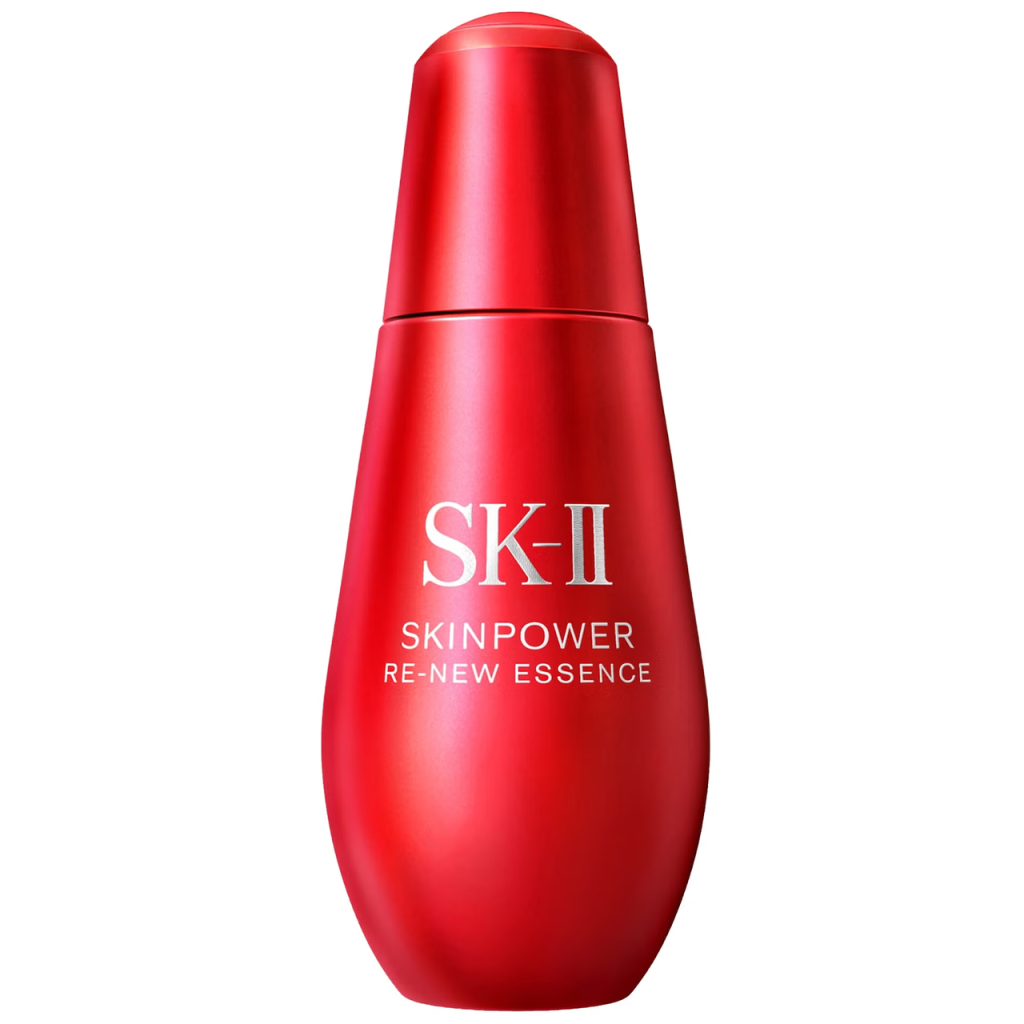
@Image1: Primary product identity reference.
Preserve the exact bottle geometry, material, pump design, product color, logo, label text, typography, and packaging proportions.

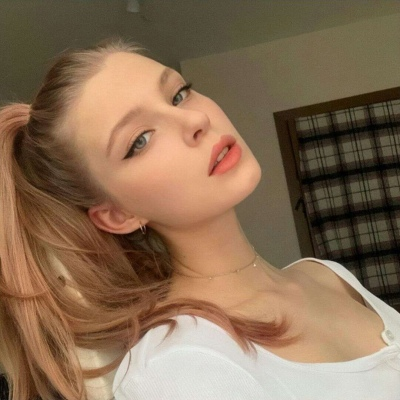
@Image2: Primary character identity reference.
Preserve the exact face, hair, age, skin tone, and body proportions.

@Image3: Bathroom environment and lighting reference only.
Do not copy any people or products visible in this image.

@Video1: Camera movement and pacing reference only.
Reproduce the subtle handheld rhythm, but do not copy the person, clothing, product, or location.

@Audio1: Voice tone and speaking rhythm reference only.
Use a warm, casual, natural female voice.
This matters because reference confusion is one of the fastest ways to break a commercial AI video. If the bathroom reference also contains a person, the model may borrow the wrong face. If the pacing reference contains another product, the model may contaminate the product design. Assigning roles reduces that risk.
The Global Scene Prompt
The global scene tells Seedance 2.5 what kind of video it is making before the storyboard begins.
GLOBAL SCENE AND VISUAL STYLE
Create one 30-second vertical 9:16 UGC-style skincare advertisement composed of six logically connected shots.
The entire video takes place in the same real home bathroom during the morning.
Soft natural daylight enters from a side window.
Use an authentic smartphone camera look, realistic skin texture, subtle handheld movement, and an approachable social-media aesthetic.
Maintain the same woman, hairstyle, white tank top, bathroom layout, lighting direction, product bottle, and product packaging throughout the entire video.
The result should feel like a genuine creator-recorded skincare recommendation, not a polished studio commercial.
This is where I tell the model the ad should feel like a creator video, not a luxury brand film. That difference matters. For UGC, too much polish can actually make the video less believable.
The Identity Lock Prompt
This is the part I would never skip for product ads.
CHARACTER AND PRODUCT IDENTITY LOCK
The same woman from @Image2 appears throughout the entire video.
Preserve her exact facial identity, hairstyle, age, skin tone, and body proportions.
She wears the same white tank top throughout.
Her performance begins slightly frustrated, becomes curious when introducing the product, and ends relaxed and genuinely satisfied.

The skincare bottle must remain identical to @Image1 in every shot.
The product must never change size, shape, color, material, branding, label layout, or packaging proportions.
The product identity lock is not just a quality detail. It is the difference between a usable ad and a nice-looking failed generation. If the bottle changes, the video cannot be used for ecommerce or paid creative.
The 30-Second Storyboard
I split the video into six shots. Each shot has a job: problem, reveal, detail, usage, result, final CTA.
【插入图片:这里放 30 秒时间线分镜图。建议做成 0-5s / 5-10s / 10-15s / 15-20s / 20-25s / 25-30s 六段横向时间线。】
TIMESTAMPED STORYBOARD

0-5s:
Medium close-up through the bathroom mirror.
The woman leans toward the mirror and gently touches one cheek, noticing that her skin looks dry and tired.
Her expression is mildly frustrated but natural.
Dialogue: "My skin always feels tight by the middle of the day."
Subtle handheld movement.

5-10s:
The camera tilts down from her reflection toward the bathroom counter.
Her hand reaches into frame and picks up the product from @Image1.
She rotates it once so the front label faces the camera.
Dialogue: "This is the one step I stopped skipping."
Use a motivated downward camera tilt, not an abrupt cut.

10-15s:
Macro close-up of the product pump.
She presses the pump exactly once.
Two small drops fall naturally onto her fingertips.
Preserve realistic liquid viscosity and product scale.
Audio: quiet pump click and soft bathroom ambience.

15-20s:
Over-the-shoulder medium close-up.
She gently presses the product into both cheeks using slow, realistic skincare motions.
Dialogue: "Two drops, then I just press it in."
Slow camera push-in.

20-25s:
Front-facing medium close-up.
She looks at her skin in the mirror, lightly touches her cheek, and gives a subtle satisfied smile.
Her skin catches the natural window light and appears hydrated without an exaggerated transformation.
Dialogue: "It feels soft, but not greasy."

25-30s:
She holds the product beside her face with the front label facing directly toward the camera.
She looks into the lens with a relaxed smile.
Dialogue: "That's my whole morning glow routine."
The camera settles into a stable final product-and-face composition.
This is the part that changed the output the most. Once the prompt had a timeline, Seedance 2.5 no longer had to guess the story structure. The video had a beginning, a middle, and an ending.
Camera Rules: Tell the Model How the Viewer Sees the Ad
Every time segment needs a camera rule. Otherwise the model may add a dramatic camera move that looks impressive but feels wrong for UGC.
CAMERA AND TRANSITION RULES
Use realistic smartphone-camera movement with subtle natural handheld motion.
Use only one primary camera movement per storyboard segment.
All camera movements must be motivated by the woman's actions or by the product reveal.
Transitions must preserve spatial continuity within the same bathroom.
Avoid random orbiting, dramatic crane shots, excessive zooming, fast whip pans, and unexplained angle changes.
My rule is simple: if a real creator would not shoot it that way on a phone, I do not ask Seedance 2.5 to do it.
Audio Rules: Make the Ad Feel Like UGC, Not a TV Commercial
For this test, I wanted the voice to feel warm and casual. The lines needed to sound like a creator recommendation, not a brand script.
AUDIO DIRECTION
Use the warm, casual female voice style from @Audio1.
Dialogue must sound conversational rather than scripted or promotional.
Maintain consistent voice identity throughout the entire video.
Include subtle bathroom room tone, a quiet product pump sound, and very light background music.
Music must remain below the dialogue and must not dominate the scene.
The small details matter. A quiet pump sound makes the product feel physical. Bathroom room tone makes the scene feel real. Low music keeps attention on the creator’s voice.
The Negative Prompt Is Where the Professionalism Shows
Most people write negative prompts like a list of generic AI problems. For product video, the negative prompt should target actual commercial failure modes.
NEGATIVE AND HARD CONSTRAINTS
No character identity drift.
No hairstyle or wardrobe changes.
No product deformation.
No changes to the logo, label text, bottle shape, pump design, product color, or packaging proportions.
No duplicated bottles.
No extra hands, fingers, arms, or facial features.
No warped mirror reflections.
No floating objects.
No product passing through fingers.
No sudden location or lighting changes.
No random jump cuts.
No camera teleportation.
No subtitles, text overlays, watermarks, or interface elements.
No exaggerated instant skin transformation.
No glossy studio-commercial aesthetic.
These lines are not there to sound technical. They are there because AI videos actually fail this way. Product ads break when the label changes, when the bottle duplicates, when fingers merge into the pump, or when the mirror reflection no longer makes sense.
The Ending State Is the CTA Frame
For ads, the final two seconds matter. You need a stable frame where the creator and product are both visible. That final frame can become a thumbnail, a landing page visual, a client review still, or a paid ad end card.
ENDING CONSTRAINTS
From 27 seconds onward, the camera settles into a stable medium close-up.
The woman occupies the left side of the frame.
The product occupies the right side of the frame beside her cheek.
The bottle remains upright and front-facing.
The full label and logo remain clearly visible and unobstructed.
Hold this final composition steadily for at least the final two seconds.
No further camera movement, no product rotation, no cut, no fade to black, and no new objects appearing before the video ends.
If you do not lock the ending, the model may keep improvising until the last frame. That is fine for experimental video, but bad for ads.
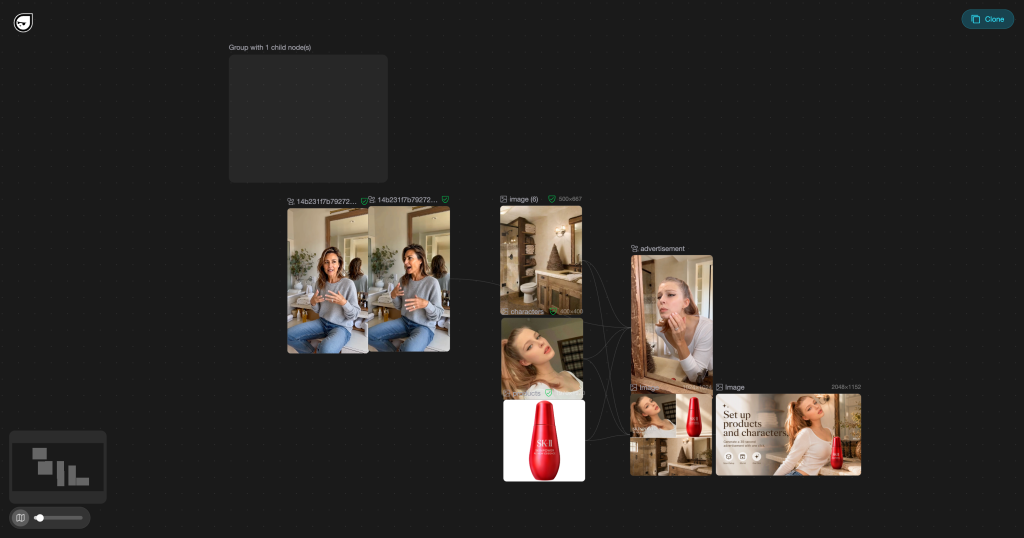
The Ima Canvas Workflow
The prompt is only half of the process. The other half is how the assets and prompt blocks are organized inside the workflow.
In Ima Canvas, I split the workflow into clear parts:
- product reference upload;
- character reference upload;
- environment reference upload;
- camera pacing reference;
- global scene prompt;
- identity lock prompt;
- timestamped storyboard prompt;
- negative constraints;
- final ending state.
That made the process easier to revise. If the product drifted, I tightened the product identity block. If the camera moved too much, I adjusted the camera rules. If the ending did not hold, I strengthened the ending constraints.
The Full Prompt Template
You can copy this structure and replace the product, character, environment, and category details.
REFERENCE ASSET ROLES
@Image1: Primary product identity reference. Preserve the exact product geometry, material, color, logo, label text, typography, and packaging proportions.
@Image2: Primary character identity reference. Preserve the exact face, hair, age, skin tone, and body proportions.
@Image3: Environment and lighting reference only. Do not copy any people or products visible in this image.
@Video1: Camera movement and pacing reference only. Reproduce the rhythm, but do not copy the person, clothing, product, or location.
@Audio1: Voice tone and speaking rhythm reference only.

GLOBAL SCENE AND VISUAL STYLE
Create one 30-second vertical 9:16 UGC-style product advertisement composed of six logically connected shots.
The entire video takes place in the same real location with consistent lighting direction and environment layout.
Use an authentic smartphone camera look, realistic texture, subtle handheld movement, and approachable social-media aesthetics.
Maintain the same person, product, outfit, environment, and visual style throughout the entire video.

CHARACTER AND PRODUCT IDENTITY LOCK
The same person from @Image2 appears throughout the entire video.
Preserve facial identity, hairstyle, age, skin tone, and body proportions.
The product from @Image1 must remain identical in every shot.
The product must never change size, shape, color, material, branding, label layout, or packaging proportions.

TIMESTAMPED STORYBOARD
0-5s: Hook and problem.
5-10s: Product reveal.
10-15s: Product detail or usage setup.
15-20s: Product use or demonstration.
20-25s: Result, feeling, proof, or reaction.
25-30s: Final product-and-face composition with CTA.

CAMERA AND TRANSITION RULES
Use realistic smartphone-camera movement with subtle handheld motion.
Use only one primary camera movement per segment.
All movements must be motivated by the subject action or product reveal.
Transitions must preserve spatial continuity.
Avoid random orbiting, extreme zooming, fast whip pans, and unexplained camera jumps.

AUDIO DIRECTION
Use a warm, casual, conversational voice.
Dialogue should sound natural rather than scripted.
Maintain consistent voice identity.
Add realistic room tone, relevant product sound effects, and low-volume background music.

NEGATIVE AND HARD CONSTRAINTS
No identity drift.
No product deformation.
No label, logo, shape, color, or packaging changes.
No duplicated products.
No extra hands, fingers, arms, or facial features.
No warped reflections.
No floating objects.
No product passing through fingers.
No sudden location or lighting changes.
No camera teleportation.
No text overlays, subtitles, watermarks, or interface elements unless explicitly requested.

ENDING CONSTRAINTS
Hold the final product-and-face composition steadily for at least the final two seconds.
The product must be upright, front-facing, clearly visible, and unobstructed.
No new motion, object, cut, or fade should appear before the video ends.
What I Would Change for Other Products
The framework stays the same, but the timeline changes by category.
| Product Type | What to Lock | What to Change in the Storyboard |
|---|---|---|
| Skincare | bottle, label, texture, routine context | skin concern, application motion, final skin feel |
| Fashion | garment cut, color, fabric, fit | outfit reveal, movement test, styling detail, final look |
| Food and beverage | packaging, serving size, texture, brand color | craving hook, pour or bite, reaction, pack shot |
| Electronics | device shape, screen, ports, material | problem setup, hand interaction, feature moment, result |
| Apps and SaaS | screen flow, brand style, product promise | pain point, screen demo, time saved, CTA |
Final Takeaway
The biggest upgrade in Seedance 2.5 is not only that the video can be longer. The real upgrade is that a longer video forces a better production mindset.
If you want a 30-second UGC ad, stop writing prompts like image captions. Write them like a compact production brief. Lock the product. Lock the person. Give every five seconds a job. Tell the camera what to do. Tell the voice how to sound. Tell the model what must never happen. Then hold the final CTA frame.
That is how one product image gets much closer to a real 30-second ad.
Create a structured 30-second product video with Seedance 2.5 on Ima Studio.
Sources
- Ima Studio Seedance 2.5 AI Video Generator
- Seedance 2.5 Launches July 17: Day-One Access on Ima Studio
Related: 20 AI Camera Movement Prompts for Cinematic AI Video — copy-paste dolly, orbit, crane and drone moves, each with a sample clip.
About The Author