











 Ima Studio
You can generate AI videos from Claude by connecting it to ImaStudio’s MCP server. Add the connector once, sign in to ImaStudio in your browser, then ask Claude to list the video models and make a clip. This guide covers Claude on the web and desktop, and Claude Code.
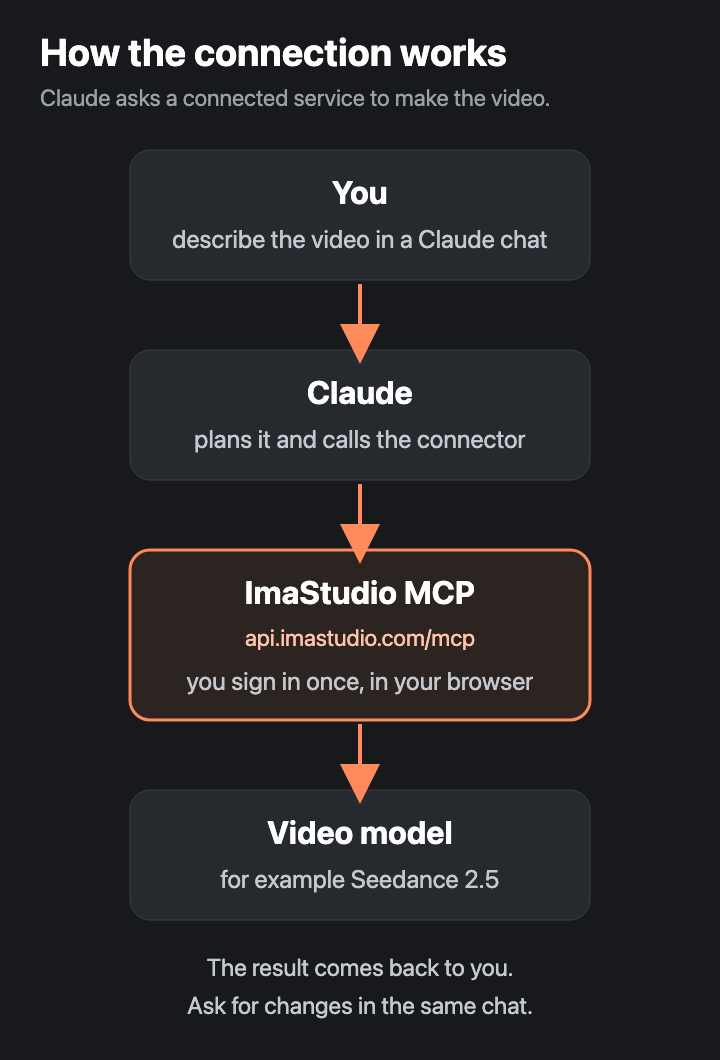
Claude doesn’t produce video frames on its own. It works with text, images and code. What it can do is call a connected service, and ImaStudio is one: it runs video models such as Seedance 2.5, and generation uses your ImaStudio credits.
What you need before you start
- An ImaStudio account with credits. Video generation costs credits, and the price depends on the model and the length.
- Claude on the web or desktop, or Claude Code in a terminal.
- A browser on the same computer, because you sign in to ImaStudio there.
- No API key. ImaStudio’s connection page says you sign in with your account in the browser and nothing secret is pasted into the chat.
Pick your route
| Claude (web or desktop) | Claude Code | |
|---|---|---|
| Best for | Describing a scene in plain language, uploading a photo, going back and forth | Making video as part of a project you already work on in a terminal |
| How you add ImaStudio | A custom connector in the app’s settings | One command, then a sign-in from inside Claude Code |
| Where you ask for videos | In a chat with the connector switched on | In your Claude Code session |
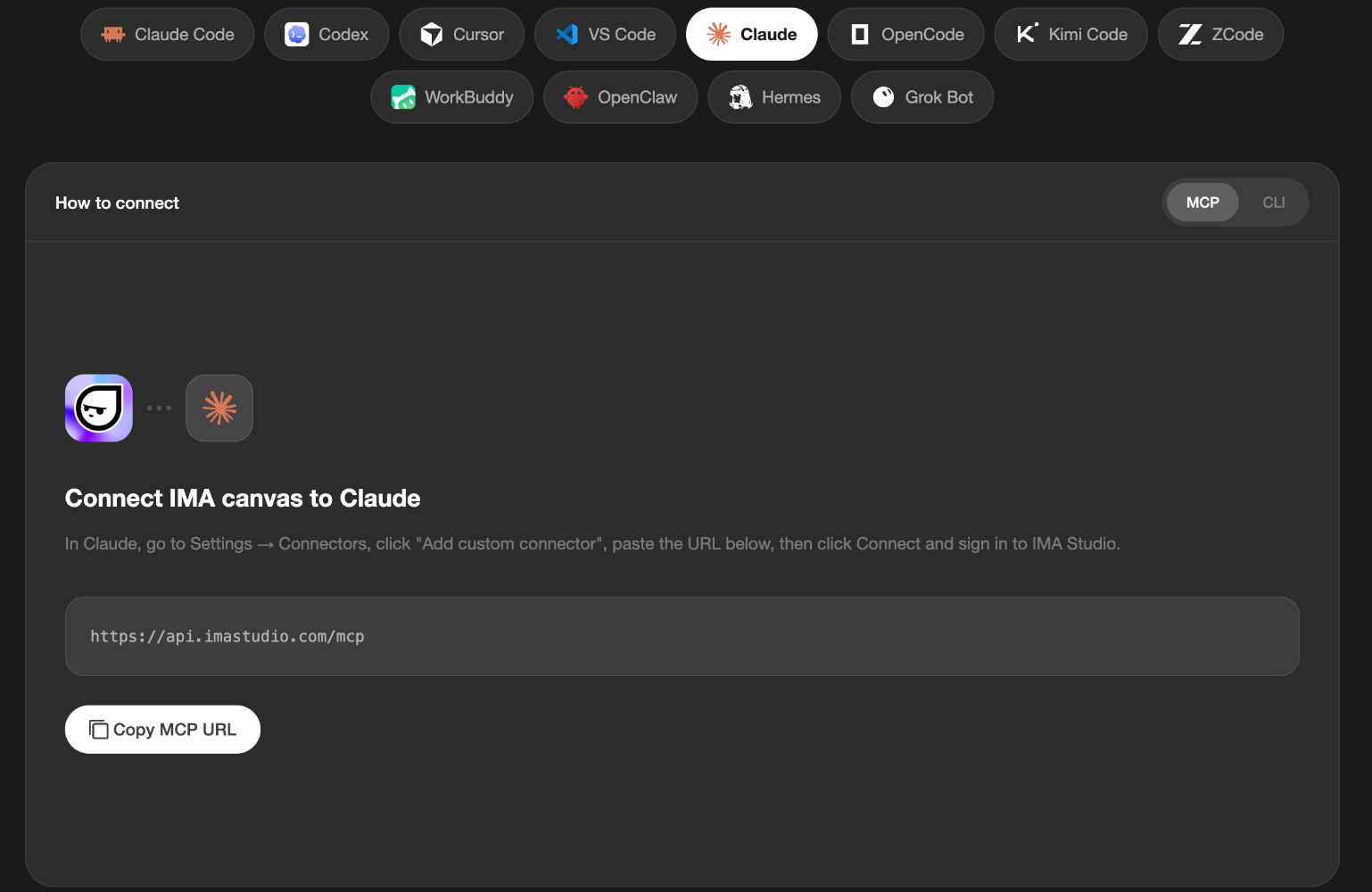
Both routes use the same server address, https://api.imastudio.com/mcp. Copy it from ImaStudio’s connection page rather than retyping it. If your project lives in Codex instead, see how to generate AI videos in Codex with ImaStudio.
Connect Claude on the web or desktop
- Open Claude and go to Customize → Connectors. Depending on your version, the menu may read Settings → Connectors.
- Click + Add, then Add custom connector.
- Name it ImaStudio and paste
https://api.imastudio.com/mcpas the server URL. ImaStudio’s own instructions ask for nothing else, so leave the other fields as they are. - Click Connect. A browser window opens. Sign in to ImaStudio and approve the connection. The server declares three permissions: read your canvas, write to it, and generate media.
- Start a new chat, click + at the lower left, choose Connectors, and switch ImaStudio on for that conversation.
Two things can stop you here. On the Free plan you can add one custom connector, so you may need to remove another first. On Team and Enterprise plans only an owner can add a connector, and members then connect it themselves. Both points come from Anthropic’s help article on custom connectors, which is also where to check the current menu names.
Connect Claude Code
Run this in your terminal. It registers the ImaStudio server as ima:
claude mcp add --transport http --client-id claude-code-ima ima https://api.imastudio.com/mcp- Open Claude Code and type
/mcp. - Pick ima. A browser window opens, so sign in to ImaStudio and click Allow.
- If
imaisn’t in the list, restart Claude Code and open/mcpagain.
Running claude mcp list in the terminal shows whether the server is registered. Registered isn’t the same as signed in, so don’t stop at the command finishing without an error. The check in the next section is the real test.
Check the connection before you spend credits
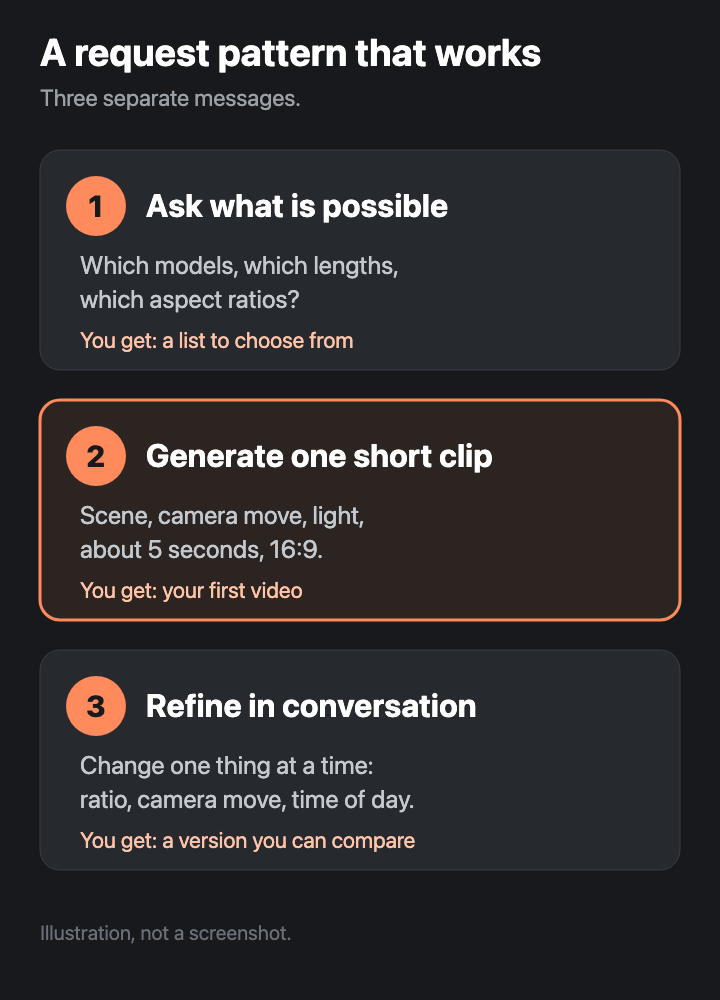
Start with a question, not a video:
Which video models can you use through ImaStudio? For each one, tell me the durations and aspect ratios it supports.If Claude answers with a list of models, the connection works. If it says it has no ImaStudio tools, go back one step: on the web or desktop, switch the connector on for this chat; in Claude Code, finish the sign-in under /mcp.
The list also saves you a failed request later. Models differ in what they accept, so you’d rather learn that a length or aspect ratio isn’t offered before you ask for it.
Generate AI videos from Claude: your first clip
Keep the first one short and simple. Copy this, change the scene, and send it:
Please use ImaStudio. First list the video models you can use, with the durations and aspect ratios each one supports. Then pick a suitable model and generate a cinematic aerial clip of about 5 seconds in 16:9: early morning, thin mist over a mountain lake, the camera moving slowly forward. If a setting isn't supported, tell me what is available before you start. When it's done, give me the result so I can watch it.We made the clip below in ImaStudio with Seedance 2.5, using a prompt in the same spirit. It shows the kind of result to expect. It wasn’t recorded from a Claude session.
Show the exact prompt we ran
A cinematic aerial shot at dawn: thin mist hangs over a quiet mountain lake, the camera glides slowly forward over the water toward distant pine-covered ridges, soft golden light, gentle ripples, no people, no text.

Model: Seedance 2.5 (text to video)
Length: 5 seconds
Aspect ratio: 16:9
Resolution: 720p
It isn’t perfect. In our run the mist covered the far ridgeline for part of the shot, so the “distant pine-covered ridges” in the prompt are barely there. That’s a normal first result, and the next section is how you fix it.
Refine the result without starting over
Change one thing per message, so you can tell what caused the difference. Four that work well on the clip above:
- “Keep the mist low so the ridgeline stays visible.”
- “Same shot, but slower camera movement.”
- “Same scene at golden hour, in 9:16 for a vertical feed.”
- “Same prompt, different model, so I can compare the two.”
Each change is usually a new generation, so it uses credits again. If you’re not sure how to word a camera move, these 20 AI camera movement prompts give you phrasing to borrow. And once the basic loop works, the same setup scales to product footage: see how to build video ads with Seedance 2.5 in ImaStudio.
If something doesn’t work
- ima isn’t listed in
/mcp(Claude Code). Restart Claude Code, then open/mcpagain. - Claude says it can’t see ImaStudio (web or desktop). Switch the connector on for the current chat. It’s a per-conversation setting.
- The request is turned down. Ask Claude which durations and aspect ratios the model supports, then ask again with a supported combination.
- You can’t add the connector. Check your plan and role. Free accounts have a one-connector limit, and Team and Enterprise need an owner.
FAQ
Can Claude make videos by itself?
No. Claude doesn’t render video on its own. With ImaStudio connected, Claude sends the request to a video model that runs on ImaStudio, and you get the result back.
Do I need an API key?
Not for this setup. ImaStudio’s connection page says you sign in with your account in the browser and no API key is pasted into the conversation. You still need an ImaStudio account with credits.
Does it work on Claude’s Free plan?
Anthropic’s help article lists custom connectors on Free, Pro, Max, Team and Enterprise plans, with a limit of one custom connector on Free. Plans and menus change, so check the article before you rely on it.
Which video models can I use?
ImaStudio’s connection page names Seedance 2.5, Kling 3.0 and Wan 3.0 as examples. The available list changes, so ask Claude to list the models first, as in the check above. For a view of which AI video generator suits which job, see our comparison. To use Seedance 2.5 specifically, with its settings and prices, see how to use Seedance 2.5 in Claude with ImaStudio.
How much does a video cost?
It depends on the model and the length. Credits are charged per generation, so check the current price in ImaStudio before you start a long clip.
Try it
Add the connector, ask for the model list, then make one 5-second clip. That’s about the whole job.
How this guide was put together: the connection steps come from Anthropic’s help article and ImaStudio’s connection page, checked on November 18, 2026. The example clip and the cover image were generated in ImaStudio. Menu names can change between Claude versions.
About The Author


 Will Your Amazon Listing Video Be Live Before Black Friday 2026?
 How to Use Seedance 2.5 in Claude with ImaStudio
 How to Generate AI Videos in Codex with ImaStudio
